

Introduction
Realtime speech transcription establishes a persistent connection over WebSocket (a protocol that keeps a long-lived, bidirectional connection between client and server), receiving a continuous audio stream and transcribing and returning results as the audio arrives. It suits latency-sensitive voice scenarios. How it differs from file transcription STT:
Available model:
- gpt-live-transcribe: streaming transcription model, supports multiple languages, and outputs transcribed text in realtime as audio arrives.
Quick Start
Connection endpoint
intent=transcription: required, declares this is a transcription session.model=gpt-live-transcribe: required. The model is fixed by URL parameters at connection time and cannot be changed during the session (see constraints below).
Authentication
Pass the key through a standard HTTP header during the handshake:Audio format requirements
Only one input format is currently supported. Convert your audio before sending:- Encoding: PCM16 (16-bit signed integer, little-endian)
- Sample rate: 24000 Hz
- Channels: mono
audio/pcm@24000. Sending any other format (such as G.711/µ-law) is rejected and the session is closed.
Transcription sessions do not support voice activity detection (turn_detection / VAD) and it must be explicitly set to
null. If it is omitted or set to a non-null value, the model provider rejects transcription with invalid_value. The gateway forces turn_detection to null in the forwarded configuration, but we still recommend setting it to null explicitly on the client for clear behavior.Session Configuration (session.update)
After the connection is established, the client first sends asession.update frame to configure transcription parameters. If you do not send one, the gateway injects a default configuration with the authorized model as a fallback, but explicit configuration is recommended.
Configuration parameters
string
required
Session type, fixed to
transcription for transcription scenarios.object
required
Input audio format, fixed to
{ "type": "audio/pcm", "rate": 24000 }.string
required
Transcription model. Must match the
model in the connection URL (gpt-live-transcribe). Passing any other model is treated as unauthorized and the session is closed with 1008.string[]
Expected language list, in array form (such as
["en", "zh"]). gpt-live-transcribe uses the plural languages, letting you declare multiple languages at once; specifying languages improves accuracy and lowers latency. See the value dictionary in Language codes below.string
The singular form, a single ISO-639-1 code (such as
"en"). Use either this or languages, not both (passing both is rejected with invalid_value). The plural languages is recommended for gpt-live-transcribe; the gateway also accepts the singular language to ease migration from older code.string
A free-text prompt describing the recording scenario (such as “customer service call” or “medical consultation with clinical terms”) to help the model match the register. In testing, the server echoes it verbatim in
session.updated, confirming it has taken effect.string[]
An array of literal hint words for product names, abbreviations, proper nouns, and other error-prone terms (such as
["AiHubMix", "gpt-live-transcribe"]). These are hints, not forced output; put each word as a separate item and avoid including <, >, or newlines. In testing, they are echoed and take effect.string
Latency / accuracy tier, with options
minimal, low, medium, high, xhigh. A higher tier is more accurate but adds latency. Note: the gateway accepts this field (no error), but in testing it is not echoed in session.updated, so its effectiveness follows the official documentation and is not yet confirmed by echo.null
required
Voice activity detection. Must be
null for transcription sessions.object
Optional noise reduction configuration, such as
{ "type": "near_field" } (near-field, suited to a microphone close to the speaker) or { "type": "far_field" } (far-field).Language codes
Values forlanguages / language follow the formats below. They are case-sensitive and must be one of the supported forms; passing an unsupported or malformed code is rejected by the realtime API:
Sending Audio
Split PCM16 audio into small chunks (such as one chunk per 100ms), base64-encode them, and send them continuously viainput_audio_buffer.append events:
input_audio_buffer.commit frame to mark the end of that segment, which triggers transcription finalization and returns the completed result:
Receiving Transcription Results
The server continuously pushes events. Key event types:event
Confirmation of session creation and configuration update.
event
Incremental transcription result; the
delta field is the newly added text fragment for this update. Returned as you speak, suitable for realtime display.event
A segment of speech transcription is complete; the
transcript field is the full text of that segment.event
Error event, containing the error code and description.
Full Examples
Two approaches are shown below; choose either one:- OpenAI official SDK (recommended): no need to hand-write WebSocket code, just point
websocket_base_url(the SDK’s WebSocket base-address parameter) at the gateway to reuse the official library. - Native websockets: no SDK installed, sending and receiving frames directly per the protocol, with minimal dependencies and easy troubleshooting.
Why must we pass the model name when the official demo does not? OpenAI’s transcription intent puts the model in
transcription.model of session.update, and the connection URL only carries ?intent=transcription. The AiHubMix gateway is different: the model name must appear in the handshake URL (?model=gpt-live-transcribe), because the gateway needs it at the moment of the WebSocket handshake to select the model provider, authenticate, and reserve quota, while session.update only arrives after the handshake completes, too late. So when using the SDK, pass model explicitly to connect() (the SDK appends it to the URL query); without it, the gateway returns 400 missing_model_parameter during the handshake, connect() throws an exception, the connection is never established, and you never reach the session.update step. Within the session, transcription.model still needs to match the URL.Live Run Results (production test)
The following are the actual results of running the above example in theaihubmix.com production environment (model gpt-live-transcribe), configured with languages: ["en", "zh"] + prompt + keywords + delay: "low" + noise_reduction: { "type": "near_field" }:
In testing,
languages, prompt, keywords, and noise_reduction are all echoed verbatim by the server in session.updated, showing that the configuration has actually taken effect (it is accepted and processed, not merely accepted). The delay field is accepted by the gateway but not echoed, so its effectiveness follows the official documentation; you can pass only one of language (singular) and languages (plural).Billing
- Unit price:
gpt-live-transcribeis billed at $0.017 / minute (the realtime listed price on the model detail page is authoritative). - Billed by the duration of audio transcribed: based on the actual audio seconds forwarded to the transcription model, rounded up to the whole second. For example, transcribing 90 seconds of audio is billed as
90 / 60 x $0.017 = $0.0255. - Billing is not affected by network round trips or idle waiting; only audio actually fed into transcription is timed.
- Pay-as-you-go settlement: this is a long-lived connection, so the cost is settled incrementally in realtime during the session rather than all at once when the session ends. When the session is established, a quota reservation is first made for about 1 minute of usage (only an admission check, not an actual charge); the reservation is rolled over every 20 seconds during the session, the actual cost is deducted in segments based on the real forwarded seconds, and any remaining reservation is released when the session ends. Therefore your available balance must cover at least about 1 minute of usage for the session to be established.
- In the consumption details under Usage and Billing, the note on each realtime transcription record shows the “per-minute unit price” and the “actual billed seconds for this session”, for easy line-by-line reconciliation.
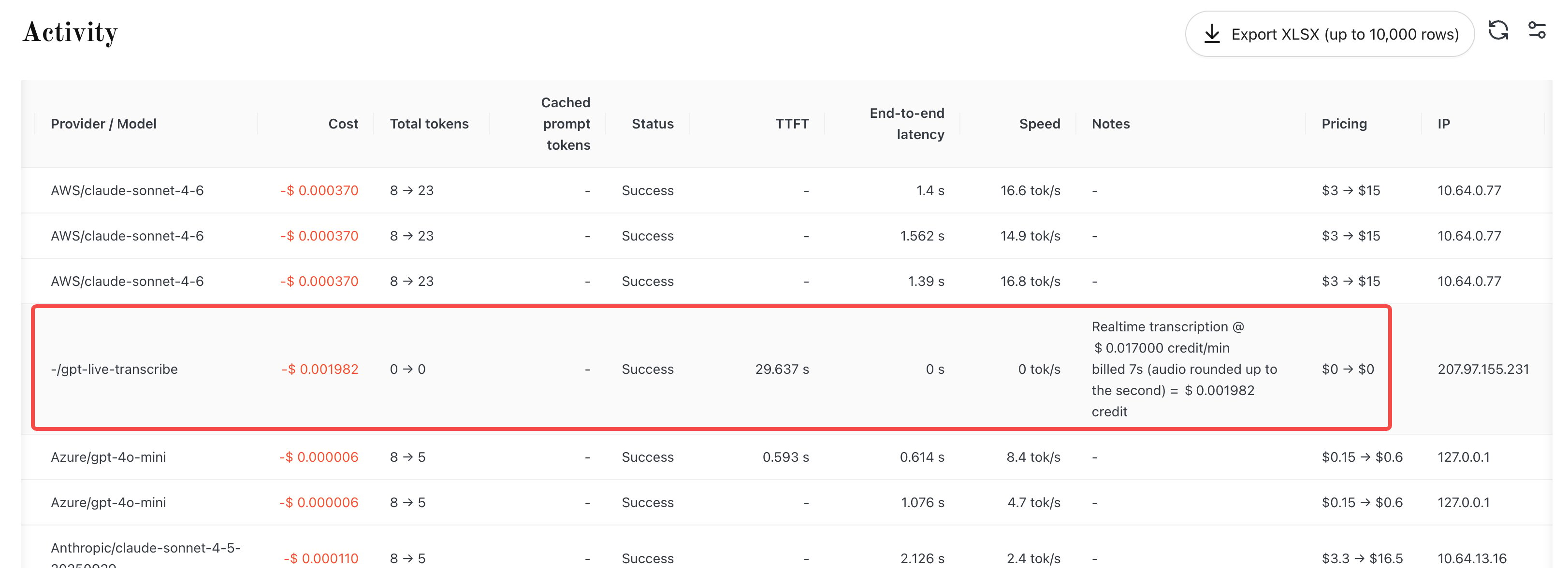
A gpt-live-transcribe realtime transcription billing record in the Usage and Billing Activity view; the note shows 7s of audio billed at $0.017 / min = $0.001982, matching the format described above.
Limits and Constraints
- Single session duration: a single WebSocket connection lasts at most 62 minutes, after which the server closes it proactively; if you need longer, reconnect in segments.
- Idle disconnect: when neither the client nor the model has any activity for 5 minutes, the server closes the session (close code
1008, reasonidle_timeout). Activity from either side resets the timer. - Insufficient balance: there are two cases. When establishing the session, if the available balance is not enough to cover the roughly 1-minute reservation, the handshake is rejected directly (HTTP 403) and the session is not established. During the session, if the balance runs out (detected by the 20-second rollover check or by a recheck after segment deduction), the established connection is closed immediately.
- Server-side only: direct browser connections are not supported (the
Originheader is validated); integrate on the server side. - Model lock: the model is fixed in the connection URL; changing the model via
session.updateduring the session is rejected and the session is closed. - Format lock: only
audio/pcm@24000mono is supported; other formats are rejected.
Common Errors
Last updated: 2026-09-16