

Don’t let an upstream outage become your outage.AIHubMix offers two Key level capabilities. Configure them once in the console and they take effect with no client code changes:
- Model Mapping is the gateway-layer capability that rewrites the model alias in a client request into the real upstream model.
- Error Fallback is the capability where, when the primary model call fails, the gateway automatically tries backup models in a preconfigured priority order, transparently to the client.
AIHubMix supports configuring model-name mapping and error fallback at the Key level, and bills by the final responding model. Both are configured per API Key on the AIHubMix Key management page.
Model name mapping and Fallback models on error sections of the panel:
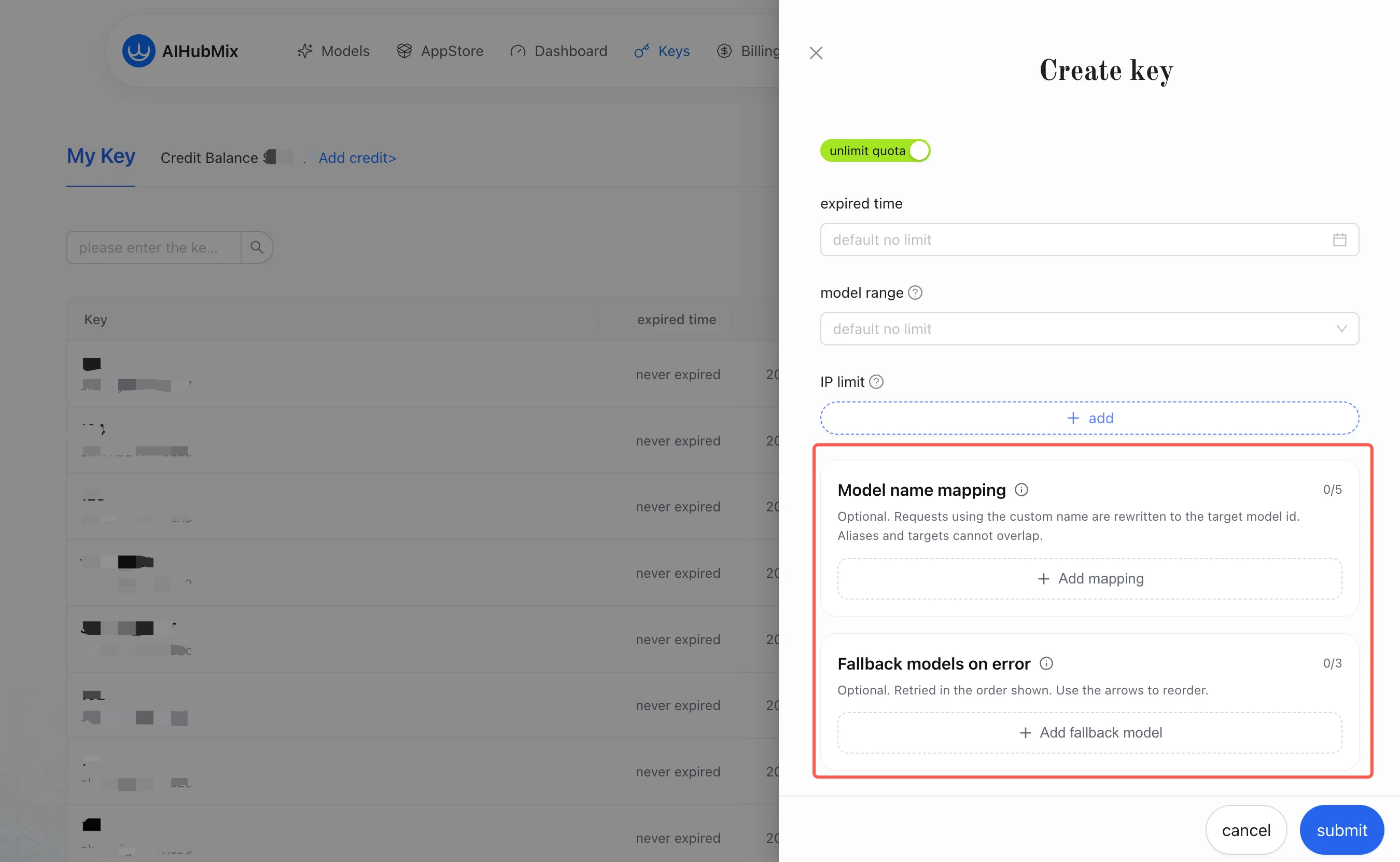
1. Model Name Mapping
Model name mapping handles the mismatch between “the model name the client sees” and “the model AIHubMix actually calls.” It is a per-key alias rewrite: it rewrites the alias in the request into the target model you configured on the Key.After a channel is selected for the target model, the platform internally performs another channel-level mapping to the real upstream model. That layer is transparent to you and requires no configuration. You only need to care about the “alias → target model” layer.Example:
All model names in the table above can be looked up on the AIHubMix models page.Common uses:
- The client restricts the model name format. For example, Claude Desktop requires model names in Claude style (see Section 5).
- Set a shorter, more stable alias for a complex Model ID.
- Keep the client configuration unchanged while switching the real model in the AIHubMix backend.
- Multiple platforms share one connection naming scheme but route to different models based on the Key.
Character-for-character match: The model name the client sends must match the left side of the mapping character for character. For example,my-gpt-5.5andmy-gpt-5-5are two different strings; if they don’t match, the mapping won’t be hit.
2. Error Fallback
Error fallback tries backup models in order when the primary model fails. It is not client-side retry; it is a model switch performed on the AIHubMix gateway side under the same Key configuration. The integrator does not need to pass any extra routing parameter on each request. You can think of fallback as “mapping to an ordered list”: after the primary model fails, the gateway automatically moves down the list to the next backup model. Example (configured on the same Key):2.1 Trigger Conditions
Fallback only happens when all of the following are true:- The Key is configured with a non-empty backup model list.
- Every channel of the primary model has been tried and all failed with a “retryable error” (channels exhausted).
- The response has not started returning yet (the first byte / header has not been sent to the client).
- The error is not a Key / user-level error (see the 2.2 comparison table below).
2.2 What Falls Back and What Does Not
Note: “Key invalid” here means your own AIHubMix Key is invalid, which does not fall back. If the key of some upstream channel is broken, the gateway switches channels, and after channels are exhausted it can still fall back. Don’t confuse the two.
2.3 Billing Basis
Billed by the final responding model. If the fallback model ultimately responds, billing, capabilities, and context limits are all based on the final responding model. That model is also reflected in the response header (see Section 4).2.4 Free Model Rule
A free model cannot be used as a fallback option — a free model can only be the primary model. Putting it in the backup list causes it to be silently skipped and the gateway continues to the next entry. So do not put free models in the fallback list.Typical usage: Set a free model as the primary model and put paid models in the backup list. When the free primary model hits a quota / rate limit, it automatically falls back to a paid backup model. Normally you save cost using the free quota, and after rate limiting you seamlessly switch to a paid model to guarantee availability. This is one of the most common uses of fallback.
3. AIHubMix vs OpenRouter / LiteLLM
Model mapping and fallback are not new concepts; OpenRouter, LiteLLM, and others provide similar capabilities. What sets AIHubMix apart is the lowest configuration cost:
In one sentence: No self-built gateway, not a single line of client code changed — configure once on the Key and it takes effect.
4. Configuration and Verification
4.1 Configuration
- Configure the alias mapping on the Key: the alias on the left must match the model name the client actually sends character for character.
- Configure the backup model list (an ordered priority list) on the same Key.
- The backup list should only contain paid / available models, not free models (they will be skipped).
- Models in the backup list must be within the Key’s range of available models (out-of-scope models will be skipped).
4.2 Verification (check the response headers first, not the logs)
When troubleshooting, don’t just look at which model the client selected. The most authoritative, automatable way is to read the response headers:X-Aihubmix-Fallback: true: a fallback occurred on this request (added when the final model ≠ the primary model).X-Aihubmix-Model: the model that actually responded on this request and was billed accordingly.
5. Scenario One Claude Desktop
Claude Desktop connects to AIHubMix throughGateway, a typical scenario for model name mapping.
This section assumes you have already completed the basic Claude Desktop integration. For the full integration steps (download and install, developer mode, Gateway configuration, auth scheme, etc.), see Connect AIHubMix in Claude Desktop. This section only covers the incremental configuration for mapping and fallback.
5.1 Why Mapping Is Needed
Claude Desktop connects viaGateway (Anthropic-compatible), and the client constrains model names in Claude style, so model names must use the claude- prefix.
This creates a conflict: the client side can only write claude- style names, but what you actually want to call is gpt-5.5, gemini-3.1-pro-preview, and the like. Model name mapping is made exactly for this — the client writes the alias claude-g-p-t-5.5, and AIHubMix maps it to the real gpt-5.5.
Claude Desktop uses the Claude native /v1/messages interface, so in the examples in this article both mapping and Fallback take effect.
5.2 AIHubMix Mapping and Fallback Configuration
Example configuration: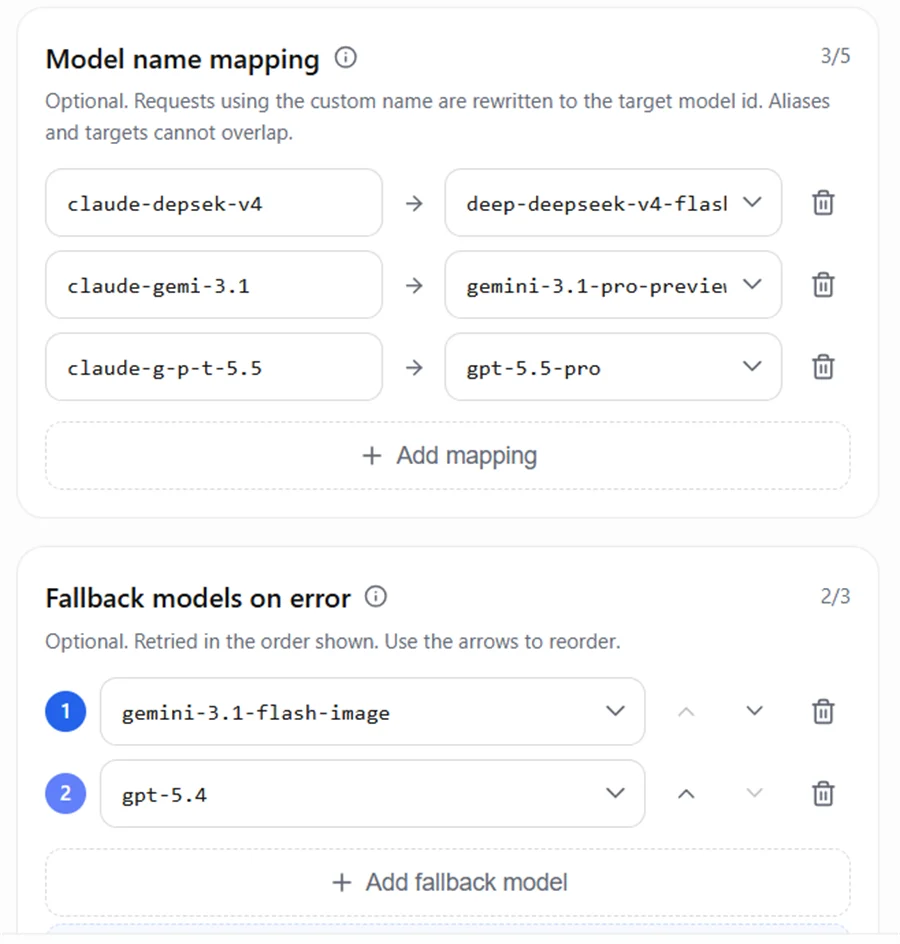
5.3 Claude Desktop Model List
What you configure in Claude Desktop’sModel list is the alias before mapping — that is, the model name Claude Desktop sends to AIHubMix, not the real upstream model name.
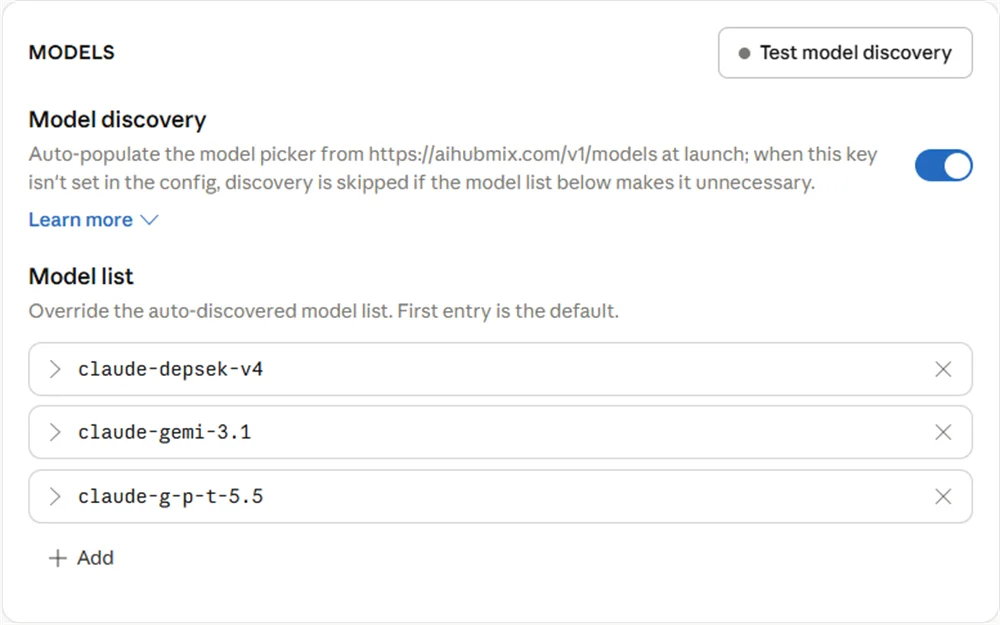
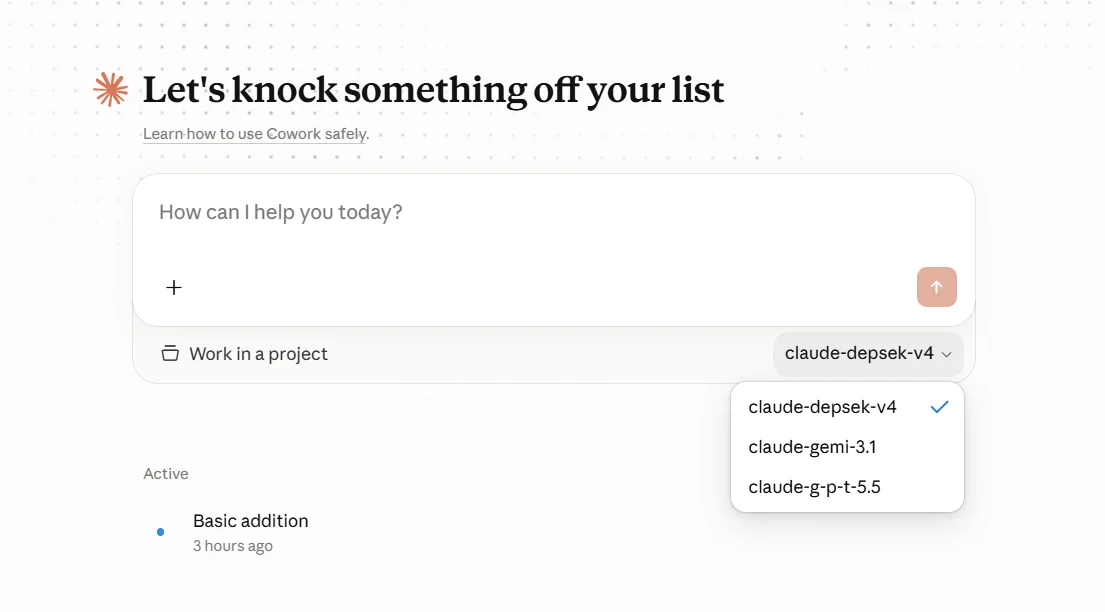
- Use the
claude-prefix for theModel ID. - Don’t directly write real model family names like
gpt,gemini, ordeepseek; use aliases such asg-p-t,gemi,depsek. - The
Model IDmust match the left side of the AIHubMix mapping character for character, otherwise the request won’t hit the expected mapping and may continue down to the error fallback model.
6. Scenario Two Multimodal Capability Fallback
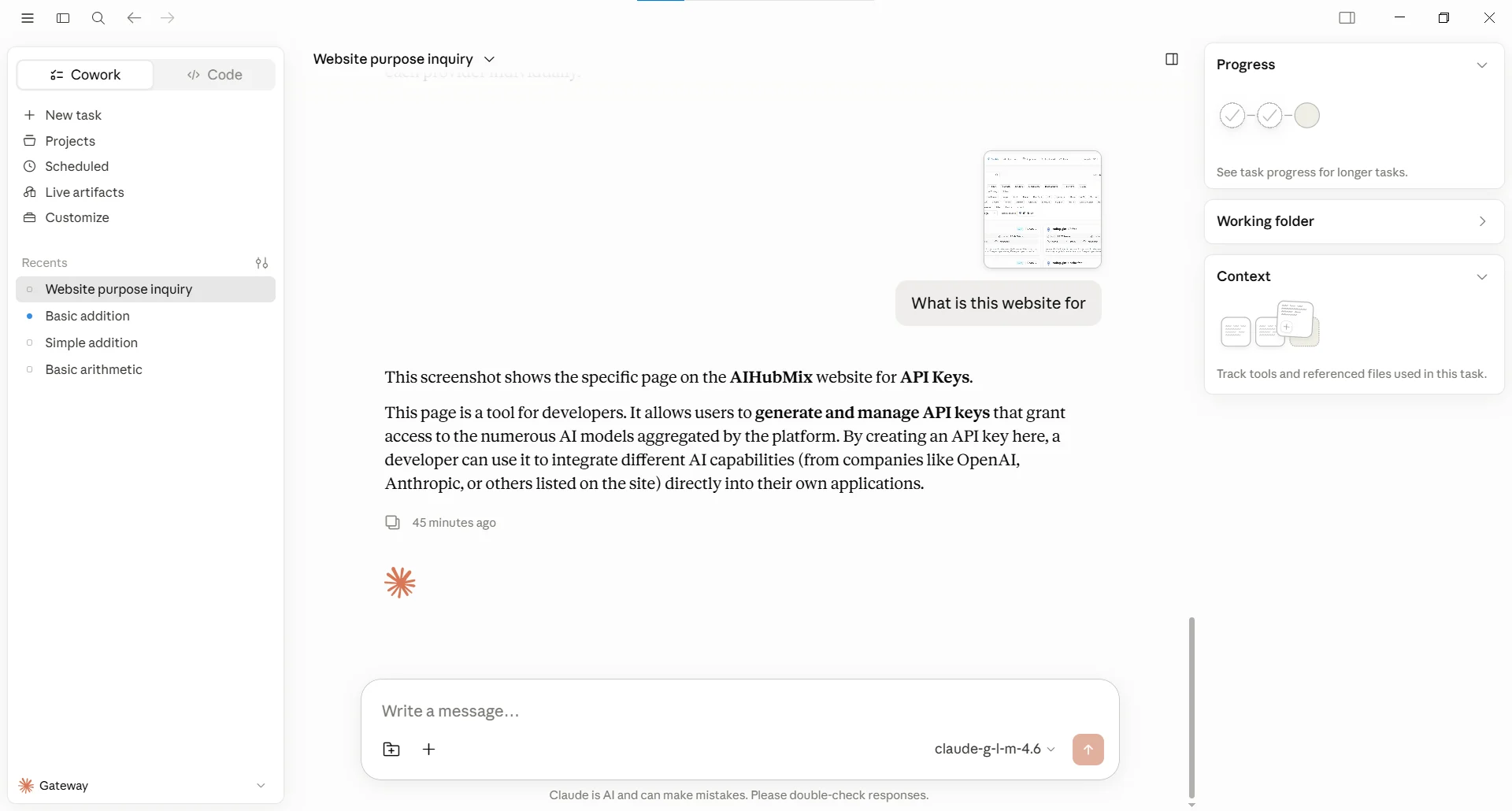
Multimodal capability fallback handles the scenario where “the primary model can answer text but does not support the current input type.” For example, the client sends an image or video while the primary model only has text input capability; AIHubMix can continue trying models in the fallback list that support the corresponding modality. Below is a real test path. This Key’s mapping and fallback configuration is as follows (see the screenshot below). The key point is that the fallback list contains both a text model and a model that supports image understanding:claude-g-l-m-4.6 — a model that only supports text input. The user uploaded a screenshot of the AIHubMix models list page and asked “what is this website for.” Because the request contained an image, the text model could not directly handle the input, which triggered the fallback.
Google AI Studio/gemini-3.1-flash-image, the 2nd entry in the fallback list. The 1st entry, gpt-5.4, also doesn’t support this image input and kept returning a retryable error for this request, so the gateway continued down and landed on gemini-3.1-flash-image, which supports image understanding.
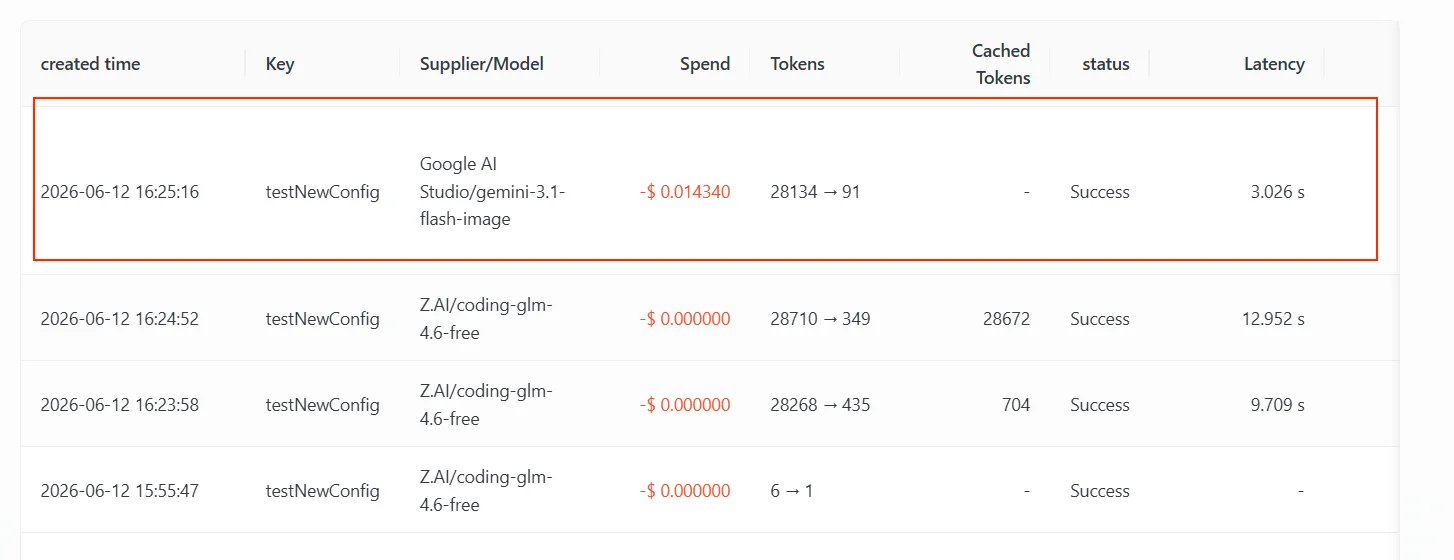
Be clear about the trigger reason: The fallback here happens because the upstream returned a retryable error for this image input and the primary model’s channels were exhausted — it’s the same fallback mechanism as “fall back after the primary model is rate-limited,” just triggered by a different error type (the former is unsupported input, the latter is a quota / rate limit).
Distinguish understanding from generation: This refers to image / video understanding fallback, not image generation or video generation. A chat request does not automatically turn into a generation endpoint; to test drawing or video generation, you should use the corresponding generation endpoint and model. Model capabilities are determined by the Input Modalities currently marked on the AIHubMix models page.
7. Scenario Three Free Model Fallback
This is one of the most common uses of fallback: set a free model as the primary model and put paid models in the backup list. Normally all requests go through the free model and save cost; once the free primary model hits a quota / rate limit, the gateway automatically falls back to a paid backup model, ensuring service is not interrupted. Example Key configuration:- While the free quota is still sufficient, the request is answered by the primary model
coding-glm-5.2-freeand billed as free. - After the free primary model is rate-limited, it automatically falls back to
gpt-5.4; ifgpt-5.4is also unavailable, it then triesgemini-3.1-pro-preview. - Whichever model ultimately responds is the one you are billed for (see 2.3).
Note: A free model can only be the primary model and cannot be put in the fallback list (if you do, it will be skipped; see 2.4). So the correct way to do “free model fallback” is: free as primary, paid as backup, not the other way around.Verification is again done by reading the response headers: when a fallback occurs,
X-Aihubmix-Fallback: true is returned, and X-Aihubmix-Model shows the final responding model (see Section 4).
8. Supported Endpoints
Model mapping and error fallback currently support the following interface categories:
Key points:
- Model mapping and error fallback support three interface categories: OpenAI-compatible interfaces, Claude native
/v1/messages, and OpenAI Responses/v1/responses. - Other native passthrough interfaces (Gemini native, Ideogram, video, TTS, Stability, OCR, predictions, etc.), specific-channel passthrough, and retrieval-by-resource-ID / file-type interfaces are not yet supported.
- Claude Desktop uses the Claude native
/v1/messages, so in the examples in this article both mapping and Fallback take effect.
9. FAQ
Q: What should I do if Claude Desktop shows model not found? A: Check whether theModel ID in Claude Desktop matches the left side of the AIHubMix mapping character for character; if they don’t match, the mapping won’t be hit.
Q: Does fallback affect billing?
A: Billed by the final responding model. Whichever model ultimately responds, you are charged based on that model’s price, capabilities, and context limits.
Q: How do I confirm whether this request actually used fallback?
A: Look at the response headers X-Aihubmix-Fallback: true (a fallback occurred) and X-Aihubmix-Model (the final responding model); see Section 4.
Q: Which errors trigger fallback and which don’t?
A: See the 2.2 comparison table. In short: fallback only happens on an upstream retryable failure, channels exhausted, and the response not yet started; specific channel, response already started, client disconnect / timeout, and Key / user-level errors do not fall back.
Q: Can a free model be put in the fallback list?
A: No, it will be skipped. A free model can only be the primary model.
Q: How is this different from OpenRouter / LiteLLM’s model alias / fallback?
A: AIHubMix is Key-level and platform-managed — configure it once in the console and it takes effect, with no client code changes and no self-built gateway. See Section 3 for details.
Related resources
- Connect AIHubMix in Claude Desktop: full steps for developer mode, Gateway configuration, auth scheme, and more.
- AIHubMix models page: look up model names, prices, and
Input Modalities. - Connect AIHubMix in LiteLLM: a reference for when you need a self-built gateway + model mapping / fallback.