Um den großen Erwartungen unserer Nutzer gerecht zu werden, haben wir zwei Reverse-Engineering-Schnittstellen veröffentlicht: gpt-4o-image und gpt-4o-image-vip. Das VIP-Modell bietet überlegene Leistung und Stabilität.
Beachten Sie, dass reverse-engineerte Schnittstellen keine vollständige Stabilität garantieren können und es zu 🕐 Queuing...-Zuständen oder Generierungsfehlern kommen kann. Sie werden nur für Trial- und Funktionstests empfohlen.
Die offizielle OpenAI-Schnittstelle gpt-image-1 ist veröffentlicht. Aufgrund der Nutzungskosten werden die aktuellen reverse-engineerten Schnittstellen vorerst beibehalten; kompatible Aufrufmethoden werden bereitgestellt.
Besonderer Hinweis: Unabhängig vom Grund werden nach dem Auslösen des API-Aufrufs Gebühren berechnet, auch wenn die Generierung fehlschlägt.
Namen lebender Künstler (wie „Ghibli” oder „Makoto Shinkai”) lösen einen input_moderation-Fehler aus, wodurch die Generierung fehlschlägt. Sie können dies umgehen, indem Sie unverfängliche Bezeichnungen wie „Ghibli” oder „Bright Modern Japanese Anime Style” verwenden.
Im Allgemeinen ist „Stil” sicherer als „Künstler”; auch „Pixar” wird unterstützt.
Ein sichererer Ansatz ist, Namen verstorbener Künstler oder entsprechende Stile zu verwenden, wie „Van Gogh” oder „Mona Lisa”.
Wir bieten Unterstützung über den vertrauten v1/completions-Endpoint, der vollständig kompatibel ist. Konkrete Verwendung:
from openai import OpenAIclient = OpenAI( api_key="AIHUBMIX_API_KEY", # Your Key Here base_url="https://aihubmix.com/v1")# Create a chat completion requeststream = client.chat.completions.create( model="gpt-4o-image-vip", #list: gpt-4o-image-vip, gpt-4o-image messages=[ { "role": "user", "content": [ { "type": "text", "text": """Redesign [Girl wearing a pearl earring] as an anime-style illustrated cover. Preserve original essence and composition. Render in refined Kyoto Anime-inspired style—soft brushwork, cinematic lighting, progressive depth. Format in AV cover layout: Japanese-English mixed typography, serif title with significant visual hierarchy - sense of design is the key.Extract words tha conveys profound meanings as title, then creative slogan, the original name can be a smaller information ONLY if necessary.Subtly embed watermark "jerlin" in clothing or background. Maintain emotional tone and posture, soften only when necessary. 2:3 portrait""" } ] } ], stream=True)# Process the streaming responsefor chunk in stream: try: if chunk.choices and len(chunk.choices) > 0 and chunk.choices[0].delta and chunk.choices[0].delta.content: print(chunk.choices[0].delta.content, end="", flush=True) except Exception as e: print(f"\nError occurred while processing the response: {str(e)}")
{ "prompt": "Redesign 'Girl with a Pearl Earring' as an anime-style illustrated cover. Preserve the original essence and composition: the iconic side-glance pose, serene expression, and intimate framing. Render in refined Kyoto Anime-inspired style with soft brushwork, cinematic lighting, and progressive depth. Create an AV cover layout with Japanese-English mixed typography, using a prominent serif title with strong visual hierarchy. Extract profound words for the title and include a creative slogan. The original name 'Girl with a Pearl Earring' should appear as smaller text if needed. Subtly embed the watermark 'jerlin' in clothing or background. For modesty, replace any potential nudity with flowing fabric, hair, or veils while maintaining the emotional tone and posture. Soften details only when necessary.", "ratio": "2:3"}>🕐 Queuing.>⚡ Generating.....>🏃 Progress 11....19....27...34....42....50....57...64....[100](https://videos.openai.com/vg-assets/assets%2Ftask_01jsccq77nfcsab7dn8bx7z230%2Fsrc_1.png?st=2025-04-21T13%3A08%3A48Z&se=2025-04-27T14%3A08%3A48Z&sks=b&skt=2025-04-21T13%3A08%3A48Z&ske=2025-04-27T14%3A08%3A48Z&sktid=a48cca56-e6da-484e-a814-9c849652bcb3&skoid=aa5ddad1-c91a-4f0a-9aca-e20682cc8969&skv=2019-02-02&sv=2018-11-09&sr=b&sp=r&spr=https%2Chttp&sig=xm6K6M7au3F3Vd9qcYxR3mYWrqAHsgbagbUV5GQo39w%3D&az=oaivgprodscus)> ✅ Generation complete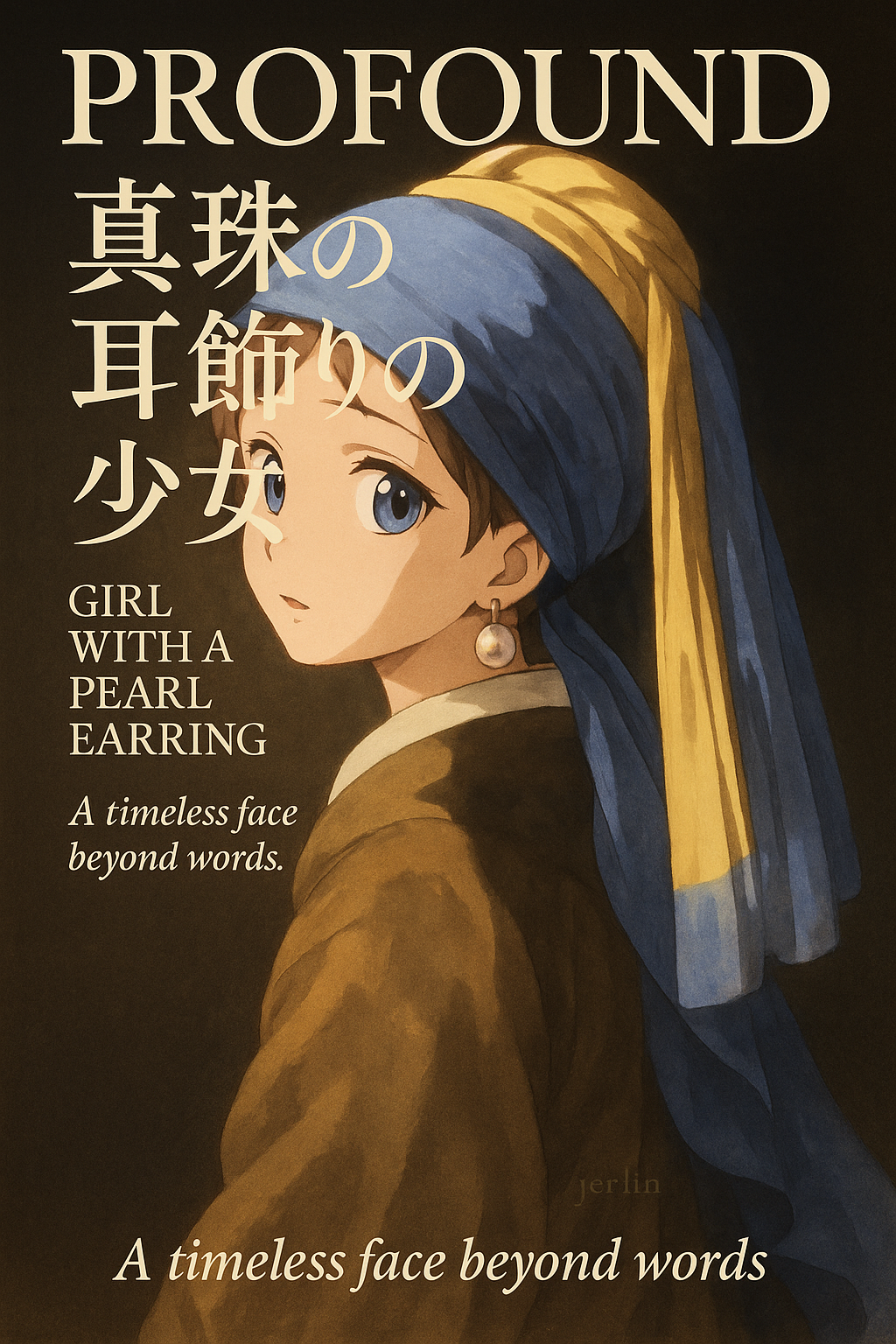[Click to download](https://filesystem.site/cdn/download/20250421/XBCrAs6qvMARG7BkFX0KI3MBs1qoto.png)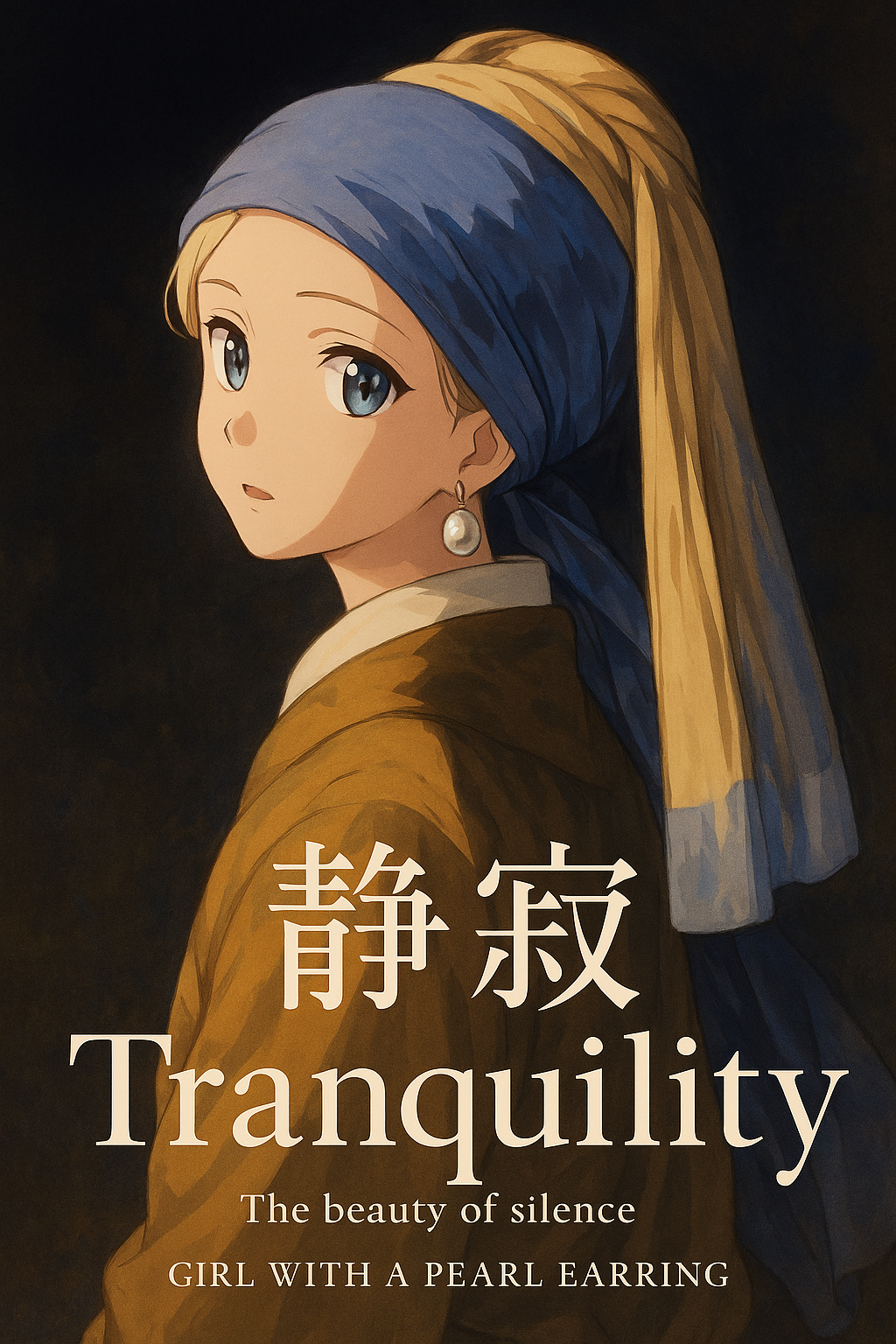[Click to download](https://filesystem.site/cdn/download/20250421/tQ62gh0BbdESApNmFJMNzsdUFDflkl.png)%
Wenn Sie die neueste, von OpenAI veröffentlichte Methode zur Bildgenerierung verwenden möchten, beachten Sie folgende 3 Punkte:
Geben Sie den Parameter quality nicht an – Modelle wie gpt-4o-image-vip und gpt-4o-image haben ihn intern festgelegt.
Das Feld usage (Token-Tracking) wird nicht unterstützt.
Die neueste Ausgabe gibt Base64-codierte Bilddaten zurück; das aktuelle Skript erledigt die automatische Speicherung bereits.
Python
from openai import OpenAIimport osimport requestsimport base64client = OpenAI( api_key="AIHUBMIX_API_KEY", # Replace with your AiHubMix API key base_url="https://aihubmix.com/v1")prompt = """redesign poster of the movie [Black Swam], 3D cartoon, smooth render, bright tone, 2:3"""result = client.images.generate( model="gpt-4o-image-vip", prompt=prompt, n=1, # Number of images to generate size="1024x1536", # 1024x1024 (square), 1536x1024 (3:2 landscape), 1024x1536 (2:3 portrait), auto (default) #quality="high" # Do not pass quality for reverse model, it's internally bound 📍)print(result) # Print full API response; usage not supported for reverse API 📍# Define output filename prefix and directoryoutput_dir = "." # You can specify another directoryfile_prefix = "image_gen-reverse"# Ensure output directory existsos.makedirs(output_dir, exist_ok=True)# Iterate through all returned image datafor i, image_data in enumerate(result.data): # Handle base64 string first if hasattr(image_data, "b64_json") and image_data.b64_json: image_bytes = base64.b64decode(image_data.b64_json) current_index = i while True: file_name = f"{file_prefix}_{current_index}.png" file_path = os.path.join(output_dir, file_name) if not os.path.exists(file_path): break current_index += 1 with open(file_path, "wb") as f: f.write(image_bytes) print(f"Image saved to: {file_path} (base64)") # Then handle url field (robust fallback in case of interface change) elif hasattr(image_data, "url") and image_data.url: try: response = requests.get(image_data.url, stream=True) response.raise_for_status() image_bytes = response.content current_index = i while True: file_name = f"{file_prefix}_{current_index}.png" file_path = os.path.join(output_dir, file_name) if not os.path.exists(file_path): break current_index += 1 with open(file_path, "wb") as f: f.write(image_bytes) print(f"Image saved to: {file_path} (url)") except requests.exceptions.RequestException as e: print(f"Failed to download image #{i}: {e}") except Exception as e: print(f"Error occurred while processing image #{i}: {e}") else: print(f"No b64_json or url found in image #{i}, skipping save.")


