

All one api x AIHubMix Setup Guide
AIHubMix supports unified API access to 700+ mainstream AI models, including GPT, Claude, Gemini, DeepSeek, and Grok. For developers who work with multiple models, multiple clients, or multiple API keys, saving keys, checking account balance, and reviewing model pricing are common day-to-day management tasks. This guide introduces All one api, a third-party open-source browser extension that can help users manage AIHubMix API keys, account balance, model pricing, and model lists, and export credential settings to commonly used AI client tools.Third-Party Tool Notice
All one api is a third-party open-source browser extension. It is not an official AIHubMix product. AIHubMix does not participate in the development, operation, maintenance, or data storage of this extension, and cannot guarantee its security, stability, compatibility, or future updates. This article only explains how All one api can be used with AIHubMix. It does not constitute an official recommendation, security guarantee, or endorsement. Before using any third-party tool, please evaluate the risks yourself and keep sensitive information such as API keys properly protected.Why AIHubMix Users May Need All one api
As AIHubMix supports more models, users may frequently need to handle tasks such as:- Checking whether an API key has been saved correctly
- Confirming whether the current account balance is sufficient
- Comparing input and output prices across different models
- Checking whether a model fits a specific client or use case
- Quickly configuring Base URL and API key settings across different AI tools
- AIHubMix account balance
- AIHubMix API keys
- AIHubMix model lists
- AIHubMix model pricing
- Export settings for common AI clients
What Is All one api?
All one api is a third-party open-source browser extension for AI API users. It is mainly designed to manage API accounts, API keys, account balance, and model pricing information in one place. When used with AIHubMix, All one api can help save the full API key after it is created and export the AIHubMix Base URL and API key to common AI clients.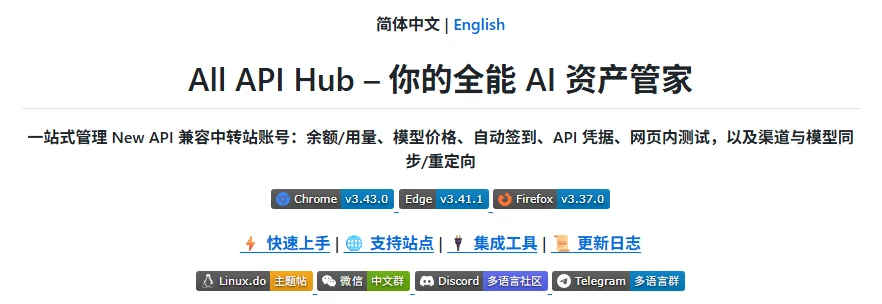
Key Features of All one api
1. View AIHubMix Account Balance
After adding an AIHubMix account, users can view account balance status in All one api, reducing the need to repeatedly open the console just to check balance.2. Save One-Time-Visible AIHubMix API Keys
For security reasons, an AIHubMix API key is usually displayed in full only once when it is created. If the user does not save it in time, the full key cannot be viewed again later and a new API key must be created. All one api can help save the full API key after creation, making it easier to copy, migrate, or export the key to other clients later.3. Check AIHubMix Model Pricing
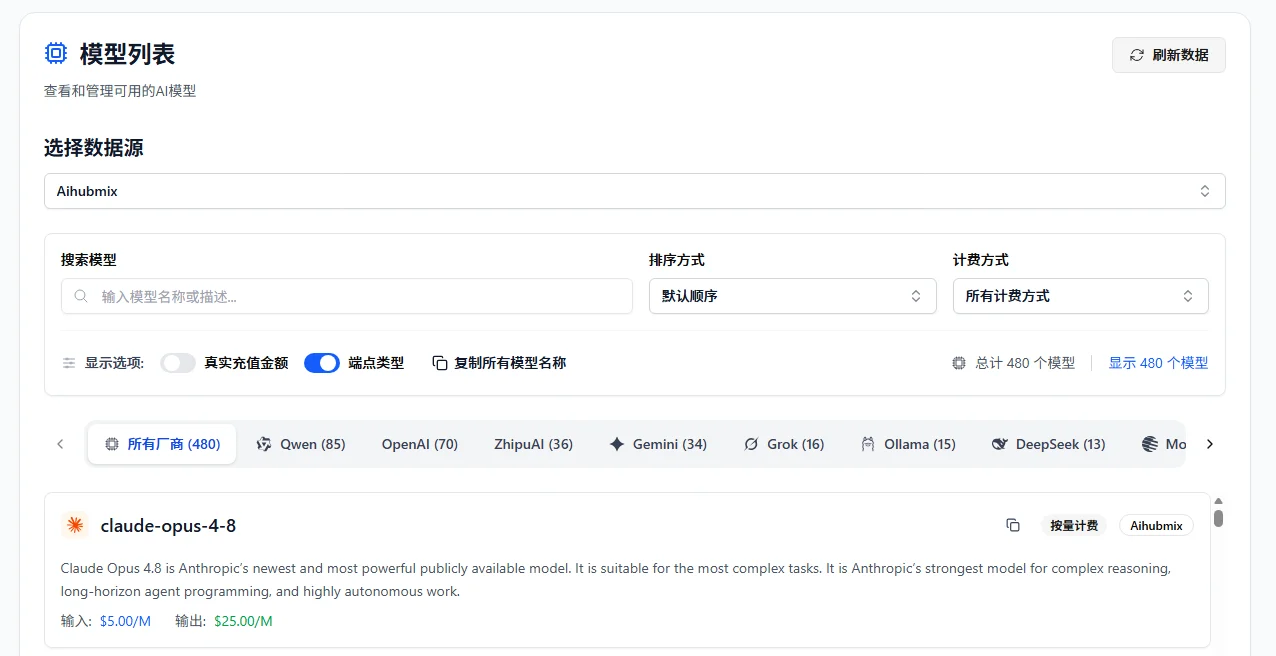
All one api supports viewing AIHubMix model lists and pricing information, including:- Model name
- Input price
- Output price
- Model search
- Available model filtering
4. Export to Common AI Clients
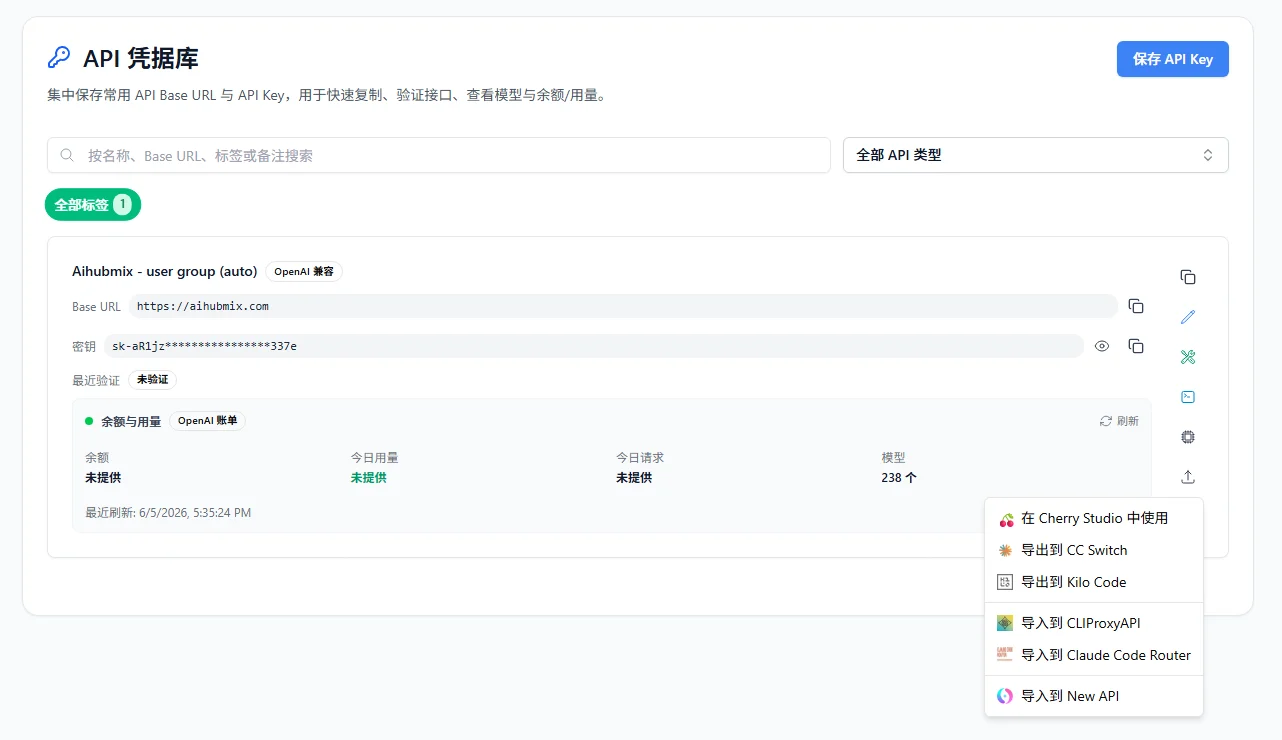
All one api supports exporting AIHubMix API keys and Base URL settings to selected AI client tools, including:- Cherry Studio
- CC Switch
- Kilo Code
- CLIProxyAPI
- Claude Code Router
How to Install All one api
For automatic updates and a more stable experience, it is recommended to install All one api from the extension store that matches your browser:- Chrome: Chrome Web Store
- Edge: Microsoft Edge Add-ons
- Firefox: Firefox Add-ons
- QQ Browser, 360 Browser, Cheetah Browser, Brave, Vivaldi, Opera, and other Chromium-based browsers: installation guide
- Safari for Mac: Safari installation guide
- Edge mobile, Firefox Android, Kiwi, and other mobile browsers: mobile browser guide
- If store installation is not available, download the Stable package from GitHub Releases and install it manually. Manual versions usually do not update automatically, so future upgrades require downloading and installing a new package again.
How to Add an AIHubMix Account in All one api
Step 1: Log in to the AIHubMix Console
Open the AIHubMix console: https://console.aihubmix.com Make sure the current browser is already logged in to your AIHubMix account.Step 2: Open the All one api Extension
Click the All one api extension icon in the top-right corner of your browser to open the extension panel.Step 3: Add an Account
Click “Add Account” and enter the AIHubMix console address.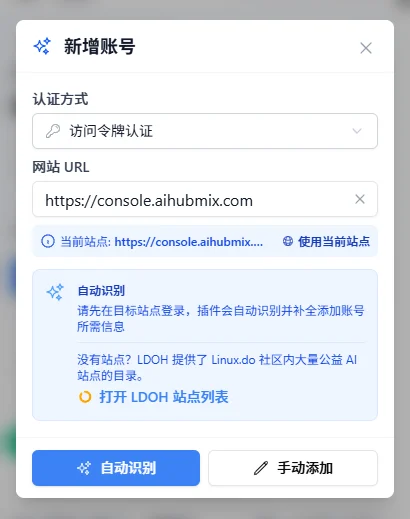
Step 4: Auto Detect the Account
Click “Auto Detect”. All one api will try to identify the current AIHubMix account type and related information.Step 5: Confirm and Save the Account
After confirming that the detected information is correct, save the account configuration.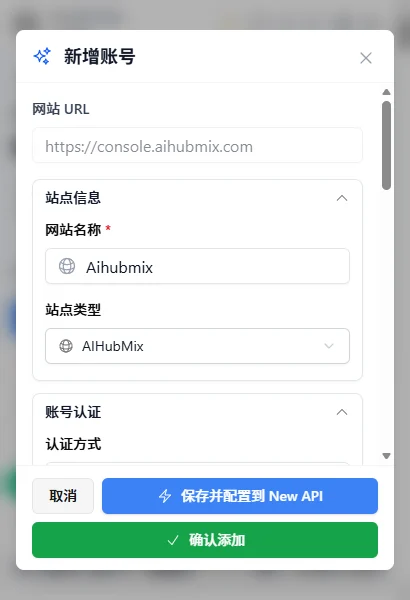
How to Save an AIHubMix API Key
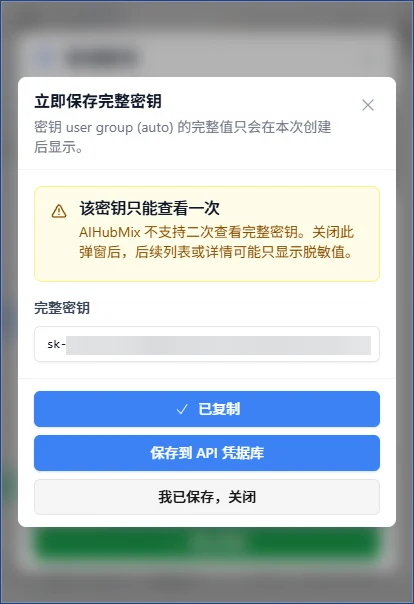
For security reasons, an AIHubMix API key is displayed in full only once when it is created. Users are advised to save the API key immediately after creation to avoid losing access to the full key later. Recommended workflow:- Add the AIHubMix account in All one api
- Create an API key in the AIHubMix console
- Save the key while it is still fully visible
- Store the full API key in the credential vault
- Export it to AI client tools as needed
- Configuring AI clients
- API testing
- Migrating between tools
- Managing multiple API keys
- Backing up commonly used credentials
How to Check AIHubMix Model Pricing
In All one api, users can view AIHubMix model lists and pricing information. Available information includes:- Model name
- Model list
- Input price
- Output price
- Model search results
How to Export an AIHubMix API Key to AI Clients
All one api supports exporting AIHubMix API key and Base URL settings to common AI tools. Supported tools include:- Cherry Studio
- CC Switch
- Kilo Code
- Claude Code Router
- CLIProxyAPI
All one api vs AI Clients
All one api is mainly used for API account, key, balance, and model pricing management. AI clients are mainly used for chat, code generation, agent workflows, or actual model calls.| Feature | All one api | AI Clients |
|---|---|---|
| API key management | Supported | Usually not supported |
| Balance check | Supported | Usually not supported |
| Model pricing lookup | Supported | Usually not supported |
| AI chat | Not supported | Supported |
| Agent workflows | Not supported | Supported |
| Model calls | Not the main use case | Supported |
- Use the AIHubMix console for top-ups, account management, and official settings
- Use All one api to assist with API key, balance, and model pricing management
- Use clients such as Cherry Studio, Claude Code Router, and Kilo Code for actual model calls
FAQ
Is All one api an official AIHubMix product?
No. All one api is a third-party open-source browser extension and is completely independent from AIHubMix. AIHubMix does not participate in its development, operation, maintenance, or data management.Why is an AIHubMix API key shown only once?
This is for security. API keys are sensitive credentials, and the full key is usually shown only once when it is created. If the full API key is not saved in time, a new key must be created later.Which AIHubMix models can All one api display?
All one api can help display information for models supported by AIHubMix, such as:- GPT series
- Claude series
- Gemini series
- DeepSeek series
- Grok series
Does All one api upload my API key?
Based on the way All one api is used, data is usually stored in the local browser environment by default. If users actively enable WebDAV or other sync features, related data may be synchronized to the storage service configured by the user. Before using it, please read the All one api open-source documentation and sync configuration instructions, and evaluate the API key storage risks yourself.Can All one api replace the AIHubMix console?
No. The AIHubMix console remains the main entry point for account management, top-ups, API key creation, official settings, and model service management. All one api is only suitable as a third-party auxiliary management tool.Is it safe to manage API keys with a third-party tool?
Any third-party tool involves some level of risk. Before using one, users are advised to:- Check whether the project is open source
- Read the permission descriptions
- Confirm how data is stored
- Avoid saving API keys on untrusted devices
- Never upload API keys to public repositories or share them in screenshots
Get Started with AIHubMix + All one api
If you want to manage AIHubMix API keys, balance, and model pricing more conveniently, you can try the following workflow:- Register or log in to your AIHubMix account
- Create an API key in the AIHubMix console
- Install the All one api browser extension
- Add your AIHubMix account
- Save the full API key
- Check balance and model pricing
- Export settings to AI client tools as needed
Related Resources
- AIHubMix website: https://aihubmix.com
- AIHubMix API docs: https://docs.aihubmix.com
- AIHubMix model list: https://aihubmix.com/models
- AIHubMix pricing: https://aihubmix.com/pricing
- All one api GitHub: https://github.com/qixing-jk/all-api-hub
- All one api docs: https://all-api-hub.qixing1217.top