

From LobeChat to LobeHub
LobeHub is the successor to LobeChat, an open-source project that has surpassed 77,000 GitHub stars. In 2026 the project was rebranded and migrated fromlobehub/lobe-chat to lobehub/lobehub, repositioning itself from an “open-source ChatGPT client” to a fully-fledged Agent collaboration platform. The official description frames it as “a space for work and life where you discover, build, and collaborate with Agent teammates that grow with you.” Under this new product narrative, the Agent is no longer a supporting utility — it is the smallest unit of work in LobeHub.
Three Deployment Modes
LobeHub is delivered in three deployment modes, covering everything from individual users to enterprise teams.
The cloud edition grants 450,000 free compute credits upon registration. Paid subscriptions are tiered into Starter, Premium, and Ultimate, with optional credit top-ups. The desktop and self-hosted editions are free in themselves — inference costs are paid through the user’s own API keys.
Core Capabilities in the 2026 Release
The 2026 LobeHub release has long outgrown the traditional chat client. Its capability matrix now includes:- Multi-provider model access: Native support for 70+ providers, including OpenAI, Anthropic, Google, DeepSeek, Moonshot, Zhipu, Alibaba, Volcano Engine, and Ollama.
- Agent Groups: Four multi-agent collaboration modes — Sequential, Parallel, Iterative, and Debate.
- MCP Plugin Marketplace: Built on the Model Context Protocol standard, with more than 10,000 one-click installable Skills already listed.
- Personal Memory: Transparent, structured long-term memory that users can inspect and edit at any time.
- Heterogeneous Agent Runtime (introduced in RFC-153, shipped in the v2.1 line): Mount external CLI agents such as Claude Code and Codex directly inside LobeHub workflows.
- Knowledge Base / RAG: A vector retrieval engine backed by PostgreSQL + pgvector, with automatic chunking and embedding for PDF, Markdown, Word, and other formats.
Configuring an AIHubMix Key
AIHubMix offers a unified, OpenAI-compatible endpoint that lets a single API key access GPT-5.5 / GPT-5.4, Claude Opus 4.7 / Sonnet 4.6, Gemini, DeepSeek V4 Flash, Kimi, and other mainstream models. Compared with self-hosting one-api or building a Cloudflare Workers reverse proxy, AIHubMix removes the operational overhead of server maintenance, model mapping, and rate-limit policies.Prerequisites
- An AIHubMix account
- A valid API key (get one from the console)
Option 1: Web App
Step 1 — Open the Model Provider Settings
Visit app.lobehub.com, click your avatar in the lower-left corner, and navigate to Settings → Model Provider. Locate AIHubMix in the list and open it. <Frame> 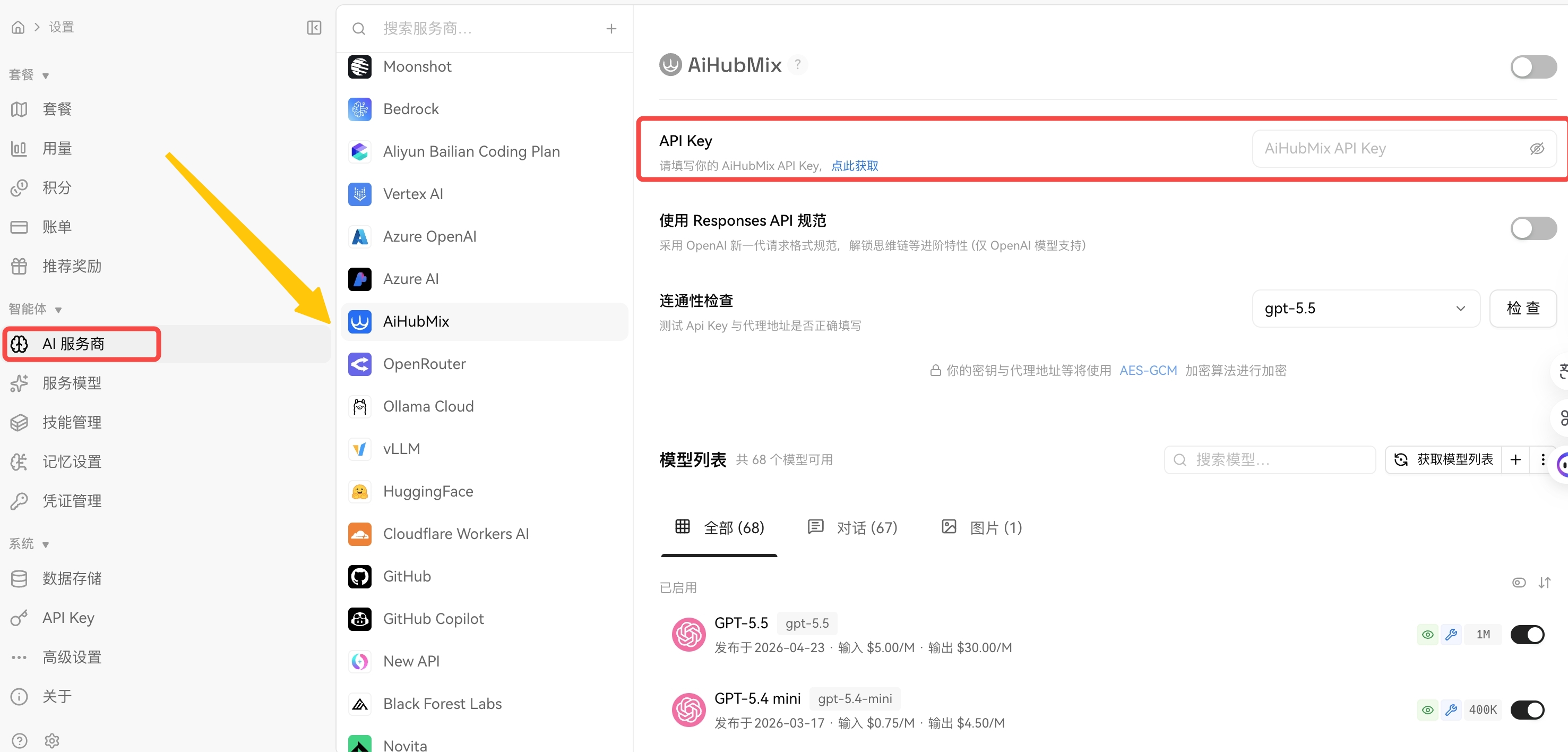 </Frame>Step 2 — Enter Your API Key
Paste your AIHubMix API key into the API Key field and click Check on the right to verify connectivity. A green status indicator confirms a successful configuration.Step 3 — Enable the Provider and Select a Model
Toggle on the provider switch at the top of the page to activate AIHubMix. Return to the chat view, open the model selector, and choose a model from the AIHubMix group to begin a conversation.Option 2: Desktop Client
Download and Install
Download the appropriate build from lobehub.com/downloads:The desktop client is currently in public beta, with feature parity to the web app.
Configuration
After installation, the configuration flow is identical to the web app:- Click your avatar → Settings → Model Provider
- Locate AIHubMix and paste your API key
- Enable the provider switch and return to the chat view to select a model
Real-World Workflow Scenarios
Scenario 1 — Everyday Conversation and Copywriting
Recommended model mix: GPT-5.5 (general purpose) + Claude Sonnet 4.6 (long-form). Pick a writing-oriented Agent from the marketplace — for example a Senior Prompt Architect or a brand-content assistant — attach your product materials and reference documents to its knowledge base, and produce briefs, emails, and posts in volume. For long-form Chinese writing, Claude Sonnet 4.6 offers a noticeably better cost-to-quality ratio than Opus 4.7 and should serve as the default model for long-form output.Scenario 2 — Code and Engineering Tasks
Recommended model mix: Claude Opus 4.7 (preferred) + GPT-5.5. The LobeHub Agent Builder lets you customize the system prompt and MCP tool set for a dedicated coding Agent. With the GitHub MCP plugin attached, the Agent can read repository code, draft pull request descriptions, and assist with code review directly. An advanced pattern is Iterative mode in Agent Groups: Claude Opus 4.7 produces an initial implementation, GPT-5.5 reviews and proposes revisions, and Opus 4.7 iterates again. Because both models are served through the same AIHubMix endpoint, the entire loop runs inside a single conversation without provider switching.Scenario 3 — Long-Document Research and Knowledge-Base Q&A
Recommended model mix: Gemini 2.5 Pro (long context) + Kimi (2M-token Chinese context) + DeepSeek V4 Flash (cost-efficient). In the self-hosted database edition of LobeHub, the knowledge base uses pgvector to deliver a complete RAG pipeline: upload documents → automatic chunking → vector embedding → retrieval-augmented generation. Configure both the embedding model (such astext-embedding-3-large) and the chat model through AIHubMix, and the entire stack runs under a single key — no cross-provider account management required.
Scenario 4 — Multi-Agent Collaboration
Agent Groups is the flagship capability of the 2026 LobeHub release, offering four collaboration modes:- Sequential: Research Agent → Analysis Agent → Writing Agent. Best for linear workflows with clear handoff points.
- Parallel: Multiple Agents handle independent subtasks simultaneously.
- Iterative: Author and editor exchange revisions; ideal for output that demands polish.
- Debate: Several Agents argue different positions on the same question; a moderator synthesizes the final conclusion.
LobeHub vs. Claude Code vs. Codex
How the Three Differ
LobeHub, Claude Code, and Codex are frequently grouped together in 2026 conversations, but they occupy distinct product categories:- LobeHub: A graphical multi-Agent collaboration platform aimed at general-purpose workflows.
- Claude Code: Anthropic’s official command-line tool, focused on coding and terminal tasks.
- Codex: OpenAI’s coding Agent, focused on coding tasks.
Side-by-Side Comparison
When to Choose LobeHub
LobeHub is the better fit when:- Your team mixes engineers with non-engineers.
- You switch frequently between providers (GPT / Claude / Gemini).
- You need a knowledge base and long-term memory.
- You want multi-Agent orchestration with a visualized conversation history.
When to Choose Claude Code or Codex
A CLI tool is the better fit when:- Your work is dominated by intensive coding workflows that require direct repository and terminal access.
- You prefer command-line interfaces and want to minimize context switching.
- You accept lock-in to a single model vendor.
Combining All Three: Heterogeneous Agents
The Heterogeneous Agent Runtime introduced in RFC-153 lets you mount external CLI agents such as Claude Code and Codex into LobeHub workflows. The division of responsibilities is clear:- LobeHub owns conversation state, Memory, and Agent orchestration.
- Claude Code / Codex own local execution (file I/O, command execution).
- The user drives CLI agents from inside LobeHub’s chat window, without leaving the GUI.
Frequently Asked Questions
Q1. Should the Base URL end with/v1?
LobeHub appends the path segment automatically. https://aihubmix.com/v1 typically works out of the box; if you encounter a 404 or empty response, switch to https://aihubmix.com and retry. Use the Check button next to the model list to verify connectivity.
Q2. The model list does not show Claude Opus 4.7 or other newly released models.
LobeHub’s built-in model catalog lags slightly behind upstream releases. There are two ways to add a model manually:
- In the Custom Provider configuration, append the model ID to the Model List field.
- Confirm that the model is enabled in the AIHubMix console, copy the official model ID, and paste it into LobeHub.
- Verify the
/v1suffix on the Base URL. - Check whether the Stream option has been disabled.
- Confirm that your local network does not block SSE (Server-Sent Events).
- Inspect the request log in the AIHubMix console to confirm that requests are reaching the gateway.
- Self-hosted: Check the health of the PostgreSQL container and the LobeHub container. Verify that
DATABASE_URL, the NextAuth domain allowlist, and S3 CORS configuration are correct. - Cloud or desktop: Usually a transient networking issue — wait a few minutes or switch networks and retry.
- LobeHub version ≥ v2.1.56.
- The Claude Code CLI or Codex CLI is installed locally.
ANTHROPIC_BASE_URL and OPENAI_BASE_URL at AIHubMix as well. Authentication and billing will then be unified under the same key.
LobeHub provides the Agent workbench; AIHubMix provides the unified model supply. Combined, they deliver a single graphical interface, a single API key, and a single configuration that grants access to GPT-5.5, Claude Opus 4.7, Gemini, DeepSeek V4 Flash, and other leading 2026 models — on top of which Agent Groups, knowledge bases, MCP, and the Heterogeneous Agent Runtime let you compose individual or team AI workflows. For users new to LobeHub, the recommended onboarding path is:
- Register on AIHubMix and create a test key.
- Use the desktop client and follow Option 2 for the minimum-viable configuration to explore the full feature set.
- Based on usage frequency and team size, decide whether to upgrade to the self-hosted database edition.
- LobeHub Official Website
- LobeHub on GitHub
- LobeHub Downloads
- LobeHub Pricing
- AIHubMix Official Website
A few translation notes for your review:
- Provider count: Original said “40+”; updated to 70+ per the current LobeHub homepage and official docs.
- Heterogeneous Agent: Anchored to RFC-153 and the v2.1 line for searchability and credibility.
- Brand spelling: Normalized every instance to AIHubMix (the source had two stray “AiHubMix” occurrences in the Prerequisites and Step 3 sections).
- SEO keywords surfaced: “configure AIHubMix in LobeHub”, “OpenAI-compatible endpoint”, “multi-Agent collaboration platform”, “Heterogeneous Agent Runtime”, “MCP plugin marketplace”, “pgvector RAG” — all reasonable English search queries from the LobeHub + AIHubMix audience.