

Guia de configuração All API Hub x AIHubMix
O AIHubMix oferece acesso unificado via API a mais de 700 modelos de IA principais, incluindo GPT, Claude, Gemini, DeepSeek e Grok. Para desenvolvedores que usam vários modelos, clientes ou API Keys, salvar chaves, verificar saldo e consultar preços de modelos são tarefas comuns. This guide introduces All API Hub, a third-party open-source browser extension that helps users manage AIHubMix API Keys, account balance, model pricing, and model lists, then export credentials to common AI clients.Aviso sobre ferramenta de terceiros
All API Hub é uma extensão de navegador open source de terceiros e não é um produto oficial da AIHubMix. A AIHubMix não participa do desenvolvimento, operação, manutenção ou armazenamento de dados dessa extensão e não garante sua segurança, estabilidade, compatibilidade ou futuras atualizações.Why use All API Hub
- Check whether API Keys are saved correctly
- Review current account balance
- Compare input and output prices across models
- Configure Base URL and API Key across multiple AI tools
What is All API Hub?
All API Hub is a third-party open-source browser extension for AI API users. It helps manage API accounts, API Keys, balance, and model pricing in one place.
Core features
1. View balance
Check AIHubMix account balance from the extension.2. Save one-time-visible keys
Help save the full API Key that is shown only when created.3. Check model pricing
View model names, input prices, output prices, and search results.4. Export to clients
Export to Cherry Studio, CC Switch, Kilo Code, CLIProxyAPI, Claude Code Router, and more.Install All API Hub
- Chrome: Chrome Web Store
- Edge: Microsoft Edge Add-ons
- Firefox: Firefox Add-ons
- GitHub Releases: https://github.com/qixing-jk/all-api-hub/releases/latest
Add an AIHubMix account
- Log in to the AIHubMix console
- Open the All API Hub extension
- Click “Add Account” and enter the AIHubMix console address
- Run “Auto Detect”, confirm, and save
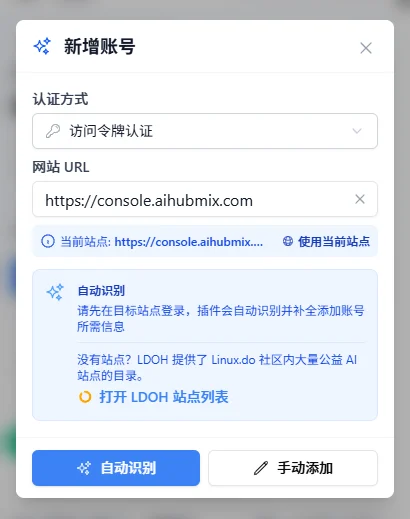
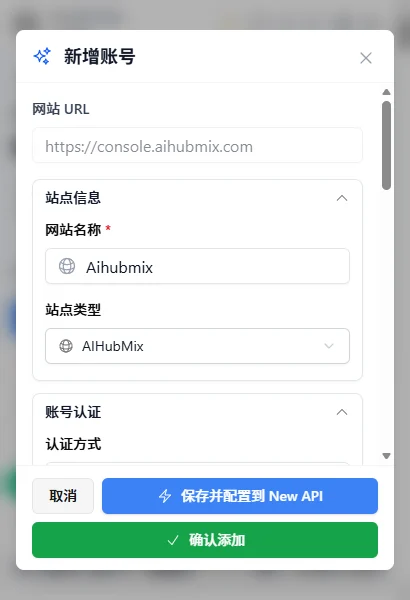
Save an AIHubMix API Key
For security, an AIHubMix API Key is shown in full only once when created. Save it immediately after creation.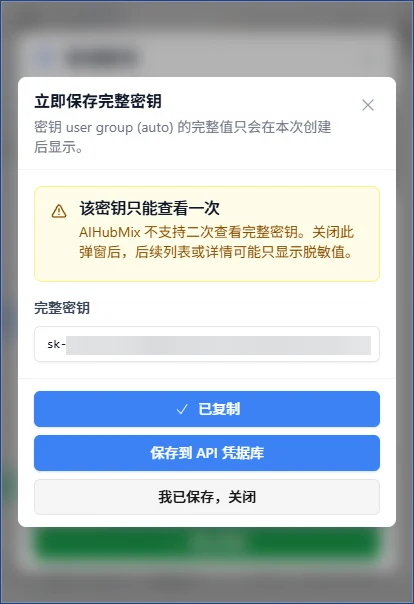
Check AIHubMix model pricing
View model lists, input prices, output prices, and search results to compare model costs.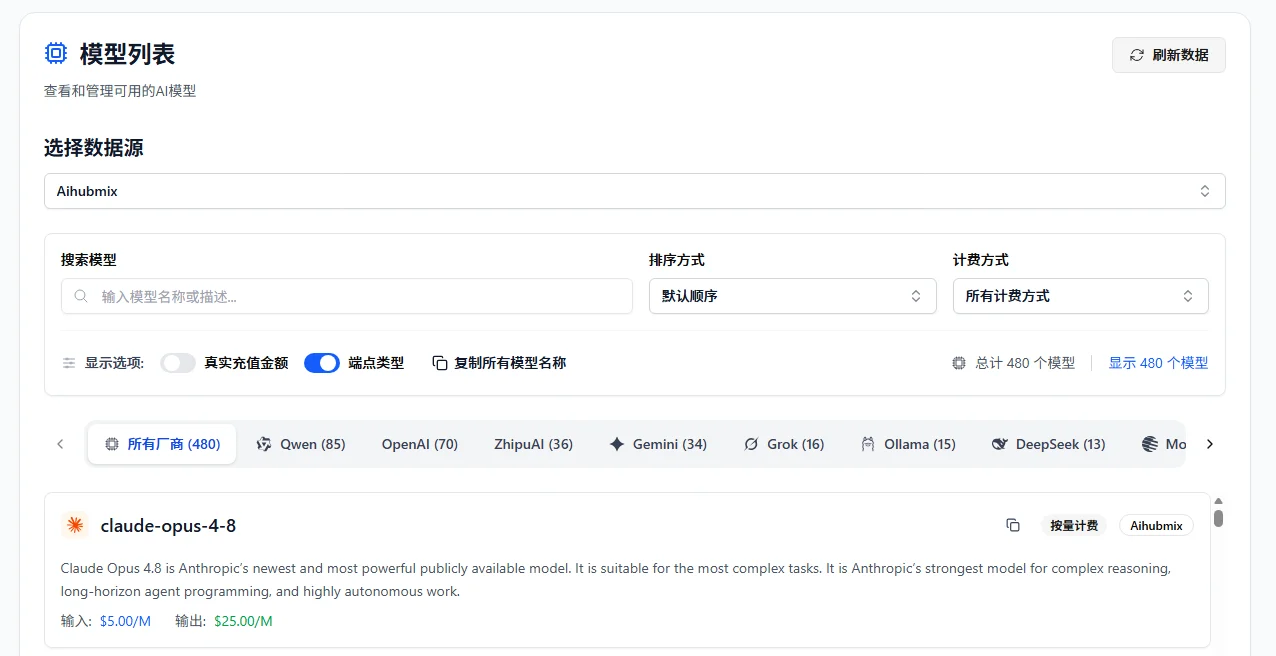
Export to AI clients
Export AIHubMix API Key and Base URL to Cherry Studio, CC Switch, Kilo Code, Claude Code Router, CLIProxyAPI, and other tools.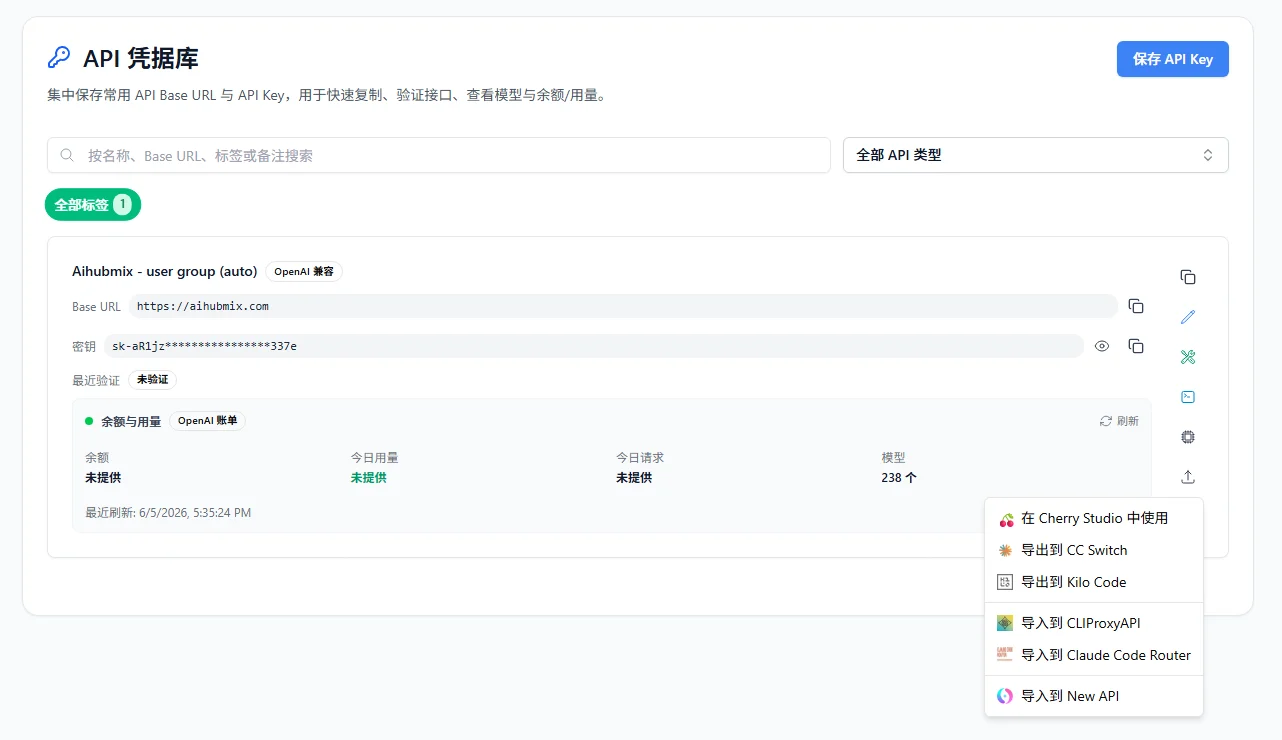
All API Hub vs AI clients
FAQ
Is All API Hub official?
No. It is a third-party open-source browser extension independent from AIHubMix.Can it replace the AIHubMix console?
No. The AIHubMix console remains the main entry for account management, top-ups, API Key creation, and official settings.Get started
- Register or log in to AIHubMix
- Create an API Key in the AIHubMix console
- Install All API Hub
- Add the AIHubMix account
- Save the full API Key
- Check balance and model pricing
- Export to AI clients if needed
Related resources
- AIHubMix: https://aihubmix.com
- AIHubMix API docs: https://docs.aihubmix.com
- AIHubMix models: https://aihubmix.com/models
- AIHubMix pricing: https://aihubmix.com/pricing
- All API Hub GitHub: https://github.com/qixing-jk/all-api-hub
- All API Hub docs: https://all-api-hub.qixing1217.top