Documentation Index
Fetch the complete documentation index at: https://docs.aihubmix.com/llms.txt
Use this file to discover all available pages before exploring further.
本文介绍 Claude Opus 4.7在推理控制方面的两项重要变化,以及 AIHubmix 原生接口与 Chat 统一接口的完整调用说明。详见 Anthropic 官方公告 与 模型更新日志。

一、推理控制新特性
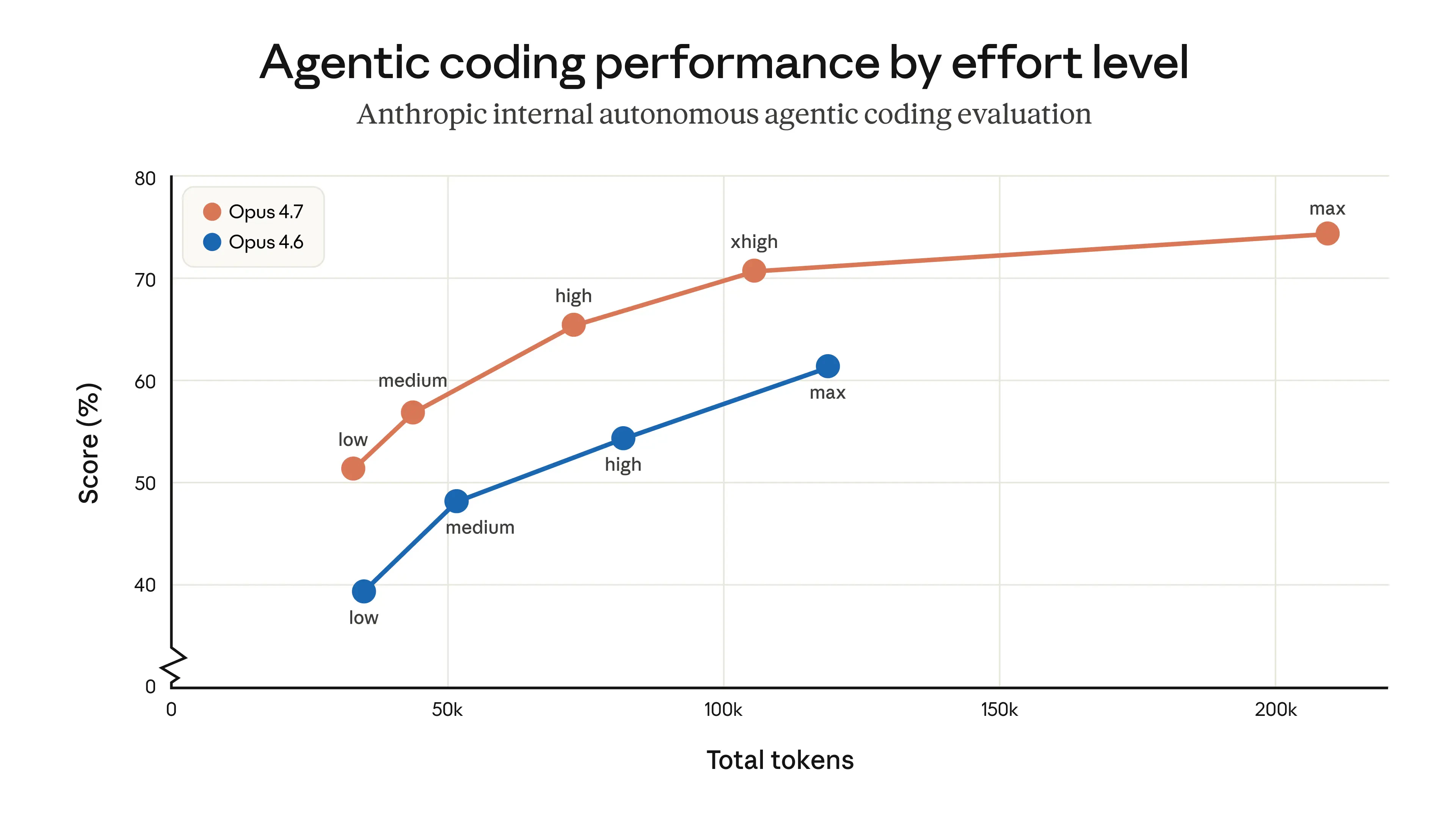
✦ 新增 xhigh 推理强度级别
全新的 xhigh 等级位于 high 与 max 之间,专为编程与 Agentic 任务设计,在性能与效率之间取得更优平衡。
low ── medium ── high ── xhigh ★NEW ── max
✦ 思考内容默认隐藏
流式输出中,思考过程默认不再展示。如需返回思考摘要,须在请求中显式传入 display 字段:
| display 值 | Opus 4.7 | Opus 4.6 | 效果 |
|---|
| ”omitted” | 默认 | 非默认 | 思考块内容为空 |
| ”summarized” | 需手动设置 | 默认 | 返回思考摘要文字 |
"reasoning": {
"effort": "xhigh",
"display": "summarized"
}
图:Opus 4.7 新增 xhigh 级别 — Agentic 编程性能对比(来源:Anthropic 官方)
二、Claude 原始格式接口说明
Anthropic 原生接口的 effort 值与官方保持一致,参考如下:
| effort值 | 适用模型 | 说明 | 推荐场景 |
|---|
| low | 所有支持模型 | 显著节省 token,适当降低能力 | 简单任务、高并发请求、子 agent |
| medium | 所有支持模型 | 均衡模式,适度节省 token | 一般 agentic 任务 |
| high | 所有支持模型 | 默认值,高能力表现 | 复杂推理、编程、agentic 任务 |
| xhigh(新增) | Opus 4.7 专属 | 扩展能力,介于 high 和 max 之间,长程任务表现优异 | 编程和 agentic 任务的推荐起点 |
| max | Opus 系列 | 最高能力 | 前沿研究问题 |
AIHubmix Claude 原生接口 Claude Opus 4.7 调用示例
from anthropic import Anthropic
client = Anthropic(
api_key="<AIHUBMIX_API_KEY>",
base_url="https://aihubmix.com"
)
response = client.messages.create(
model="claude-opus-4-7",
max_tokens=16000,
thinking={"type": "adaptive"},
output_config={"effort": "xhigh"}, # 可选:low / medium / high / xhigh / max
messages=[
{
"role": "user",
"content": "A snail is at the bottom of a 10-meter well. Each day it climbs 3 meters, but each night it slides back 2 meters. How many days does it take to reach the top?"
}
]
)
print(response.content[-1].text)
三、AIHubmix Chat 统一接口的推理思考 effort 增加适配
AIHubMix Chat 统一接口与 OpenAI 规范对齐,通过 reasoning.effort 控制推理强度,不同模型自动适配对应级别:
Claude 系列模型的参数reasoning_effort (思考强度控制)说明
| effort值 | Opus >=4-7(新增) | Opus 4.6 / 4.5 | Sonnet 4.6 |
|---|
| minimal | low | low | low |
| medium | medium | medium | medium |
| high | high | high | high |
| xhigh | xhigh | max | high |
| max | max | max | high |
说明 :xhigh 仅 Opus 4.7 原生支持,其他 Opus 模型自动回退到 max,Sonnet 系列回退到 high。
Chat 统一接口Opus 4.7 调用示例
from openai import OpenAI
client = OpenAI(
base_url="https://aihubmix.com/v1",
api_key="<AIHUBMIX_API_KEY>",
)
completion = client.chat.completions.create(
model="claude-opus-4-7",
# max_tokens=10000, # 默认 4096,生成长文本时启用
messages=[
{
"role": "user",
"content": "A snail is at the bottom of a 10-meter well. Each day it climbs 3 meters, but each night it slides back 2 meters. How many days does it take to reach the top?"
}
],
extra_body={
"reasoning": {"effort": "xhigh"}
}
)
print(completion.choices[0].message.content)
四、Chat 统一接口Opus 4.7 控制思考内容说明
在 OpenAI 兼容接口中,reasoning 支持 display 字段,用于控制是否返回思考摘要。
Claude Opus 4.7 默认不返回思考内容,需手动设置 "display": "summarized" 开启。
| 字段 | 值 | 说明 |
|---|
display | (不传) | 默认不返回思考内容 |
display | "summarized" | 返回思考摘要 |
Opus 4.7 返回思考摘要示例
from openai import OpenAI
client = OpenAI(
base_url="https://aihubmix.com/v1",
api_key="<AIHUBMIX_API_KEY>",
)
completion = client.chat.completions.create(
model="claude-opus-4-7",
messages=[
{
"role": "user",
"content": "A snail is at the bottom of a 10-meter well. Each day it climbs 3 meters, but each night it slides back 2 meters. How many days does it take to reach the top?"
}
],
extra_body={
"reasoning": {"effort": "xhigh", "display": "summarized"}
}
)
print(completion.choices[0].message.content)
如需进一步了解接口细节,请参考 AIHubmix 官方文档 或 Anthropic 官方文档。