跳转到主要内容
本文介绍 Claude Opus 4.7 在推理控制上的两项关键变化,并给出 AIHubmix 原生 API 与 Chat 统一接口两种用法的完整说明。延伸阅读:Anthropic 官方公告模型更新日志
Claude Opus 4.7 xhigh 推理档位示意图

1. Opus 4.7 新增了哪些推理控制能力?

✦ 新增 xhigh 推理强度档位

新增的 xhigh 档位介于 highmax 之间,专为编码与 Agent 类任务设计,在能力与效率之间取得了更好的平衡。
low  ──  medium  ──  high  ──  xhigh ★NEW  ──  max

✦ 思考内容默认隐藏

在流式响应中,思考过程默认不再展示。若需获取推理摘要,请在请求中显式传入 display 字段:
display 取值Opus 4.7Opus 4.6行为
”omitted”默认非默认思考块内容为空
”summarized”需手动设置默认返回思考摘要文本
"reasoning": {
  "effort": "xhigh",
  "display": "summarized"
}
:Opus 4.7 新增 xhigh 档位 —— Agent 编码性能对比(来源:Anthropic 官方)
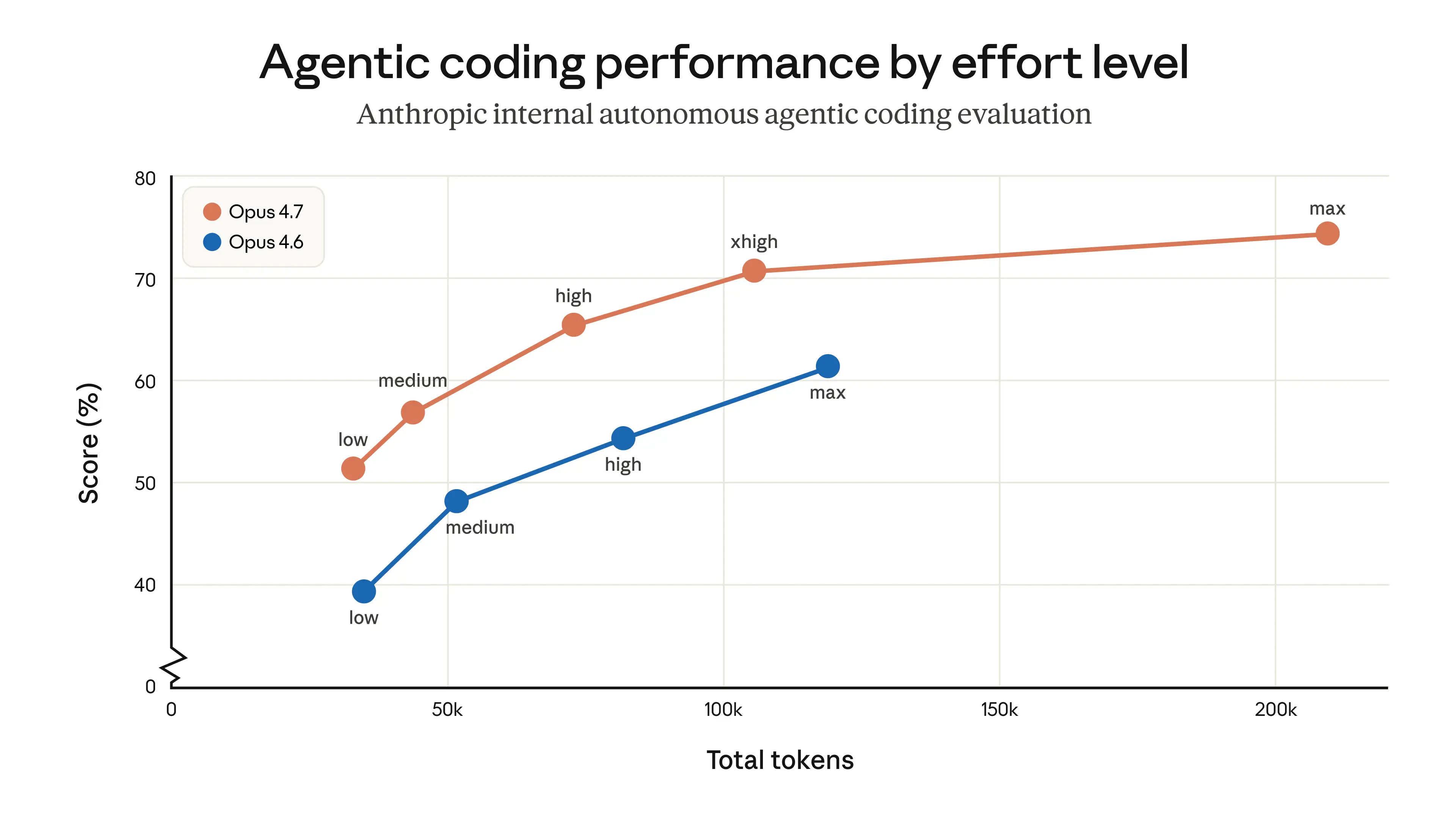
Claude Opus 4.7 xhigh 档位 Agent 编码性能对比

2. Claude 原生 API 参考

Anthropic 原生 API 的 effort 取值与官方规范保持一致:

effort 取值支持的模型说明推荐场景
low所有支持的模型显著节省 token,能力适度折中简单任务、高并发请求、子 Agent
medium所有支持的模型均衡模式,适度节省 token通用 Agent 任务
high所有支持的模型默认值;高能力表现复杂推理、编码、Agent 任务
xhigh(新增)仅 Opus 4.7介于 high 与 max 之间的增强能力;擅长长周期任务编码与 Agent 任务的推荐起点
maxOpus 系列最高能力前沿研究类难题

AIHubmix Claude 原生 API —— Opus 4.7 示例

from anthropic import Anthropic

client = Anthropic(
    api_key="<AIHUBMIX_API_KEY>",
    base_url="https://aihubmix.com"
)

response = client.messages.create(
    model="claude-opus-4-7",
    max_tokens=16000,
    thinking={"type": "adaptive"},
    output_config={"effort": "xhigh"},  # 可选:low / medium / high / xhigh / max
    messages=[
        {
            "role": "user",
            "content": "A snail is at the bottom of a 10-meter well. Each day it climbs 3 meters, but each night it slides back 2 meters. How many days does it take to reach the top?"
        }
    ]
)

print(response.content[-1].text)

3. AIHubmix Chat 统一接口对推理强度的支持

AIHubMix Chat 统一接口对齐 OpenAI 规范,通过 reasoning.effort 控制推理强度。不同的 Claude 模型会自动映射到对应的 effort 档位:

Claude 模型的 reasoning_effort(推理强度控制)

effort 取值Opus >=4.7(新增)Opus 4.6 / 4.5Sonnet 4.6
minimallowlowlow
mediummediummediummedium
highhighhighhigh
xhighxhighmaxhigh
maxmaxmaxhigh
说明xhigh 仅 Opus 4.7 原生支持。其他 Opus 模型会自动回退到 max,Sonnet 系列回退到 high

Chat 统一接口 —— Opus 4.7 示例

from openai import OpenAI

client = OpenAI(
    base_url="https://aihubmix.com/v1",
    api_key="<AIHUBMIX_API_KEY>",
)

completion = client.chat.completions.create(
    model="claude-opus-4-7",
    # max_tokens=10000,  # 默认 4096;需要更长输出时开启
    messages=[
        {
            "role": "user",
            "content": "A snail is at the bottom of a 10-meter well. Each day it climbs 3 meters, but each night it slides back 2 meters. How many days does it take to reach the top?"
        }
    ],
    extra_body={
        "reasoning": {"effort": "xhigh"}
    }
)

print(completion.choices[0].message.content)

4. 如何在 Chat 统一接口中控制思考内容?

在 OpenAI 兼容接口中,reasoning 支持 display 字段,用于控制是否返回思考摘要。 Claude Opus 4.7 默认不返回思考内容。设置 "display": "summarized" 即可开启。
字段取值说明
display(省略)不返回思考内容(默认)
display"summarized"返回思考摘要

Opus 4.7 —— 思考摘要示例

from openai import OpenAI

client = OpenAI(
    base_url="https://aihubmix.com/v1",
    api_key="<AIHUBMIX_API_KEY>",
)

completion = client.chat.completions.create(
    model="claude-opus-4-7",
    messages=[
        {
            "role": "user",
            "content": "A snail is at the bottom of a 10-meter well. Each day it climbs 3 meters, but each night it slides back 2 meters. How many days does it take to reach the top?"
        }
    ],
    extra_body={
        "reasoning": {"effort": "xhigh", "display": "summarized"}
    }
)

print(completion.choices[0].message.content)

更多细节请参阅 AIHubmix 文档Anthropic 官方文档

更新时间:2026-06-26