Documentation Index
Fetch the complete documentation index at: https://docs.aihubmix.com/llms.txt
Use this file to discover all available pages before exploring further.
本文介紹 Claude Opus 4.7 推理控制的兩項關鍵變更,以及 AIHubmix 原生 API 與 Chat 統一介面的完整使用說明。延伸閱讀:Anthropic 官方公告以及模型變更日誌。
1. 新增的推理控制功能
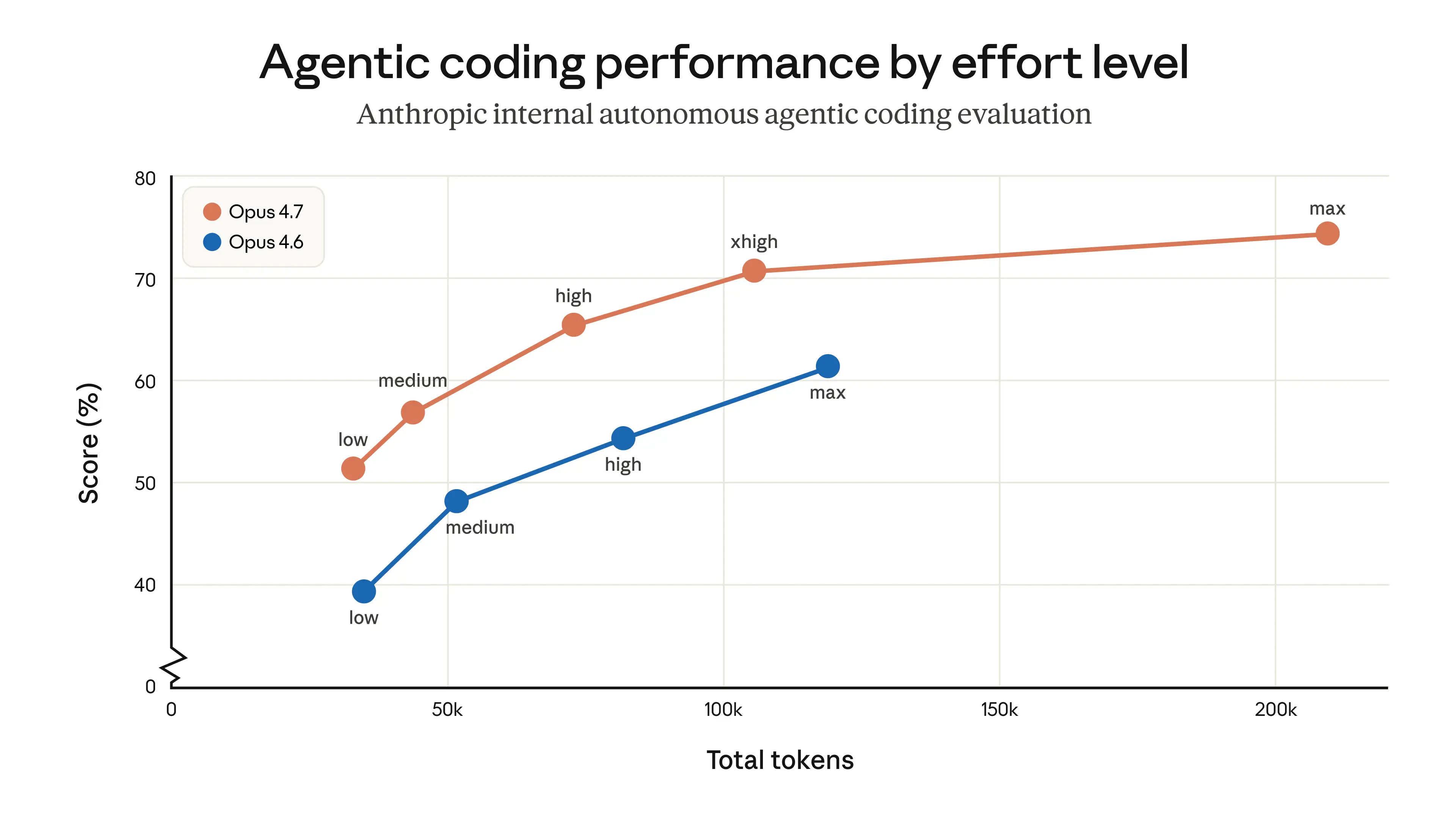
✦ 新增 xhigh 推理強度層級
新的 xhigh 層級介於 high 與 max 之間,專為程式設計與代理(agentic)任務設計,在能力與效率之間取得更好的平衡。
low ── medium ── high ── xhigh ★NEW ── max
✦ Thinking 內容預設隱藏
在串流回應中,thinking 過程預設不再顯示。若要接收推理摘要,請在請求中明確傳入 display 欄位:
| display 值 | Opus 4.7 | Opus 4.6 | 行為 |
|---|
| ”omitted” | 預設 | 非預設 | thinking block 內容為空 |
| ”summarized” | 必須手動設定 | 預設 | 傳回 thinking 摘要文字 |
"reasoning": {
  "effort": "xhigh",
  "display": "summarized"
}
圖:Opus 4.7 新增 xhigh 層級 — 代理程式設計效能比較(來源:Anthropic 官方)
2. Claude 原生 API 參考
Anthropic 原生 API 的 effort 值與官方規範一致:
| effort 值 | 支援的模型 | 說明 | 建議使用情境 |
|---|
| low | 所有支援的模型 | 大幅節省 token,能力小幅取捨 | 簡單任務、高並行請求、子代理 |
| medium | 所有支援的模型 | 平衡模式,適度節省 token | 一般代理任務 |
| high | 所有支援的模型 | 預設;高能力表現 | 複雜推理、程式設計、代理任務 |
| xhigh(新) | 僅 Opus 4.7 | 介於 high 與 max 之間的延伸能力;擅長長時程任務 | 程式設計與代理任務的建議起點 |
| max | Opus 系列 | 最大能力 | 前沿研究問題 |
AIHubmix Claude 原生 API — Opus 4.7 範例
from anthropic import Anthropic

client = Anthropic(
    api_key="<AIHUBMIX_API_KEY>",
    base_url="https://aihubmix.com"
)

response = client.messages.create(
    model="claude-opus-4-7",
    max_tokens=16000,
    thinking={"type": "adaptive"},
    output_config={"effort": "xhigh"},  # Options: low / medium / high / xhigh / max
    messages=[
        {
            "role": "user",
            "content": "A snail is at the bottom of a 10-meter well. Each day it climbs 3 meters, but each night it slides back 2 meters. How many days does it take to reach the top?"
        }
    ]
)

print(response.content[-1].text)
3. AIHubmix Chat 統一介面中的推理強度支援
AIHubMix Chat 統一介面與 OpenAI 規範對齊,透過 reasoning.effort 控制推理強度。不同的 Claude 模型會自動對應到對應的 effort 層級:
Claude 模型的 reasoning_effort (推理強度控制)
| effort 值 | Opus >=4.7(新) | Opus 4.6 / 4.5 | Sonnet 4.6 |
|---|
| minimal | low | low | low |
| medium | medium | medium | medium |
| high | high | high | high |
| xhigh | xhigh | max | high |
| max | max | max | high |
xhigh 僅在 Opus 4.7 上原生支援。其他 Opus 模型會自動降級為 max,Sonnet 系列則降級為 high。
Chat 統一介面 — Opus 4.7 範例
from openai import OpenAI

client = OpenAI(
    base_url="https://aihubmix.com/v1",
    api_key="<AIHUBMIX_API_KEY>",
)

completion = client.chat.completions.create(
    model="claude-opus-4-7",
    # max_tokens=10000,  # Default is 4096; enable for longer outputs
    messages=[
        {
            "role": "user",
            "content": "A snail is at the bottom of a 10-meter well. Each day it climbs 3 meters, but each night it slides back 2 meters. How many days does it take to reach the top?"
        }
    ],
    extra_body={
        "reasoning": {"effort": "xhigh"}
    }
)

print(completion.choices[0].message.content)
4. 在 Chat 統一介面中控制 Thinking 內容
在 OpenAI 相容介面中,reasoning 支援 display 欄位以控制是否傳回 thinking 摘要。
Claude Opus 4.7 預設不傳回 thinking 內容。設定 "display": "summarized" 以啟用。
| 欄位 | 值 | 說明 |
|---|
display | (省略) | 不傳回 thinking 內容(預設) |
display | "summarized" | 傳回 thinking 摘要 |
Opus 4.7 — Thinking 摘要範例
from openai import OpenAI

client = OpenAI(
    base_url="https://aihubmix.com/v1",
    api_key="<AIHUBMIX_API_KEY>",
)

completion = client.chat.completions.create(
    model="claude-opus-4-7",
    messages=[
        {
            "role": "user",
            "content": "A snail is at the bottom of a 10-meter well. Each day it climbs 3 meters, but each night it slides back 2 meters. How many days does it take to reach the top?"
        }
    ],
    extra_body={
        "reasoning": {"effort": "xhigh", "display": "summarized"}
    }
)

print(completion.choices[0].message.content)
最後更新:2026-06-01