> ## Documentation Index
> Fetch the complete documentation index at: https://docs.aihubmix.com/llms.txt
> Use this file to discover all available pages before exploring further.
# 結構化輸出修復
> 為 API Key 開啟結構化輸出修復:結構化輸出請求回傳的 JSON 存在截斷、尾隨逗號、程式碼區塊包裹等格式錯誤時,閘道自動修復為可解析的合法 JSON,數值保持原樣,支援 Chat Completions、Responses、Claude、Gemini,用戶端零改動。
模型在[結構化輸出](/zh-Hant/api/Structured-Output)場景下回傳的 JSON 有時無法通過解析:輸出被 `max_tokens` 截斷、帶有尾隨逗號、內容被包在 Markdown 程式碼區塊裡。應用側通常要為此撰寫重試或手動修復邏輯。
**結構化輸出修復**(Structured Output Repair)是一個 **Key 級別**的能力,預設關閉。開啟後,對宣告了結構化 JSON 輸出的**非串流**請求,當模型回傳的 JSON 存在格式錯誤時,AIHubMix 閘道在回傳前自動將其修復為可解析的合法 JSON;用戶端程式碼無需改動。
該開關預設關閉;未開啟時所有回應原樣回傳。開關按 Key 獨立設定,開啟後立即生效。
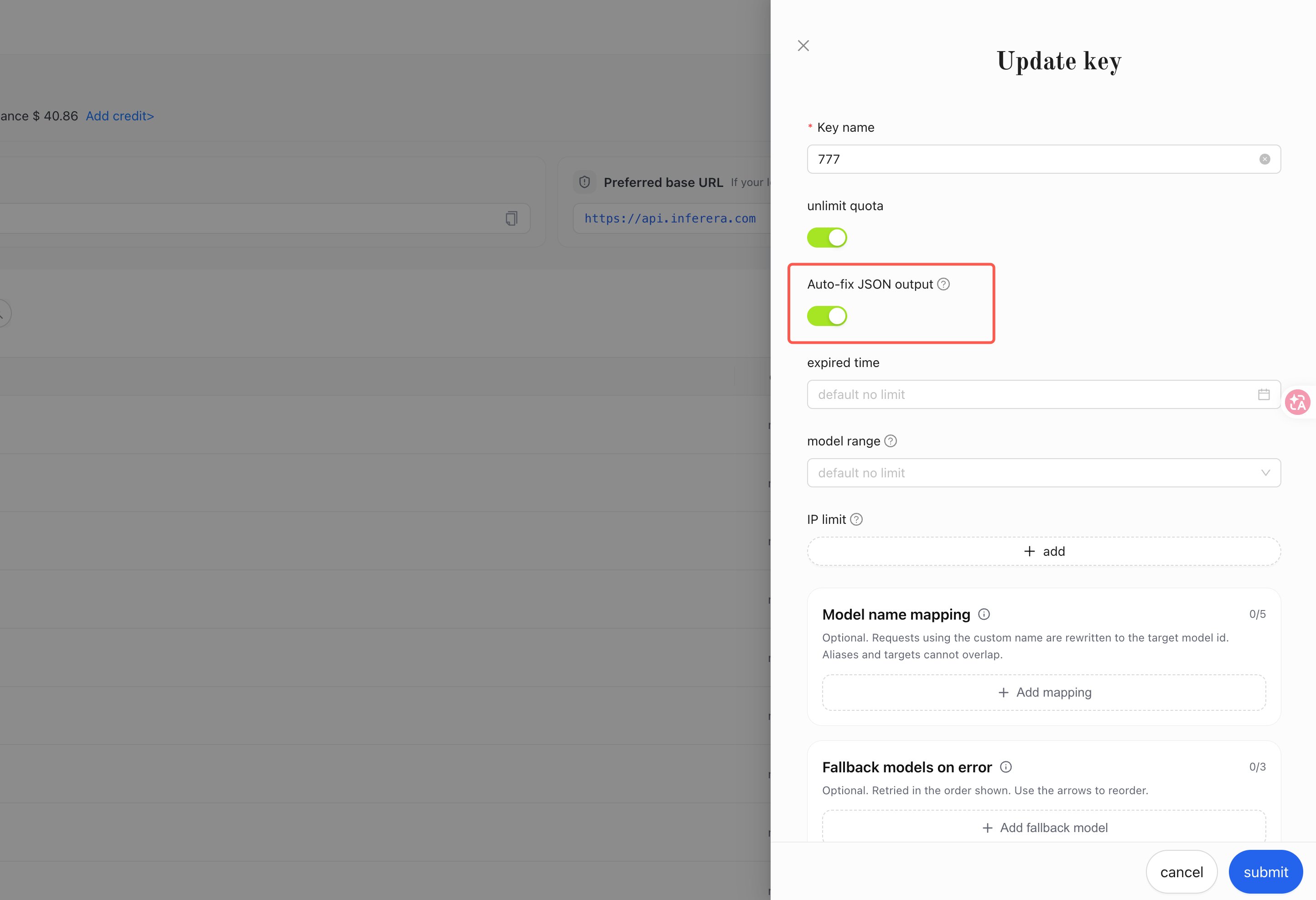
建立或編輯 Key,打開「結構化輸出修復」(Structured Output Repair)開關。
 ***
## 1. 生效條件
修復只在以下條件**全部滿足**時發生:
1. 請求使用的 Key 已開啟「結構化輸出修復」。
2. 請求為**非串流**(未設定 `stream: true`)。
3. 請求宣告了結構化 JSON 輸出(各協議的宣告欄位見下表)。
4. 模型回傳的文字內容無法通過 JSON 解析。
| 協議 | 端點 | 結構化輸出宣告欄位 |
| ---------------- | ----------------------------------------------- | ------------------------------------------------------------------------------ |
| Chat Completions | `/v1/chat/completions` | `response_format.type` 為 `json_object` 或 `json_schema` |
| Responses | `/v1/responses` | `text.format.type` 為 `json_schema` 或 `json_object` |
| Claude Messages | `/v1/messages` | `output_config.format.type` 為 `json_schema` |
| Gemini | `/gemini/v1beta/models/{model}:generateContent` | `generationConfig.responseMimeType` 為 `application/json`,或設定了 `responseSchema` |
內容本身是合法 JSON 時不做任何改動,原樣回傳。
***
## 2. 可修復的格式錯誤
**輸出截斷導致括號 / 引號未閉合**(如 `finish_reason` 為 `length`):
```text 修復前 theme={null}
{"items": [{"name": "Widget", "price": 9.99}, {"name": "Gad
```
```json 修復後 theme={null}
{"items": [{"name": "Widget", "price": 9.99}, {"name": "Gad"}]}
```
**Markdown 程式碼區塊包裹**:
````text 修復前 theme={null}
```json
{"status": "ok", "count": 3}
```
````
```json 修復後 theme={null}
{"status": "ok", "count": 3}
```
**尾隨逗號**:
```text 修復前 theme={null}
{"a": 1, "b": 2,}
```
```json 修復後 theme={null}
{"a": 1, "b": 2}
```
**單引號**:
```text 修復前 theme={null}
{'name': 'Widget'}
```
```json 修復後 theme={null}
{"name": "Widget"}
```
**鍵名未加引號**:
```text 修復前 theme={null}
{name: "Widget", price: 9.99}
```
```json 修復後 theme={null}
{"name": "Widget", "price": 9.99}
```
**文字與 JSON 混雜**(JSON 前後帶說明文字):
```text 修復前 theme={null}
Here is the JSON you requested: {"name": "Widget", "price": 9.99}
```
```json 修復後 theme={null}
{"name": "Widget", "price": 9.99}
```
修復採取保守策略:
* 修復只補全或規範化 JSON 語法;**數值與字串內容保持原文,不發生精度損失或改寫**。
* 修復產物必須是合法的 JSON 物件或陣列,且與原文差異在合理範圍內;任一條件不滿足時放棄修復、原樣回傳原始內容。
***
## 3. 如何判斷回應被修復過
發生修復時,有兩個可程式化 / 可查看的訊號:
1. **回應標頭** `X-JSON-Repaired: true`(未發生修復時無此回應標頭)。
2. **呼叫日誌備註**:[呼叫記錄頁](https://console.aihubmix.com/logs) 對應請求的備註欄顯示 `This request gateway automatically corrected the JSON format issue in the model output.`
Token 用量與計費按模型的原始輸出計算,修復不改變計費結果。
***
## 4. 完整範例
以生成商品資訊為例,請求使用 `json_schema` 宣告結構化輸出;開啟開關後,即使模型輸出存在上述格式錯誤,拿到的 `content` 也可以直接解析:
```python Python theme={null}
import json
import os
import requests
response = requests.post(
"https://aihubmix.com/v1/chat/completions",
headers={
"Authorization": f"Bearer {os.environ['AIHUBMIX_API_KEY']}",
"Content-Type": "application/json",
},
json={
"model": "gpt-5.2",
"messages": [
{"role": "user", "content": "Generate a product listing for a wireless keyboard."}
],
"response_format": {
"type": "json_schema",
"json_schema": {
"name": "product",
"schema": {
"type": "object",
"properties": {
"name": {"type": "string"},
"price": {"type": "number"},
"description": {"type": "string"},
},
"required": ["name", "price"],
"additionalProperties": False,
},
},
},
},
)
repaired = response.headers.get("X-JSON-Repaired") == "true"
product = json.loads(response.json()["choices"][0]["message"]["content"])
print(product, "repaired:", repaired)
```
```typescript TypeScript theme={null}
const response = await fetch("https://aihubmix.com/v1/chat/completions", {
method: "POST",
headers: {
Authorization: `Bearer ${process.env.AIHUBMIX_API_KEY}`,
"Content-Type": "application/json",
},
body: JSON.stringify({
model: "gpt-5.2",
messages: [
{ role: "user", content: "Generate a product listing for a wireless keyboard." },
],
response_format: {
type: "json_schema",
json_schema: {
name: "product",
schema: {
type: "object",
properties: {
name: { type: "string" },
price: { type: "number" },
description: { type: "string" },
},
required: ["name", "price"],
additionalProperties: false,
},
},
},
}),
});
const repaired = response.headers.get("X-JSON-Repaired") === "true";
const data = await response.json();
const product = JSON.parse(data.choices[0].message.content);
console.log(product, "repaired:", repaired);
```
```shell curl theme={null}
curl -sD - https://aihubmix.com/v1/chat/completions \
-H "Authorization: Bearer $AIHUBMIX_API_KEY" \
-H "Content-Type: application/json" \
-d '{
"model": "gpt-5.2",
"messages": [
{"role": "user", "content": "Generate a product listing for a wireless keyboard."}
],
"response_format": {
"type": "json_schema",
"json_schema": {
"name": "product",
"schema": {
"type": "object",
"properties": {
"name": {"type": "string"},
"price": {"type": "number"},
"description": {"type": "string"}
},
"required": ["name", "price"],
"additionalProperties": false
}
}
}
}'
```
想主動觀察一次修復,可以把 `max_tokens` 設定為較小的值(如 `80`)讓輸出被截斷:回應的 `finish_reason` 為 `length`,`content` 是修復後的合法 JSON,回應標頭帶有 `X-JSON-Repaired: true`。
***
## 5. 邊界與說明
串流請求(`stream: true`)不做修復,按原樣轉發。需要修復能力時請使用非串流請求。
修復保證內容可以通過 JSON 解析;被截斷而缺失的資料無法復原。建議同時檢查 `finish_reason` / `stop_reason`,輸出被截斷時按需增大 `max_tokens` 後重試。
* **語法修復**:欄位名、欄位型別是否符合你的 schema 仍需應用側校驗。
* **工具呼叫參數不在修復範圍**:`tool_calls` / `function_call` 的參數 JSON 不做修復;工具參數在執行前應始終由應用側校驗。
* **多文字區塊輸出不做修復**:模型輸出包含多個文字區塊(例如 Gemini 回傳多個 `parts`)時按原樣回傳。
* **推理內容不受影響**:`reasoning_content`、Gemini 的 thought 部分等推理文字不參與修復。
***
## 常見問題
**修復會改變回傳內容裡的數值或文字嗎?**
不會。修復只補全或規範化 JSON 語法(補全閉合括號、去除尾隨逗號、引號規範化、剝離程式碼區塊標記),數值與字串內容保持模型輸出原文。
**開啟開關會影響未宣告結構化輸出的普通請求嗎?**
不會。未宣告 `response_format` 等結構化輸出欄位的請求,以及所有串流請求,回應均原樣回傳。
**修復會額外計費或改變 token 用量嗎?**
不會。Token 用量與計費按模型的原始輸出計算,修復過程不產生額外費用。
**修復後的 JSON 一定符合我定義的 schema 嗎?**
修復保證內容可以通過 JSON 解析;欄位名與欄位型別是否符合 schema 取決於模型輸出本身,建議應用側繼續保留 schema 校驗。
***
## 1. 生效條件
修復只在以下條件**全部滿足**時發生:
1. 請求使用的 Key 已開啟「結構化輸出修復」。
2. 請求為**非串流**(未設定 `stream: true`)。
3. 請求宣告了結構化 JSON 輸出(各協議的宣告欄位見下表)。
4. 模型回傳的文字內容無法通過 JSON 解析。
| 協議 | 端點 | 結構化輸出宣告欄位 |
| ---------------- | ----------------------------------------------- | ------------------------------------------------------------------------------ |
| Chat Completions | `/v1/chat/completions` | `response_format.type` 為 `json_object` 或 `json_schema` |
| Responses | `/v1/responses` | `text.format.type` 為 `json_schema` 或 `json_object` |
| Claude Messages | `/v1/messages` | `output_config.format.type` 為 `json_schema` |
| Gemini | `/gemini/v1beta/models/{model}:generateContent` | `generationConfig.responseMimeType` 為 `application/json`,或設定了 `responseSchema` |
內容本身是合法 JSON 時不做任何改動,原樣回傳。
***
## 2. 可修復的格式錯誤
**輸出截斷導致括號 / 引號未閉合**(如 `finish_reason` 為 `length`):
```text 修復前 theme={null}
{"items": [{"name": "Widget", "price": 9.99}, {"name": "Gad
```
```json 修復後 theme={null}
{"items": [{"name": "Widget", "price": 9.99}, {"name": "Gad"}]}
```
**Markdown 程式碼區塊包裹**:
````text 修復前 theme={null}
```json
{"status": "ok", "count": 3}
```
````
```json 修復後 theme={null}
{"status": "ok", "count": 3}
```
**尾隨逗號**:
```text 修復前 theme={null}
{"a": 1, "b": 2,}
```
```json 修復後 theme={null}
{"a": 1, "b": 2}
```
**單引號**:
```text 修復前 theme={null}
{'name': 'Widget'}
```
```json 修復後 theme={null}
{"name": "Widget"}
```
**鍵名未加引號**:
```text 修復前 theme={null}
{name: "Widget", price: 9.99}
```
```json 修復後 theme={null}
{"name": "Widget", "price": 9.99}
```
**文字與 JSON 混雜**(JSON 前後帶說明文字):
```text 修復前 theme={null}
Here is the JSON you requested: {"name": "Widget", "price": 9.99}
```
```json 修復後 theme={null}
{"name": "Widget", "price": 9.99}
```
修復採取保守策略:
* 修復只補全或規範化 JSON 語法;**數值與字串內容保持原文,不發生精度損失或改寫**。
* 修復產物必須是合法的 JSON 物件或陣列,且與原文差異在合理範圍內;任一條件不滿足時放棄修復、原樣回傳原始內容。
***
## 3. 如何判斷回應被修復過
發生修復時,有兩個可程式化 / 可查看的訊號:
1. **回應標頭** `X-JSON-Repaired: true`(未發生修復時無此回應標頭)。
2. **呼叫日誌備註**:[呼叫記錄頁](https://console.aihubmix.com/logs) 對應請求的備註欄顯示 `This request gateway automatically corrected the JSON format issue in the model output.`
Token 用量與計費按模型的原始輸出計算,修復不改變計費結果。
***
## 4. 完整範例
以生成商品資訊為例,請求使用 `json_schema` 宣告結構化輸出;開啟開關後,即使模型輸出存在上述格式錯誤,拿到的 `content` 也可以直接解析:
```python Python theme={null}
import json
import os
import requests
response = requests.post(
"https://aihubmix.com/v1/chat/completions",
headers={
"Authorization": f"Bearer {os.environ['AIHUBMIX_API_KEY']}",
"Content-Type": "application/json",
},
json={
"model": "gpt-5.2",
"messages": [
{"role": "user", "content": "Generate a product listing for a wireless keyboard."}
],
"response_format": {
"type": "json_schema",
"json_schema": {
"name": "product",
"schema": {
"type": "object",
"properties": {
"name": {"type": "string"},
"price": {"type": "number"},
"description": {"type": "string"},
},
"required": ["name", "price"],
"additionalProperties": False,
},
},
},
},
)
repaired = response.headers.get("X-JSON-Repaired") == "true"
product = json.loads(response.json()["choices"][0]["message"]["content"])
print(product, "repaired:", repaired)
```
```typescript TypeScript theme={null}
const response = await fetch("https://aihubmix.com/v1/chat/completions", {
method: "POST",
headers: {
Authorization: `Bearer ${process.env.AIHUBMIX_API_KEY}`,
"Content-Type": "application/json",
},
body: JSON.stringify({
model: "gpt-5.2",
messages: [
{ role: "user", content: "Generate a product listing for a wireless keyboard." },
],
response_format: {
type: "json_schema",
json_schema: {
name: "product",
schema: {
type: "object",
properties: {
name: { type: "string" },
price: { type: "number" },
description: { type: "string" },
},
required: ["name", "price"],
additionalProperties: false,
},
},
},
}),
});
const repaired = response.headers.get("X-JSON-Repaired") === "true";
const data = await response.json();
const product = JSON.parse(data.choices[0].message.content);
console.log(product, "repaired:", repaired);
```
```shell curl theme={null}
curl -sD - https://aihubmix.com/v1/chat/completions \
-H "Authorization: Bearer $AIHUBMIX_API_KEY" \
-H "Content-Type: application/json" \
-d '{
"model": "gpt-5.2",
"messages": [
{"role": "user", "content": "Generate a product listing for a wireless keyboard."}
],
"response_format": {
"type": "json_schema",
"json_schema": {
"name": "product",
"schema": {
"type": "object",
"properties": {
"name": {"type": "string"},
"price": {"type": "number"},
"description": {"type": "string"}
},
"required": ["name", "price"],
"additionalProperties": false
}
}
}
}'
```
想主動觀察一次修復,可以把 `max_tokens` 設定為較小的值(如 `80`)讓輸出被截斷:回應的 `finish_reason` 為 `length`,`content` 是修復後的合法 JSON,回應標頭帶有 `X-JSON-Repaired: true`。
***
## 5. 邊界與說明
串流請求(`stream: true`)不做修復,按原樣轉發。需要修復能力時請使用非串流請求。
修復保證內容可以通過 JSON 解析;被截斷而缺失的資料無法復原。建議同時檢查 `finish_reason` / `stop_reason`,輸出被截斷時按需增大 `max_tokens` 後重試。
* **語法修復**:欄位名、欄位型別是否符合你的 schema 仍需應用側校驗。
* **工具呼叫參數不在修復範圍**:`tool_calls` / `function_call` 的參數 JSON 不做修復;工具參數在執行前應始終由應用側校驗。
* **多文字區塊輸出不做修復**:模型輸出包含多個文字區塊(例如 Gemini 回傳多個 `parts`)時按原樣回傳。
* **推理內容不受影響**:`reasoning_content`、Gemini 的 thought 部分等推理文字不參與修復。
***
## 常見問題
**修復會改變回傳內容裡的數值或文字嗎?**
不會。修復只補全或規範化 JSON 語法(補全閉合括號、去除尾隨逗號、引號規範化、剝離程式碼區塊標記),數值與字串內容保持模型輸出原文。
**開啟開關會影響未宣告結構化輸出的普通請求嗎?**
不會。未宣告 `response_format` 等結構化輸出欄位的請求,以及所有串流請求,回應均原樣回傳。
**修復會額外計費或改變 token 用量嗎?**
不會。Token 用量與計費按模型的原始輸出計算,修復過程不產生額外費用。
**修復後的 JSON 一定符合我定義的 schema 嗎?**
修復保證內容可以通過 JSON 解析;欄位名與欄位型別是否符合 schema 取決於模型輸出本身,建議應用側繼續保留 schema 校驗。