> ## Documentation Index
> Fetch the complete documentation index at: https://docs.aihubmix.com/llms.txt
> Use this file to discover all available pages before exploring further.
# Gemini 新「智繪」
> Gemini 繪圖和影片生成指引
## Imagen 繪圖
Imagen 是 Google 推出的先進圖像生成 AI 模型系列,能夠根據文字提示創建高品質、逼真的圖像。本指南將幫助您了解如何使用 Imagen 系列 API 生成圖像,包括參數設置、模型選擇和程式碼範例。
可用模型列表:
* imagen-4.0-ultra-generate-001
* imagen-4.0-generate-001
* imagen-4.0-fast-generate-001
* imagen-4.0-fast-generate-preview-06-06
* imagen-3.0-generate-002
1. 目前 Imagen 僅支援英文提示詞(prompt),整合時建議增加自動翻譯,讓使用者能夠無障礙使用
2. 繪製大量文字的表現不穩定,建議只繪製重點關鍵詞
3. 搶先體驗期間,Imagen 系列模型同價,後續可能會按官方正式價格調整。
### 模型參數
Imagen 目前僅支援英文提示詞,並提供以下參數:
* **numberOfImages**: 要生成的圖像數量,範圍從 1 到 4(含)。默認值為 4。另外注意 `imagen-4.0-ultra-generate-001` 單次只能生成 1 張。
* **aspectRatio**: 更改生成圖像的寬高比。支援的值有 "1:1"、"3:4"、"4:3"、"9:16" 和 "16:9"。默認值為 "1:1"。
* **personGeneration**: 允許模型生成人物圖像。支援以下值:
* "DONT\_ALLOW": 阻止生成人物圖像。
* "ALLOW\_ADULT": 生成成人圖像,但不生成兒童圖像。這是默認值。
### 費率
使用 Imagen API 生成圖像的費用如下:
* imagen-4-ultra:\$0.06/張
* imagen-4:\$0.04/張
* imagen-4-fast:\$0.02/張
* imagen-3:\$0.03/張
請注意,每次調用可生成 1-4 張圖像,費用將根據實際生成的圖像數量計算。
### 調用示例
以下是使用 Imagen 生成圖像的 Python 調用示例:
```py Imagen theme={null}
import os
import time
from google import genai
from google.genai import types
from PIL import Image
from io import BytesIO
client = genai.Client(
api_key="sk-***", # 🔑 換成你在 AiHubMix 生成的密鑰
http_options={"base_url": "https://aihubmix.com/gemini"},
)
# 目前只支援英文 prompt,繪製大量文字的表現較差
response = client.models.generate_images(
model='imagen-3.0-generate-002',
prompt='A minimalist logo for a LLM router market company on a solid white background. trident in a circle as the main symbol, with ONLY text \'InferEra\' below.',
config=types.GenerateImagesConfig(
number_of_images=1,
aspect_ratio="1:1", # supports "1:1", "9:16", "16:9", "3:4", or "4:3".
)
)
script_dir = os.path.dirname(os.path.abspath(__file__))
output_dir = os.path.join(script_dir, "output")
os.makedirs(output_dir, exist_ok=True)
# 生成時間戳作為文件名前綴,避免文件名衝突
timestamp = int(time.time())
# 保存並顯示生成的圖片
for i, generated_image in enumerate(response.generated_images):
image = Image.open(BytesIO(generated_image.image.image_bytes))
image.show()
file_name = f"imagen3_{timestamp}_{i+1}.png"
file_path = os.path.join(output_dir, file_name)
image.save(file_path)
print(f"圖片已保存至:{file_path}")
```
### 提示詞技巧
創建有效的提示詞對於獲得理想的圖像至關重要:
* 使用詳細的描述,包括主題、風格、光照、角度等。
* 指定藝術風格(如電影感、寫實主義、動漫風格等)。
* 包含技術細節(如 DSLR、高清、細節豐富等)。
* 避免負面或違禁內容。
* **避免在提示詞中包含大量文字**,僅使用重點關鍵詞以獲得更穩定的結果。
* 關鍵詞包含 `girl` 時容易觸發 TypeError: 'NoneType' object is not iterable 報錯,不推薦用於人物繪製
## Gemini 2.0 Flash 圖像生成
Gemini 也提供了圖像生成能力,作為一種替代方案。與 Imagen 3.0 相比,Gemini 的圖像生成更適合於需要上下文理解和推理的場景,而非追求極致的藝術表現和視覺質量。
* 更高的視覺質量 → 相比 exp 版,圖像更銳利、更豐富、更清晰。
* 更準確的文字呈現 → 生成的視覺中,文字更加精准、乾淨、易讀。
* 顯著減少過濾攔截 → 得益於更智能、寬鬆的過濾機制,創作時幾乎不再被打斷。
**說明:**
* 模型 id:`gemini-2.0-flash-preview-image-generation`
* 費率(輸入→輸出):$0.1→$0.4/M tokens
* 需要新增參數來體驗新特性 `"modalities":["text","image"]`
* 圖片以 Base64 編碼形式傳遞與輸出
* 作為實驗模型,建議明確指出 "輸出圖片",否則可能只有文字
* 輸出圖片的默認高度為 1024px
* python 調用需要最新的 openai sdk 支援,請先運行 `pip install -U openai`
* 了解更多請訪問 [Gemini 官方文件](https://ai.google.dev/gemini-api/docs/image-generation)
`gemini-2.0-flash-exp` 已經正式升級為 `gemini-2.0-flash-preview-image-generation`,讓你的創作流程更流暢、更精彩。
**輸入參考結構:**
```json theme={null}
"modalities": ["text","image"]
{
"model": "gemini-2.0-flash-preview-image-generation",
"messages": [
{
"role": "user",
"content": "生成一幅山水畫,並給出一首詩詞描述"
}
],
"modalities":["text","image"], //需要添加 image
"temperature": 0.7
}'
```
**輸出參考結構:**
```json theme={null}
"choices":
[
{
"index": 0,
"message":
{
"role": "assistant",
"content": "Hello! How can I assist you today?",
"refusal": null,
"multi_mod_content": //📍 新增
[
{
"text": "",
"inlineData":
{
"data":"base64 str",
"mimeType":"png"
}
},
{
"text": "hello",
"inlineData":
{
}
}
],
"annotations":
[]
},
"logprobs": null,
"finish_reason": "stop"
}
],
```
### 圖文生成
Iuput:text
Output:text + image
```shell Curl theme={null}
IMG_PATH="/your_path/image.jpg"
if [[ "$(base64 --version 2>&1)" = *"FreeBSD"* ]]; then
B64FLAGS="--input"
else
B64FLAGS="-w0"
fi
IMG_BASE64=$(base64 "$B64FLAGS" "$IMG_PATH" 2>&1)
curl https://aihubmix.com/v1/chat/completions \
-H "Content-Type: application/json" \
-H "Authorization: Bearer sk-***" \
-d '{
"model": "gemini-2.0-flash-preview-image-generation",
"messages": [
{
"role": "user",
"content": [
{
"type":"text",
"text":"describe the image with a concise and engaging paragraph, then fill color as children's crayon style"
},
{
"type": "image_url",
"image_url": {
"url": "data:image/jpeg;base64,'$IMG_BASE64'"
}
}
]
}
],
"modalities": ["text","image"],
"temperature": 0.7
}' \
| grep -o '"data":"[^"]*"' \
| cut -d'"' -f4 \
| base64 --decode > /your_path/imageGen.jpg
```
```py Python theme={null}
import os
from openai import OpenAI
from PIL import Image
from io import BytesIO
import base64
client = OpenAI(
api_key="sk-***", # 換成你在 AiHubMix 生成的密鑰
base_url="https://aihubmix.com/v1",
)
# Using text-only input
response = client.chat.completions.create(
model="gemini-2.0-flash-preview-image-generation",
messages=[
{
"role": "user",
"content": [
{
"type": "text",
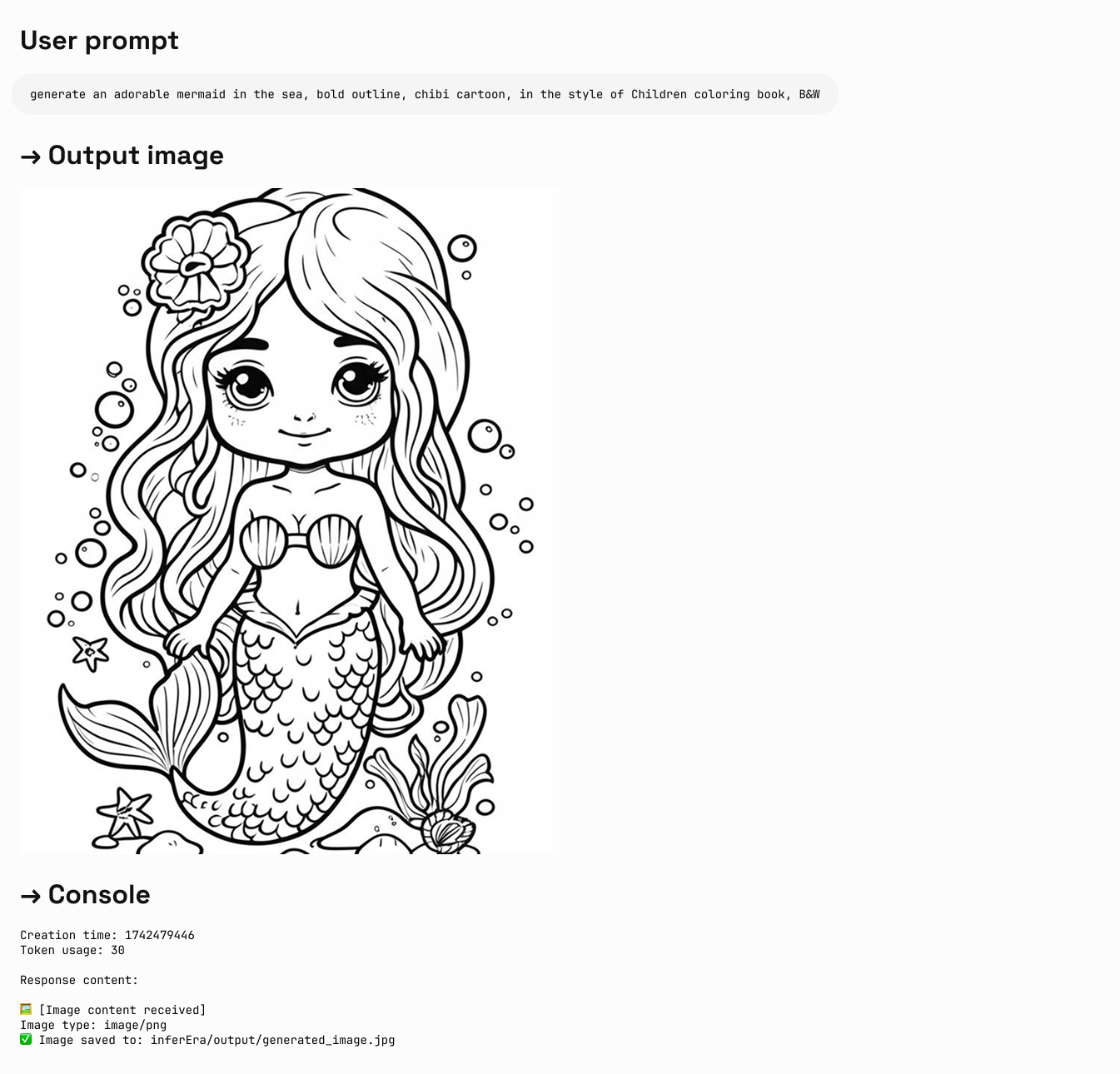
"text": "generate an adorable mermaid in the sea, bold outline, chibi cartoon, in the style of Children coloring book, B&W, HD",
}
],
},
],
modalities=["text", "image"],
temperature=0.7,
)
try:
# Print basic response information
print(f"Creation time: {response.created}")
print(f"Token usage: {response.usage.total_tokens}")
# Check if multi_mod_content field exists
if (
hasattr(response.choices[0].message, "multi_mod_content")
and response.choices[0].message.multi_mod_content is not None
):
print("\nResponse content:")
for part in response.choices[0].message.multi_mod_content:
if "text" in part and part["text"] is not None:
print(part["text"])
# Process image content
elif "inline_data" in part and part["inline_data"] is not None:
print("\n🖼️ [Image content received]")
image_data = base64.b64decode(part["inline_data"]["data"])
mime_type = part["inline_data"].get("mime_type", "image/png")
print(f"Image type: {mime_type}")
image = Image.open(BytesIO(image_data))
image.show()
# Save image
output_dir = os.path.join(os.path.dirname(os.path.abspath(__file__)), "output")
os.makedirs(output_dir, exist_ok=True)
output_path = os.path.join(output_dir, "generated_image.jpg")
image.save(output_path)
print(f"✅ Image saved to: {output_path}")
else:
print("No valid multimodal response received, check response structure")
except Exception as e:
print(f"Error processing response: {str(e)}")
```
**輸出實例:**
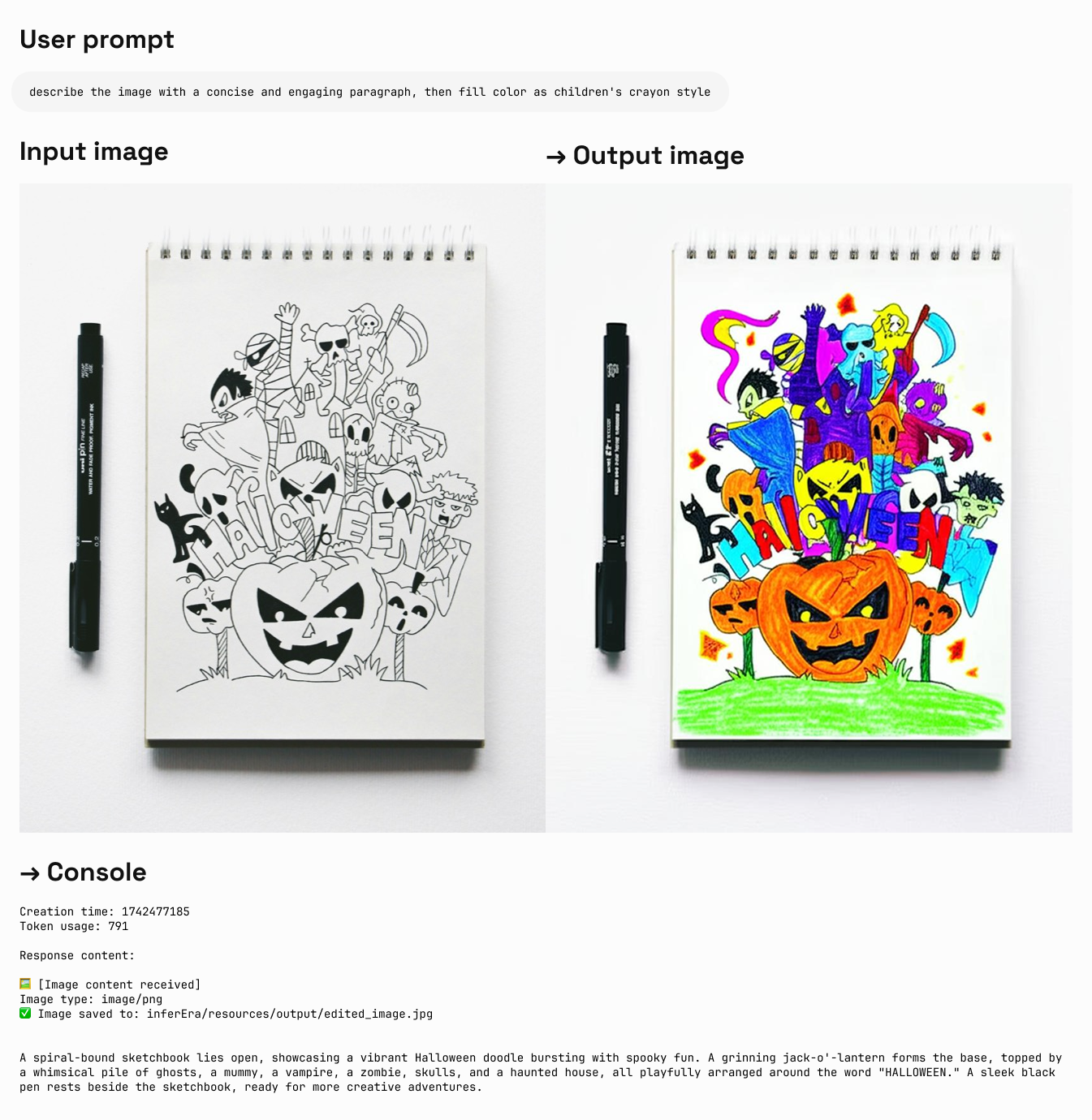 ### 圖片編輯
Iuput:text + image\
Output:text + image
```py Python theme={null}
import os
from openai import OpenAI
from PIL import Image
from io import BytesIO
import base64
client = OpenAI(
api_key="sk-***", # 換成你在 AiHubMix 生成的密鑰
base_url="https://aihubmix.com/v1",
)
project_root = os.path.dirname(os.path.dirname(os.path.abspath(__file__)))
image_path = os.path.join(os.path.dirname(os.path.abspath(__file__)), "resources", "filled.jpg")
if not os.path.exists(image_path):
raise FileNotFoundError(f"image {image_path} not exists")
def encode_image(image_path):
with open(image_path, "rb") as image_file:
return base64.b64encode(image_file.read()).decode("utf-8")
base64_image = encode_image(image_path)
response = client.chat.completions.create(
model="gemini-2.0-flash-preview-image-generation",
messages=[
{
"role": "user",
"content": [
{
"type": "text",
"text": "describe the image with a concise and engaging paragraph, then fill color as children's crayon style",
},
{
"type": "image_url",
"image_url": {"url": f"data:image/jpeg;base64,{base64_image}"},
},
],
},
],
modalities=["text", "image"],
temperature=0.7,
)
try:
# Print basic response information without base64 data
print(f"Creation time: {response.created}")
print(f"Token usage: {response.usage.total_tokens}")
# Check if multi_mod_content field exists
if (
hasattr(response.choices[0].message, "multi_mod_content")
and response.choices[0].message.multi_mod_content is not None
):
print("\nResponse content:")
for part in response.choices[0].message.multi_mod_content:
if "text" in part and part["text"] is not None:
print(part["text"])
# Process image content
elif "inline_data" in part and part["inline_data"] is not None:
print("\n🖼️ [Image content received]")
image_data = base64.b64decode(part["inline_data"]["data"])
mime_type = part["inline_data"].get("mime_type", "image/png")
print(f"Image type: {mime_type}")
image = Image.open(BytesIO(image_data))
image.show()
# Save image
output_dir = os.path.join(os.path.dirname(image_path), "output")
os.makedirs(output_dir, exist_ok=True)
output_path = os.path.join(output_dir, "edited_image.jpg")
image.save(output_path)
print(f"✅ Image saved to: {output_path}")
else:
print("No valid multimodal response received, check response structure")
except Exception as e:
print(f"Error processing response: {str(e)}")
```
**輸出實例:**
### 圖片編輯
Iuput:text + image\
Output:text + image
```py Python theme={null}
import os
from openai import OpenAI
from PIL import Image
from io import BytesIO
import base64
client = OpenAI(
api_key="sk-***", # 換成你在 AiHubMix 生成的密鑰
base_url="https://aihubmix.com/v1",
)
project_root = os.path.dirname(os.path.dirname(os.path.abspath(__file__)))
image_path = os.path.join(os.path.dirname(os.path.abspath(__file__)), "resources", "filled.jpg")
if not os.path.exists(image_path):
raise FileNotFoundError(f"image {image_path} not exists")
def encode_image(image_path):
with open(image_path, "rb") as image_file:
return base64.b64encode(image_file.read()).decode("utf-8")
base64_image = encode_image(image_path)
response = client.chat.completions.create(
model="gemini-2.0-flash-preview-image-generation",
messages=[
{
"role": "user",
"content": [
{
"type": "text",
"text": "describe the image with a concise and engaging paragraph, then fill color as children's crayon style",
},
{
"type": "image_url",
"image_url": {"url": f"data:image/jpeg;base64,{base64_image}"},
},
],
},
],
modalities=["text", "image"],
temperature=0.7,
)
try:
# Print basic response information without base64 data
print(f"Creation time: {response.created}")
print(f"Token usage: {response.usage.total_tokens}")
# Check if multi_mod_content field exists
if (
hasattr(response.choices[0].message, "multi_mod_content")
and response.choices[0].message.multi_mod_content is not None
):
print("\nResponse content:")
for part in response.choices[0].message.multi_mod_content:
if "text" in part and part["text"] is not None:
print(part["text"])
# Process image content
elif "inline_data" in part and part["inline_data"] is not None:
print("\n🖼️ [Image content received]")
image_data = base64.b64decode(part["inline_data"]["data"])
mime_type = part["inline_data"].get("mime_type", "image/png")
print(f"Image type: {mime_type}")
image = Image.open(BytesIO(image_data))
image.show()
# Save image
output_dir = os.path.join(os.path.dirname(image_path), "output")
os.makedirs(output_dir, exist_ok=True)
output_path = os.path.join(output_dir, "edited_image.jpg")
image.save(output_path)
print(f"✅ Image saved to: {output_path}")
else:
print("No valid multimodal response received, check response structure")
except Exception as e:
print(f"Error processing response: {str(e)}")
```
**輸出實例:**
 ## 選擇正確的繪圖模型
### 選擇 Gemini 的情況:
* 需要利用世界知識和推理能力生成上下文相關的圖像。
* 需要無縫混合文字和圖像。
* 希望在長文字序列中嵌入準確的視覺內容。
* 希望在保持上下文的同時以對話方式編輯圖像。
### 選擇 Imagen 的情況:
* 圖像質量、照片真實感、藝術細節或特定風格(如印象派、動漫)是首要考慮因素。
* 執行專業編輯任務,如產品背景更新或圖像放大。
* 注入品牌、風格或生成標誌和產品設計。
### 最佳實踐
1. **優化提示詞**:精心設計提示詞,這是獲得高品質輸出的關鍵。
2. **實驗參數**:嘗試不同的寬高比和設置,找到最適合您需求的配置。
3. **批量生成**:生成多張圖像以增加獲得理想結果的機會。
4. **保存元數據**:將提示詞和時間戳與圖像一起保存,以便追踪和複製成功的結果。
5. **遵守使用政策**:確保您的使用符合 Google 的內容政策和使用條款。
## Veo 3.0 影片生成
VEO 3.0 是由 Google DeepMind 開發的最新先進影片生成模型。使用 [VEO 3.0](https://aihubmix.com/models?model=veo-3.0-generate-preview),您可以生成具有以下特點的影片:
* 從文字和圖像提示中生成的質量提升
* 語音,例如對話和配音
* 音頻,例如音樂和聲音效果
1. 目前 VEO 3.0 僅支援英文提示詞(prompt),整合時建議增加自動翻譯
2. 影片通常在幾分鐘內生成完成,但高峰期可能需要更長時間
3. 目前不支援用圖片進行對話生成的影片
### 已知限制
目前 VEO 3.0 的參數固定,無法更改:
* **分辨率**: 720p(橫屏)
* **幀率**: 24fps
* **影片長度**: 8秒
### 費率
使用 VEO 3.0 API 的費用是 **\$0.675/秒**(Aihubmix 提供 10% 限時優惠)
### 調用示例
VEO 3.0 目前僅支援 curl 命令調用,採用兩步處理方式:
其中:`sk-***` 換成你在 AiHubMix 生成的密鑰。
```shell 步驟 1:發起生成請求 theme={null}
curl "https://aihubmix.com/gemini/v1beta/models/veo-3.0-generate-preview:predictLongRunning?key=sk-***" \
-H "Content-Type: application/json" \
-X "POST" \
-d '{
"instances":
[
{
"prompt": "A cat playing with a ball"
}
],
"parameters":
{
"numberOfVideos": 1,
"durationSeconds": 8,
"aspectRatio": "16:9",
"personGeneration": "dont_allow"
}
}'
```
```shell 步驟 2:獲取生成結果 theme={null}
# 使用步驟 1 返回的 name 字段中的操作ID
curl "https://aihubmix.com/gemini/v1beta/models/veo-3.0-generate-preview/operations/ff5***?key=sk-***"
```
```py 影片提取腳本 theme={null}
import json
import base64
# 1. 讀入響應 JSON 文件
with open('yourpath/response.json', 'r') as f:
data = json.load(f)
# 2. 獲取 base64 編碼的影片字符串
b64_str = data['response']['videos'][0]['bytesBase64Encoded']
# 3. 解碼並寫入 mp4 文件
with open('output.mp4', 'wb') as f:
f.write(base64.b64decode(b64_str))
print("影片已保存為 output.mp4")
```
### 返回示例
**步驟 1 返回:**
```json theme={null}
{
"name": "models/veo-3.0-generate-preview/operations/ff5***"
}
```
**步驟 2 返回(生成完成):**
```json theme={null}
{
"name": "projects/ahm-gemini-03/locations/us-central1/publishers/google/models/veo-3.0-generate-preview/operations/ff5***",
"done": true,
"response": {
"@type": "type.googleapis.com/cloud.ai.large_models.vision.GenerateVideoResponse",
"raiMediaFilteredCount": 0,
"videos": [
{
"bytesBase64Encoded": "AAA...2xl",
"mimeType": "video/mp4"
}
]
}
}
```
**步驟 2 返回(仍在處理中):**
```json theme={null}
{
"name": "projects/ahm-gemini-03/locations/us-central1/publishers/google/models/veo-3.0-generate-preview/operations/777***"
}
```
如果收到處理中的返回,請稍等幾分鐘後重新發送步驟 2 的請求。
**影片效果:**
### 最佳實踐
1. **耐心等待**:影片生成通常需要幾分鐘,高峰期可能更長
2. **檢查狀態**:如果返回中沒有 `done: true`,說明仍在處理中
3. **保存操作 ID**:確保保存步驟 1 返回的操作 ID 用於後續查詢
4. **遵守使用政策**:確保您的使用符合 Google 的內容政策和使用條款
更多信息請參考 [Vertex AI 官方文件](https://cloud.google.com/vertex-ai/generative-ai/docs/video/generate-videos)
## Veo 2.0 影片生成
VEO 2.0 是 Google 推出的先進影片生成 AI 模型,能夠根據文字提示創建高品質、逼真的短影片。下面的指南將幫助您了解如何使用 VEO 2.0 API 生成影片,包括參數設置、模型選擇和程式碼範例。
1. 目前 VEO 2.0 僅支援英文提示詞(prompt),整合時建議增加自動翻譯,讓使用者能夠無障礙使用
2. 生成影片需要耗時 2-3 分鐘,請耐心等待
### 模型參數
VEO 2.0 提供以下參數:
* **numberOfVideos**: 要生成的影片數量,可選 1 或 2。默認值為 2。
* **aspectRatio**: 生成影片的寬高比。支援的值有 "16:9" 和 "9:16"。
* **durationSeconds**: 影片時長,可選 5 秒或 8 秒。默認值為 8 秒。
* **personGeneration**: 控制是否允許生成含人物的影片。支援以下值:
* "dont\_allow": 阻止生成含人物的影片。
* "allow\_adult": 允許生成含成人的影片,但不生成兒童影片。
### 費率
使用 VEO 2.0 API 的費用是 \$0.35/秒
### 調用示例
以下是使用 VEO 2.0 生成影片的 Python 調用示例:
```py 文生影片 theme={null}
import os
import time
from google import genai
from google.genai import types
client = genai.Client(
api_key="sk-***", # 換成你在 AiHubMix 生成的密鑰
http_options={"base_url": "https://aihubmix.com/gemini"},
)
operation = client.models.generate_videos(
model="veo-2.0-generate-001",
prompt="Panning wide shot of a calico kitten sleeping in the sunshine",
config=types.GenerateVideosConfig(
person_generation="dont_allow", # "dont_allow" 或 "allow_adult"
aspect_ratio="16:9", # "16:9" 或 "9:16"
number_of_videos=1, # 整數,可選 1、2,默認 2
durationSeconds=5, # 整數,可選 5、8,默認 8
),
)
# 耗時 2-3 分鐘,影片時長 5-8s
while not operation.done:
time.sleep(20)
operation = client.operations.get(operation)
for n, generated_video in enumerate(operation.response.generated_videos):
client.files.download(file=generated_video.video)
generated_video.video.save(f"video{n}.mp4") # 保存影片
```
```py 參考圖驅動 theme={null}
import os
import time
from google import genai
from google.genai import types
def load_image(path):
with open(path, "rb") as image_file:
return image_file.read()
client = genai.Client(
api_key="sk-***", # 換成你在 AiHubMix 生成的密鑰
http_options={"base_url": "https://aihubmix.com/gemini"},
)
operation = client.models.generate_videos(
model="veo-2.0-generate-001",
prompt="The waves in the background keep flowing",
image=types.Image(
mime_type="image/png",
image_bytes=load_image("img/inferbanner.png") # 使用你的圖片路徑
),
config=types.GenerateVideosConfig(
person_generation="dont_allow",
aspect_ratio="16:9",
numberOfVideos=1,
durationSeconds=5,
),
)
while not operation.done:
time.sleep(20)
operation = client.operations.get(operation)
for n, generated_video in enumerate(operation.response.generated_videos):
client.files.download(file=generated_video.video)
generated_video.video.save(f"video{n}.mp4")
```
### 提示詞技巧
創建有效的提示詞對於獲得理想的影片至關重要:
* 描述清晰的場景、動作和氛圍
* 指定拍攝風格(如全景、特寫、跟隨鏡頭等)
* 描述光照條件(如陽光明媚、黃昏、室內燈光等)
* 指明主體對象及其動作(如"貓咪在陽光下睡覺")
* 避免過於複雜的叙事或快速變化的場景
* 避免負面或違禁內容
### 最佳實踐
1. **簡潔明瞭的提示詞**:使用清晰、具體的描述來指導影片生成。
2. **耐心等待**:影片生成需要 2-3 分鐘,請耐心等待完成。
3. **測試不同參數**:嘗試不同的寬高比和時長,找到最適合您需求的設置。
4. **保存生成記錄**:將提示詞與生成的影片一起記錄,以便追踪成功的結果。
5. **遵守使用政策**:確保您的使用符合 Google 的內容政策和使用條款。
***
最後更新:2026-06-01
## 選擇正確的繪圖模型
### 選擇 Gemini 的情況:
* 需要利用世界知識和推理能力生成上下文相關的圖像。
* 需要無縫混合文字和圖像。
* 希望在長文字序列中嵌入準確的視覺內容。
* 希望在保持上下文的同時以對話方式編輯圖像。
### 選擇 Imagen 的情況:
* 圖像質量、照片真實感、藝術細節或特定風格(如印象派、動漫)是首要考慮因素。
* 執行專業編輯任務,如產品背景更新或圖像放大。
* 注入品牌、風格或生成標誌和產品設計。
### 最佳實踐
1. **優化提示詞**:精心設計提示詞,這是獲得高品質輸出的關鍵。
2. **實驗參數**:嘗試不同的寬高比和設置,找到最適合您需求的配置。
3. **批量生成**:生成多張圖像以增加獲得理想結果的機會。
4. **保存元數據**:將提示詞和時間戳與圖像一起保存,以便追踪和複製成功的結果。
5. **遵守使用政策**:確保您的使用符合 Google 的內容政策和使用條款。
## Veo 3.0 影片生成
VEO 3.0 是由 Google DeepMind 開發的最新先進影片生成模型。使用 [VEO 3.0](https://aihubmix.com/models?model=veo-3.0-generate-preview),您可以生成具有以下特點的影片:
* 從文字和圖像提示中生成的質量提升
* 語音,例如對話和配音
* 音頻,例如音樂和聲音效果
1. 目前 VEO 3.0 僅支援英文提示詞(prompt),整合時建議增加自動翻譯
2. 影片通常在幾分鐘內生成完成,但高峰期可能需要更長時間
3. 目前不支援用圖片進行對話生成的影片
### 已知限制
目前 VEO 3.0 的參數固定,無法更改:
* **分辨率**: 720p(橫屏)
* **幀率**: 24fps
* **影片長度**: 8秒
### 費率
使用 VEO 3.0 API 的費用是 **\$0.675/秒**(Aihubmix 提供 10% 限時優惠)
### 調用示例
VEO 3.0 目前僅支援 curl 命令調用,採用兩步處理方式:
其中:`sk-***` 換成你在 AiHubMix 生成的密鑰。
```shell 步驟 1:發起生成請求 theme={null}
curl "https://aihubmix.com/gemini/v1beta/models/veo-3.0-generate-preview:predictLongRunning?key=sk-***" \
-H "Content-Type: application/json" \
-X "POST" \
-d '{
"instances":
[
{
"prompt": "A cat playing with a ball"
}
],
"parameters":
{
"numberOfVideos": 1,
"durationSeconds": 8,
"aspectRatio": "16:9",
"personGeneration": "dont_allow"
}
}'
```
```shell 步驟 2:獲取生成結果 theme={null}
# 使用步驟 1 返回的 name 字段中的操作ID
curl "https://aihubmix.com/gemini/v1beta/models/veo-3.0-generate-preview/operations/ff5***?key=sk-***"
```
```py 影片提取腳本 theme={null}
import json
import base64
# 1. 讀入響應 JSON 文件
with open('yourpath/response.json', 'r') as f:
data = json.load(f)
# 2. 獲取 base64 編碼的影片字符串
b64_str = data['response']['videos'][0]['bytesBase64Encoded']
# 3. 解碼並寫入 mp4 文件
with open('output.mp4', 'wb') as f:
f.write(base64.b64decode(b64_str))
print("影片已保存為 output.mp4")
```
### 返回示例
**步驟 1 返回:**
```json theme={null}
{
"name": "models/veo-3.0-generate-preview/operations/ff5***"
}
```
**步驟 2 返回(生成完成):**
```json theme={null}
{
"name": "projects/ahm-gemini-03/locations/us-central1/publishers/google/models/veo-3.0-generate-preview/operations/ff5***",
"done": true,
"response": {
"@type": "type.googleapis.com/cloud.ai.large_models.vision.GenerateVideoResponse",
"raiMediaFilteredCount": 0,
"videos": [
{
"bytesBase64Encoded": "AAA...2xl",
"mimeType": "video/mp4"
}
]
}
}
```
**步驟 2 返回(仍在處理中):**
```json theme={null}
{
"name": "projects/ahm-gemini-03/locations/us-central1/publishers/google/models/veo-3.0-generate-preview/operations/777***"
}
```
如果收到處理中的返回,請稍等幾分鐘後重新發送步驟 2 的請求。
**影片效果:**
### 最佳實踐
1. **耐心等待**:影片生成通常需要幾分鐘,高峰期可能更長
2. **檢查狀態**:如果返回中沒有 `done: true`,說明仍在處理中
3. **保存操作 ID**:確保保存步驟 1 返回的操作 ID 用於後續查詢
4. **遵守使用政策**:確保您的使用符合 Google 的內容政策和使用條款
更多信息請參考 [Vertex AI 官方文件](https://cloud.google.com/vertex-ai/generative-ai/docs/video/generate-videos)
## Veo 2.0 影片生成
VEO 2.0 是 Google 推出的先進影片生成 AI 模型,能夠根據文字提示創建高品質、逼真的短影片。下面的指南將幫助您了解如何使用 VEO 2.0 API 生成影片,包括參數設置、模型選擇和程式碼範例。
1. 目前 VEO 2.0 僅支援英文提示詞(prompt),整合時建議增加自動翻譯,讓使用者能夠無障礙使用
2. 生成影片需要耗時 2-3 分鐘,請耐心等待
### 模型參數
VEO 2.0 提供以下參數:
* **numberOfVideos**: 要生成的影片數量,可選 1 或 2。默認值為 2。
* **aspectRatio**: 生成影片的寬高比。支援的值有 "16:9" 和 "9:16"。
* **durationSeconds**: 影片時長,可選 5 秒或 8 秒。默認值為 8 秒。
* **personGeneration**: 控制是否允許生成含人物的影片。支援以下值:
* "dont\_allow": 阻止生成含人物的影片。
* "allow\_adult": 允許生成含成人的影片,但不生成兒童影片。
### 費率
使用 VEO 2.0 API 的費用是 \$0.35/秒
### 調用示例
以下是使用 VEO 2.0 生成影片的 Python 調用示例:
```py 文生影片 theme={null}
import os
import time
from google import genai
from google.genai import types
client = genai.Client(
api_key="sk-***", # 換成你在 AiHubMix 生成的密鑰
http_options={"base_url": "https://aihubmix.com/gemini"},
)
operation = client.models.generate_videos(
model="veo-2.0-generate-001",
prompt="Panning wide shot of a calico kitten sleeping in the sunshine",
config=types.GenerateVideosConfig(
person_generation="dont_allow", # "dont_allow" 或 "allow_adult"
aspect_ratio="16:9", # "16:9" 或 "9:16"
number_of_videos=1, # 整數,可選 1、2,默認 2
durationSeconds=5, # 整數,可選 5、8,默認 8
),
)
# 耗時 2-3 分鐘,影片時長 5-8s
while not operation.done:
time.sleep(20)
operation = client.operations.get(operation)
for n, generated_video in enumerate(operation.response.generated_videos):
client.files.download(file=generated_video.video)
generated_video.video.save(f"video{n}.mp4") # 保存影片
```
```py 參考圖驅動 theme={null}
import os
import time
from google import genai
from google.genai import types
def load_image(path):
with open(path, "rb") as image_file:
return image_file.read()
client = genai.Client(
api_key="sk-***", # 換成你在 AiHubMix 生成的密鑰
http_options={"base_url": "https://aihubmix.com/gemini"},
)
operation = client.models.generate_videos(
model="veo-2.0-generate-001",
prompt="The waves in the background keep flowing",
image=types.Image(
mime_type="image/png",
image_bytes=load_image("img/inferbanner.png") # 使用你的圖片路徑
),
config=types.GenerateVideosConfig(
person_generation="dont_allow",
aspect_ratio="16:9",
numberOfVideos=1,
durationSeconds=5,
),
)
while not operation.done:
time.sleep(20)
operation = client.operations.get(operation)
for n, generated_video in enumerate(operation.response.generated_videos):
client.files.download(file=generated_video.video)
generated_video.video.save(f"video{n}.mp4")
```
### 提示詞技巧
創建有效的提示詞對於獲得理想的影片至關重要:
* 描述清晰的場景、動作和氛圍
* 指定拍攝風格(如全景、特寫、跟隨鏡頭等)
* 描述光照條件(如陽光明媚、黃昏、室內燈光等)
* 指明主體對象及其動作(如"貓咪在陽光下睡覺")
* 避免過於複雜的叙事或快速變化的場景
* 避免負面或違禁內容
### 最佳實踐
1. **簡潔明瞭的提示詞**:使用清晰、具體的描述來指導影片生成。
2. **耐心等待**:影片生成需要 2-3 分鐘,請耐心等待完成。
3. **測試不同參數**:嘗試不同的寬高比和時長,找到最適合您需求的設置。
4. **保存生成記錄**:將提示詞與生成的影片一起記錄,以便追踪成功的結果。
5. **遵守使用政策**:確保您的使用符合 Google 的內容政策和使用條款。
***
最後更新:2026-06-01