> ## Documentation Index
> Fetch the complete documentation index at: https://docs.aihubmix.com/llms.txt
> Use this file to discover all available pages before exploring further.
# LiteLLM
## LiteLLM Overview
LiteLLM is an open-source **unified AI gateway** developed by [BerriAI](https://github.com/BerriAI/litellm). It provides a single standardized interface to call almost every major LLM on the market. Repository: [https://github.com/BerriAI/litellm](https://github.com/BerriAI/litellm)
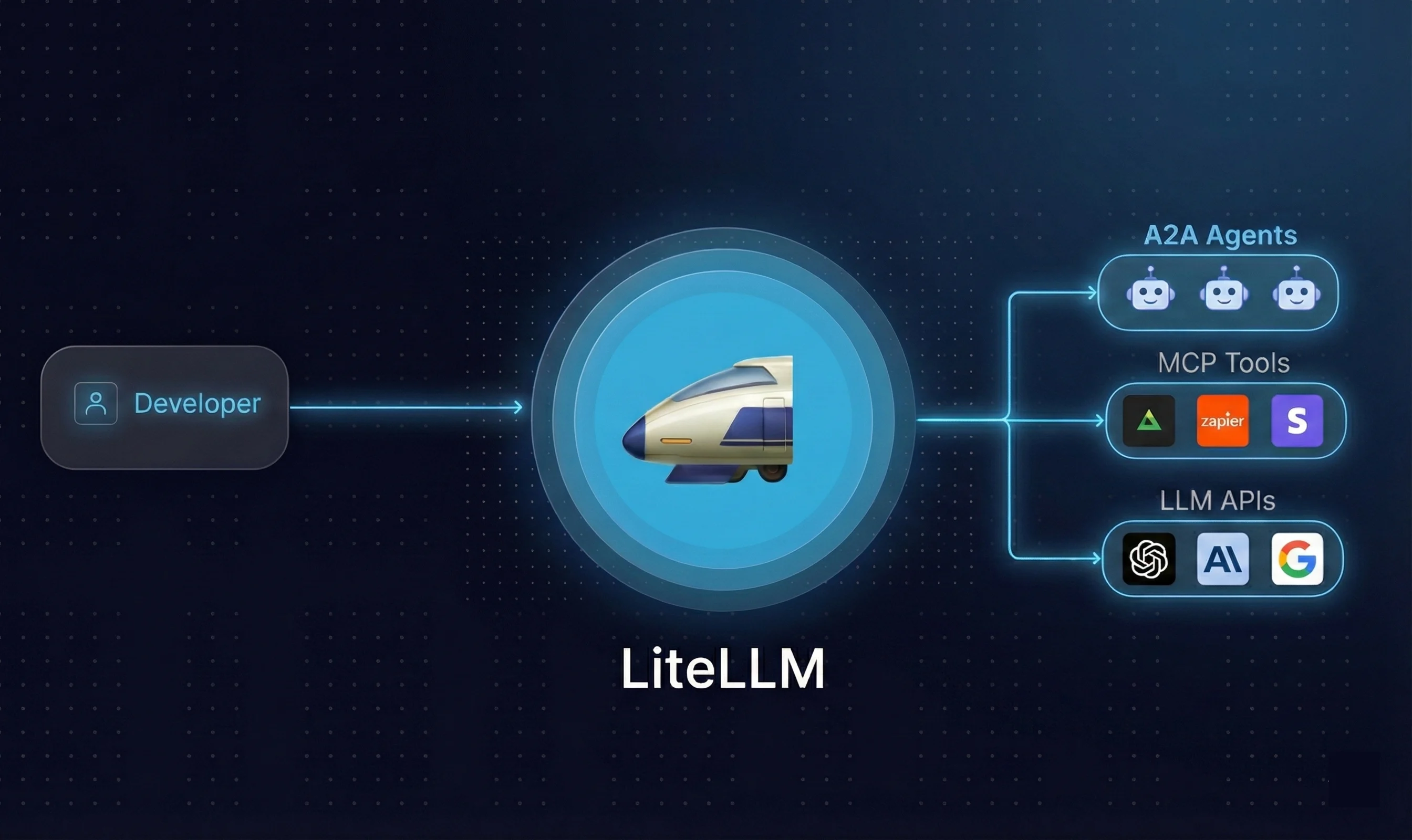 Every LLM provider ships its own SDK and API format — OpenAI, Anthropic, and Google all differ. Switching models or using multiple models at once means maintaining separate codebases. LiteLLM solves this: **write once, change one parameter, call any model**.
### Two Usage Modes
| Mode | Description | Best For |
| :--------------- | :------------------------------------------- | :-------------------------------------- |
| **Python SDK** | `pip install litellm`, call directly in code | Personal projects, rapid prototyping |
| **Proxy Server** | Standalone deployable AI gateway | Team sharing, enterprise access control |
### Core Capabilities
* **Unified OpenAI format**: suporta 100+ providers including OpenAI, Anthropic, Gemini, Bedrock, Azure, and more
* **Virtual key management**: centrally manage team chave de APIs without exposing the originals
* **Cost tracking**: monitor token usage and spend per user or project
* **Load balancing**: automatic traffic distribution across models with failover support
* **High performance**: P95 latency of \~8ms at 1,000 RPS
***
## Instalação
### Requirements
Python 3.8+
**macOS**
Install via [Homebrew](https://brew.sh/):
```bash theme={null}
brew install python
```
Verify:
```bash theme={null}
python3 --version
```
**Windows**
Download the installer from [python.org/downloads](https://www.python.org/downloads/). During installation, check **"Add Python to PATH"**.
Verify:
```bash theme={null}
python --version
```
**Linux (Ubuntu/Debian)**
```bash theme={null}
sudo apt update
sudo apt install python3 python3-pip
```
### pip
pip is usually bundled with Python. Verify it is available:
```bash theme={null}
pip --version
# or
pip3 --version
```
If not found, install manually:
```bash theme={null}
# Universal method
python3 -m ensurepip --upgrade
# Ubuntu/Debian
sudo apt install python3-pip
# Upgrade to latest
pip install --upgrade pip
```
### Install LiteLLM
Once your environment is ready:
```bash theme={null}
python3 -m pip install litellm
```
Verify the installation:
```bash theme={null}
python3 -m pip show litellm
```
### Optional Dependencies
Some providers require additional packages:
```bash theme={null}
# AWS Bedrock
pip install litellm[bedrock]
# Google Vertex AI
pip install litellm[vertex]
# All dependencies (not recommended for production)
pip install litellm[all]
```
### Install Proxy Server
To deploy a standalone gateway:
```bash theme={null}
pip install 'litellm[proxy]'
```
### Docker (Optional)
```bash theme={null}
docker pull ghcr.io/berriai/litellm:main-latest
```
> **Recommendation**: use `pip install litellm` for personal development; escolha Proxy + Docker for team deployments.
***
## Configure chave de API and Make Your First Call
### Get Your AiHubMix chave de API
Go to the [aihubmix.com](https://aihubmix.com) dashboard and create an chave de API.
### Defina o Environment Variable
```bash theme={null}
export AIHUBMIX_API_KEY="your-aihubmix-key"
```
### First Call
```python theme={null}
import os
from litellm import completion
response = completion(
model="openai/gpt-4o-mini",
api_base="https://aihubmix.com/v1",
api_key=os.environ.get("AIHUBMIX_API_KEY"),
messages=[{"role": "user", "content": "Hello, introduce yourself"}]
)
print(response.choices[0].message.content)
```
***
## Basic Usage
### 1. Switching Models
AiHubMix suporta all major models. Switching only requires changing the `model` parameter:
```python theme={null}
import os
from litellm import completion
response = completion(
model="openai/claude-sonnet-4-6", # change this
api_base="https://aihubmix.com/v1",
api_key=os.environ.get("AIHUBMIX_API_KEY"),
messages=[{"role": "user", "content": "Hello, introduce yourself"}]
)
print(response.choices[0].message.content)
```
***
### 2. Streaming
Add `stream=True` to receive output token by token:
```python theme={null}
import os
from litellm import completion
response = completion(
model="openai/claude-sonnet-4-6",
api_base="https://aihubmix.com/v1",
api_key=os.environ.get("AIHUBMIX_API_KEY"),
messages=[{"role": "user", "content": "Explain Python in 100 words"}],
stream=True
)
for chunk in response:
print(chunk.choices[0].delta.content or "", end="", flush=True)
print()
```
***
### 3. Multi-Turn Conversation
Pass the conversation history no `messages` list so the model remembers context:
```python theme={null}
import os
from litellm import completion
messages = [
{"role": "user", "content": "My name is Alex"},
{"role": "assistant", "content": "Hello, Alex!"},
{"role": "user", "content": "What is my name?"}
]
response = completion(
model="openai/claude-sonnet-4-6",
api_base="https://aihubmix.com/v1",
api_key=os.environ.get("AIHUBMIX_API_KEY"),
messages=messages
)
print(response.choices[0].message.content)
```
***
### 4. Async Calls
Send multiple requests concurrently without waiting for each to finish:
```python theme={null}
import os
import asyncio
from litellm import acompletion
async def ask(question):
response = await acompletion(
model="openai/claude-sonnet-4-6",
api_base="https://aihubmix.com/v1",
api_key=os.environ.get("AIHUBMIX_API_KEY"),
messages=[{"role": "user", "content": question}]
)
return response.choices[0].message.content
async def main():
questions = [
"What color is an apple?",
"What color is the sky?",
"What color is grass?"
]
results = await asyncio.gather(*[ask(q) for q in questions])
for q, r in zip(questions, results):
print(f"Q: {q}")
print(f"A: {r}")
print()
asyncio.run(main())
```
***
### 5. Timeout and Retry
Prevent requests from hanging or failing due to network issues:
```python theme={null}
import os
from litellm import completion
response = completion(
model="openai/claude-sonnet-4-6",
api_base="https://aihubmix.com/v1",
api_key=os.environ.get("AIHUBMIX_API_KEY"),
messages=[{"role": "user", "content": "Hello"}],
timeout=10, # raise an error after 10 seconds
num_retries=3 # retry up to 3 times on failure
)
print(response.choices[0].message.content)
```
> `timeout` is in seconds. Set `num_retries` to 2-3; higher values slow down responses.
***
### 6. Token Usage and Cost Tracking
Every response includes token usage data:
```python theme={null}
import os
from litellm import completion
response = completion(
model="openai/claude-sonnet-4-6",
api_base="https://aihubmix.com/v1",
api_key=os.environ.get("AIHUBMIX_API_KEY"),
messages=[{"role": "user", "content": "Explain Python in 100 words"}]
)
print(response.choices[0].message.content)
print()
print("Token usage:")
print(f" Input: {response.usage.prompt_tokens}")
print(f" Output: {response.usage.completion_tokens}")
print(f" Total: {response.usage.total_tokens}")
```
Track cost per call:
```python theme={null}
import os
from litellm import completion, completion_cost
response = completion(
model="openai/claude-sonnet-4-6",
api_base="https://aihubmix.com/v1",
api_key=os.environ.get("AIHUBMIX_API_KEY"),
messages=[{"role": "user", "content": "Explain Python in 100 words"}]
)
cost = completion_cost(completion_response=response)
print(f"Cost: ${cost:.6f}")
```
***
### 7. Load Balancing and Failover
Configure multiple models to automatically distribute traffic or switch to a backup when one fails:
```python theme={null}
import os
from litellm import Router
router = Router(
model_list=[
{
"model_name": "my-model",
"litellm_params": {
"model": "openai/claude-sonnet-4-6",
"api_base": "https://aihubmix.com/v1",
"api_key": os.environ.get("AIHUBMIX_API_KEY"),
}
},
{
"model_name": "my-model",
"litellm_params": {
"model": "openai/gpt-4o",
"api_base": "https://aihubmix.com/v1",
"api_key": os.environ.get("AIHUBMIX_API_KEY"),
}
}
]
)
response = router.completion(
model="my-model",
messages=[{"role": "user", "content": "Hello"}]
)
print(response.choices[0].message.content)
```
> Both models share the same `model_name`. LiteLLM round-robins between them and automatically fails over if one returns an error.
***
### 8. Deploy Proxy Server
The Proxy Server is a standalone gateway. Team members route all requests through it without needing their own chave de APIs.
**Install**
```bash theme={null}
python3 -m pip install 'litellm[proxy]'
```
**Create config.yaml**
```yaml theme={null}
model_list:
- model_name: gpt-4o
litellm_params:
model: openai/gpt-4o
api_base: https://aihubmix.com/v1
api_key: os.environ/AIHUBMIX_API_KEY
- model_name: claude-sonnet
litellm_params:
model: openai/claude-sonnet-4-6
api_base: https://aihubmix.com/v1
api_key: os.environ/AIHUBMIX_API_KEY
- model_name: gemini-flash
litellm_params:
model: openai/gemini-2.0-flash
api_base: https://aihubmix.com/v1
api_key: os.environ/AIHUBMIX_API_KEY
```
**Start the server**
```bash theme={null}
litellm --config config.yaml --port 4000
```
A successful start shows:
```text theme={null}
LiteLLM: Proxy running on http://0.0.0.0:4000
```
**Call the local server**
```python theme={null}
import os
from litellm import completion
response = completion(
model="gpt-4o",
api_base="http://localhost:4000",
api_key="any-string",
messages=[{"role": "user", "content": "Hello"}]
)
print(response.choices[0].message.content)
```
> The `api_key` here can be any string. The real AiHubMix key is managed by the Proxy.
***
### 9. Virtual Key Management
Virtual keys let you assign independent keys to different team members or projects, controlling access and usage without exposing the real AiHubMix key.
**Prerequisites: start a PostgreSQL instance**
```bash theme={null}
docker run -d \
--name litellm-db \
-e POSTGRES_USER=litellm \
-e POSTGRES_PASSWORD=litellm \
-e POSTGRES_DB=litellm \
-p 5432:5432 \
postgres
```
**Update config.yaml**
```yaml theme={null}
model_list:
- model_name: gpt-4o
litellm_params:
model: openai/gpt-4o
api_base: https://aihubmix.com/v1
api_key: os.environ/AIHUBMIX_API_KEY
- model_name: claude-sonnet
litellm_params:
model: openai/claude-sonnet-4-6
api_base: https://aihubmix.com/v1
api_key: os.environ/AIHUBMIX_API_KEY
general_settings:
master_key: sk-my-master-key
database_url: postgresql://litellm:litellm@localhost:5432/litellm
```
**Restart the server**
```bash theme={null}
litellm --config config.yaml --port 4000
```
**Create a virtual key**
```bash theme={null}
curl -X POST http://localhost:4000/key/generate \
-H "Authorization: Bearer sk-my-master-key" \
-H "Content-Type: application/json" \
-d '{
"key_alias": "team-a",
"max_budget": 10,
"models": ["gpt-4o", "claude-sonnet"]
}'
```
The `key` field no response is the virtual key, e.g. `sk-xxxxxx`.
**Use the virtual key**
```python theme={null}
from litellm import completion
response = completion(
model="claude-sonnet",
api_base="http://localhost:4000",
api_key="sk-xxxxxx",
messages=[{"role": "user", "content": "Hello"}]
)
print(response.choices[0].message.content)
```
**Check usage**
```bash theme={null}
curl http://localhost:4000/key/info \
-H "Authorization: Bearer sk-my-master-key" \
-H "Content-Type: application/json" \
-d '{"key": "sk-xxxxxx"}'
```
> Each virtual key suporta individual model restrictions, budget limits, and expiry times — ideal for multi-member team workflows.
***
## Practical Example: Multi-Model Comparison
Send the same question to multiple models simultaneously and compare output quality, speed, and token usage.
**Set chave de API**
```bash theme={null}
export AIHUBMIX_API_KEY="your-key"
```
**Run the comparison**
```python theme={null}
import os
import time
import asyncio
from litellm import acompletion
MODELS = [
"gpt-5.5",
"claude-opus-4-7",
"deepseek-v4-flash",
"coding-glm-5.1-free",
]
QUESTION = "If you could give a programmer only one piece of advice, what would it be?"
async def ask_model(model, question):
start = time.time()
try:
response = await acompletion(
model=f"openai/{model}",
api_base="https://aihubmix.com/v1",
api_key=os.environ.get("AIHUBMIX_API_KEY"),
messages=[{"role": "user", "content": question}]
)
return {
"model": model,
"answer": response.choices[0].message.content.strip(),
"tokens": response.usage.total_tokens,
"time": round(time.time() - start, 2),
"error": None
}
except Exception as e:
return {
"model": model,
"answer": None,
"tokens": 0,
"time": round(time.time() - start, 2),
"error": str(e)
}
async def main():
print(f"Question: {QUESTION}")
print("=" * 60)
tasks = [ask_model(m, QUESTION) for m in MODELS]
results = await asyncio.gather(*tasks)
for r in results:
print(f"\nModel: {r['model']}")
print(f"Time: {r['time']}s | Tokens: {r['tokens']}")
print("-" * 40)
if r["error"]:
print(f"Error: {r['error']}")
else:
print(r["answer"])
print("\n" + "=" * 60)
print(f"{'Model':<30} {'Time':>8} {'Tokens':>8}")
print("-" * 50)
for r in sorted(results, key=lambda x: x["time"]):
status = f"{r['time']}s" if not r["error"] else "failed"
print(f"{r['model']:<30} {status:>8} {r['tokens']:>8}")
asyncio.run(main())
```
Every LLM provider ships its own SDK and API format — OpenAI, Anthropic, and Google all differ. Switching models or using multiple models at once means maintaining separate codebases. LiteLLM solves this: **write once, change one parameter, call any model**.
### Two Usage Modes
| Mode | Description | Best For |
| :--------------- | :------------------------------------------- | :-------------------------------------- |
| **Python SDK** | `pip install litellm`, call directly in code | Personal projects, rapid prototyping |
| **Proxy Server** | Standalone deployable AI gateway | Team sharing, enterprise access control |
### Core Capabilities
* **Unified OpenAI format**: suporta 100+ providers including OpenAI, Anthropic, Gemini, Bedrock, Azure, and more
* **Virtual key management**: centrally manage team chave de APIs without exposing the originals
* **Cost tracking**: monitor token usage and spend per user or project
* **Load balancing**: automatic traffic distribution across models with failover support
* **High performance**: P95 latency of \~8ms at 1,000 RPS
***
## Instalação
### Requirements
Python 3.8+
**macOS**
Install via [Homebrew](https://brew.sh/):
```bash theme={null}
brew install python
```
Verify:
```bash theme={null}
python3 --version
```
**Windows**
Download the installer from [python.org/downloads](https://www.python.org/downloads/). During installation, check **"Add Python to PATH"**.
Verify:
```bash theme={null}
python --version
```
**Linux (Ubuntu/Debian)**
```bash theme={null}
sudo apt update
sudo apt install python3 python3-pip
```
### pip
pip is usually bundled with Python. Verify it is available:
```bash theme={null}
pip --version
# or
pip3 --version
```
If not found, install manually:
```bash theme={null}
# Universal method
python3 -m ensurepip --upgrade
# Ubuntu/Debian
sudo apt install python3-pip
# Upgrade to latest
pip install --upgrade pip
```
### Install LiteLLM
Once your environment is ready:
```bash theme={null}
python3 -m pip install litellm
```
Verify the installation:
```bash theme={null}
python3 -m pip show litellm
```
### Optional Dependencies
Some providers require additional packages:
```bash theme={null}
# AWS Bedrock
pip install litellm[bedrock]
# Google Vertex AI
pip install litellm[vertex]
# All dependencies (not recommended for production)
pip install litellm[all]
```
### Install Proxy Server
To deploy a standalone gateway:
```bash theme={null}
pip install 'litellm[proxy]'
```
### Docker (Optional)
```bash theme={null}
docker pull ghcr.io/berriai/litellm:main-latest
```
> **Recommendation**: use `pip install litellm` for personal development; escolha Proxy + Docker for team deployments.
***
## Configure chave de API and Make Your First Call
### Get Your AiHubMix chave de API
Go to the [aihubmix.com](https://aihubmix.com) dashboard and create an chave de API.
### Defina o Environment Variable
```bash theme={null}
export AIHUBMIX_API_KEY="your-aihubmix-key"
```
### First Call
```python theme={null}
import os
from litellm import completion
response = completion(
model="openai/gpt-4o-mini",
api_base="https://aihubmix.com/v1",
api_key=os.environ.get("AIHUBMIX_API_KEY"),
messages=[{"role": "user", "content": "Hello, introduce yourself"}]
)
print(response.choices[0].message.content)
```
***
## Basic Usage
### 1. Switching Models
AiHubMix suporta all major models. Switching only requires changing the `model` parameter:
```python theme={null}
import os
from litellm import completion
response = completion(
model="openai/claude-sonnet-4-6", # change this
api_base="https://aihubmix.com/v1",
api_key=os.environ.get("AIHUBMIX_API_KEY"),
messages=[{"role": "user", "content": "Hello, introduce yourself"}]
)
print(response.choices[0].message.content)
```
***
### 2. Streaming
Add `stream=True` to receive output token by token:
```python theme={null}
import os
from litellm import completion
response = completion(
model="openai/claude-sonnet-4-6",
api_base="https://aihubmix.com/v1",
api_key=os.environ.get("AIHUBMIX_API_KEY"),
messages=[{"role": "user", "content": "Explain Python in 100 words"}],
stream=True
)
for chunk in response:
print(chunk.choices[0].delta.content or "", end="", flush=True)
print()
```
***
### 3. Multi-Turn Conversation
Pass the conversation history no `messages` list so the model remembers context:
```python theme={null}
import os
from litellm import completion
messages = [
{"role": "user", "content": "My name is Alex"},
{"role": "assistant", "content": "Hello, Alex!"},
{"role": "user", "content": "What is my name?"}
]
response = completion(
model="openai/claude-sonnet-4-6",
api_base="https://aihubmix.com/v1",
api_key=os.environ.get("AIHUBMIX_API_KEY"),
messages=messages
)
print(response.choices[0].message.content)
```
***
### 4. Async Calls
Send multiple requests concurrently without waiting for each to finish:
```python theme={null}
import os
import asyncio
from litellm import acompletion
async def ask(question):
response = await acompletion(
model="openai/claude-sonnet-4-6",
api_base="https://aihubmix.com/v1",
api_key=os.environ.get("AIHUBMIX_API_KEY"),
messages=[{"role": "user", "content": question}]
)
return response.choices[0].message.content
async def main():
questions = [
"What color is an apple?",
"What color is the sky?",
"What color is grass?"
]
results = await asyncio.gather(*[ask(q) for q in questions])
for q, r in zip(questions, results):
print(f"Q: {q}")
print(f"A: {r}")
print()
asyncio.run(main())
```
***
### 5. Timeout and Retry
Prevent requests from hanging or failing due to network issues:
```python theme={null}
import os
from litellm import completion
response = completion(
model="openai/claude-sonnet-4-6",
api_base="https://aihubmix.com/v1",
api_key=os.environ.get("AIHUBMIX_API_KEY"),
messages=[{"role": "user", "content": "Hello"}],
timeout=10, # raise an error after 10 seconds
num_retries=3 # retry up to 3 times on failure
)
print(response.choices[0].message.content)
```
> `timeout` is in seconds. Set `num_retries` to 2-3; higher values slow down responses.
***
### 6. Token Usage and Cost Tracking
Every response includes token usage data:
```python theme={null}
import os
from litellm import completion
response = completion(
model="openai/claude-sonnet-4-6",
api_base="https://aihubmix.com/v1",
api_key=os.environ.get("AIHUBMIX_API_KEY"),
messages=[{"role": "user", "content": "Explain Python in 100 words"}]
)
print(response.choices[0].message.content)
print()
print("Token usage:")
print(f" Input: {response.usage.prompt_tokens}")
print(f" Output: {response.usage.completion_tokens}")
print(f" Total: {response.usage.total_tokens}")
```
Track cost per call:
```python theme={null}
import os
from litellm import completion, completion_cost
response = completion(
model="openai/claude-sonnet-4-6",
api_base="https://aihubmix.com/v1",
api_key=os.environ.get("AIHUBMIX_API_KEY"),
messages=[{"role": "user", "content": "Explain Python in 100 words"}]
)
cost = completion_cost(completion_response=response)
print(f"Cost: ${cost:.6f}")
```
***
### 7. Load Balancing and Failover
Configure multiple models to automatically distribute traffic or switch to a backup when one fails:
```python theme={null}
import os
from litellm import Router
router = Router(
model_list=[
{
"model_name": "my-model",
"litellm_params": {
"model": "openai/claude-sonnet-4-6",
"api_base": "https://aihubmix.com/v1",
"api_key": os.environ.get("AIHUBMIX_API_KEY"),
}
},
{
"model_name": "my-model",
"litellm_params": {
"model": "openai/gpt-4o",
"api_base": "https://aihubmix.com/v1",
"api_key": os.environ.get("AIHUBMIX_API_KEY"),
}
}
]
)
response = router.completion(
model="my-model",
messages=[{"role": "user", "content": "Hello"}]
)
print(response.choices[0].message.content)
```
> Both models share the same `model_name`. LiteLLM round-robins between them and automatically fails over if one returns an error.
***
### 8. Deploy Proxy Server
The Proxy Server is a standalone gateway. Team members route all requests through it without needing their own chave de APIs.
**Install**
```bash theme={null}
python3 -m pip install 'litellm[proxy]'
```
**Create config.yaml**
```yaml theme={null}
model_list:
- model_name: gpt-4o
litellm_params:
model: openai/gpt-4o
api_base: https://aihubmix.com/v1
api_key: os.environ/AIHUBMIX_API_KEY
- model_name: claude-sonnet
litellm_params:
model: openai/claude-sonnet-4-6
api_base: https://aihubmix.com/v1
api_key: os.environ/AIHUBMIX_API_KEY
- model_name: gemini-flash
litellm_params:
model: openai/gemini-2.0-flash
api_base: https://aihubmix.com/v1
api_key: os.environ/AIHUBMIX_API_KEY
```
**Start the server**
```bash theme={null}
litellm --config config.yaml --port 4000
```
A successful start shows:
```text theme={null}
LiteLLM: Proxy running on http://0.0.0.0:4000
```
**Call the local server**
```python theme={null}
import os
from litellm import completion
response = completion(
model="gpt-4o",
api_base="http://localhost:4000",
api_key="any-string",
messages=[{"role": "user", "content": "Hello"}]
)
print(response.choices[0].message.content)
```
> The `api_key` here can be any string. The real AiHubMix key is managed by the Proxy.
***
### 9. Virtual Key Management
Virtual keys let you assign independent keys to different team members or projects, controlling access and usage without exposing the real AiHubMix key.
**Prerequisites: start a PostgreSQL instance**
```bash theme={null}
docker run -d \
--name litellm-db \
-e POSTGRES_USER=litellm \
-e POSTGRES_PASSWORD=litellm \
-e POSTGRES_DB=litellm \
-p 5432:5432 \
postgres
```
**Update config.yaml**
```yaml theme={null}
model_list:
- model_name: gpt-4o
litellm_params:
model: openai/gpt-4o
api_base: https://aihubmix.com/v1
api_key: os.environ/AIHUBMIX_API_KEY
- model_name: claude-sonnet
litellm_params:
model: openai/claude-sonnet-4-6
api_base: https://aihubmix.com/v1
api_key: os.environ/AIHUBMIX_API_KEY
general_settings:
master_key: sk-my-master-key
database_url: postgresql://litellm:litellm@localhost:5432/litellm
```
**Restart the server**
```bash theme={null}
litellm --config config.yaml --port 4000
```
**Create a virtual key**
```bash theme={null}
curl -X POST http://localhost:4000/key/generate \
-H "Authorization: Bearer sk-my-master-key" \
-H "Content-Type: application/json" \
-d '{
"key_alias": "team-a",
"max_budget": 10,
"models": ["gpt-4o", "claude-sonnet"]
}'
```
The `key` field no response is the virtual key, e.g. `sk-xxxxxx`.
**Use the virtual key**
```python theme={null}
from litellm import completion
response = completion(
model="claude-sonnet",
api_base="http://localhost:4000",
api_key="sk-xxxxxx",
messages=[{"role": "user", "content": "Hello"}]
)
print(response.choices[0].message.content)
```
**Check usage**
```bash theme={null}
curl http://localhost:4000/key/info \
-H "Authorization: Bearer sk-my-master-key" \
-H "Content-Type: application/json" \
-d '{"key": "sk-xxxxxx"}'
```
> Each virtual key suporta individual model restrictions, budget limits, and expiry times — ideal for multi-member team workflows.
***
## Practical Example: Multi-Model Comparison
Send the same question to multiple models simultaneously and compare output quality, speed, and token usage.
**Set chave de API**
```bash theme={null}
export AIHUBMIX_API_KEY="your-key"
```
**Run the comparison**
```python theme={null}
import os
import time
import asyncio
from litellm import acompletion
MODELS = [
"gpt-5.5",
"claude-opus-4-7",
"deepseek-v4-flash",
"coding-glm-5.1-free",
]
QUESTION = "If you could give a programmer only one piece of advice, what would it be?"
async def ask_model(model, question):
start = time.time()
try:
response = await acompletion(
model=f"openai/{model}",
api_base="https://aihubmix.com/v1",
api_key=os.environ.get("AIHUBMIX_API_KEY"),
messages=[{"role": "user", "content": question}]
)
return {
"model": model,
"answer": response.choices[0].message.content.strip(),
"tokens": response.usage.total_tokens,
"time": round(time.time() - start, 2),
"error": None
}
except Exception as e:
return {
"model": model,
"answer": None,
"tokens": 0,
"time": round(time.time() - start, 2),
"error": str(e)
}
async def main():
print(f"Question: {QUESTION}")
print("=" * 60)
tasks = [ask_model(m, QUESTION) for m in MODELS]
results = await asyncio.gather(*tasks)
for r in results:
print(f"\nModel: {r['model']}")
print(f"Time: {r['time']}s | Tokens: {r['tokens']}")
print("-" * 40)
if r["error"]:
print(f"Error: {r['error']}")
else:
print(r["answer"])
print("\n" + "=" * 60)
print(f"{'Model':<30} {'Time':>8} {'Tokens':>8}")
print("-" * 50)
for r in sorted(results, key=lambda x: x["time"]):
status = f"{r['time']}s" if not r["error"] else "failed"
print(f"{r['model']:<30} {status:>8} {r['tokens']:>8}")
asyncio.run(main())
```
 Última atualização: April 29, 2026