> ## Documentation Index
> Fetch the complete documentation index at: https://docs.aihubmix.com/llms.txt
> Use this file to discover all available pages before exploring further.
# Qwen Code
## Guia de Configuração Rápida:
### 1️⃣ Instale o npm Package Globally
Certifique-se your Node.js version is ≥ 20, then execute o seguinte in your terminal:
```shell theme={null}
npm install -g @qwen-code/qwen-code
qwen --version
```
Para mais detalhes, refer to the[official repository](https://github.com/QwenLM/qwen-code)
### 2️⃣ Configure Environment Variables
Add your Aihubmix key and forwarding address à sua system environment variables. Você pode generate a key on the Aihubmix [Keys page](https://aihubmix.com/token).
Por exemplo, add o seguinte à sua \~/.zshrc:
```shell theme={null}
export OPENAI_API_KEY="your_aihubmix_key"
export OPENAI_BASE_URL="https://aihubmix.com/v1"
export OPENAI_MODEL="your_model"
```
For Mac users, você pode reveal the hidden `.zshrc` file in your home directory com o shortcut `⌘ + ⇧ + .`. Abra it com o system “TextEdit” app and adicione o lines above.
### 3️⃣ Apply the Configuration
After adding the configuration, run `source ~/.zshrc` in your terminal and press Enter.
### 4️⃣ Launch and Use
Type o seguinte in your terminal:
```shell theme={null}
qwen
```
After launching, enter `/about` and press Enter to confirm your setup. You’ll see the current version and the selected large language model:
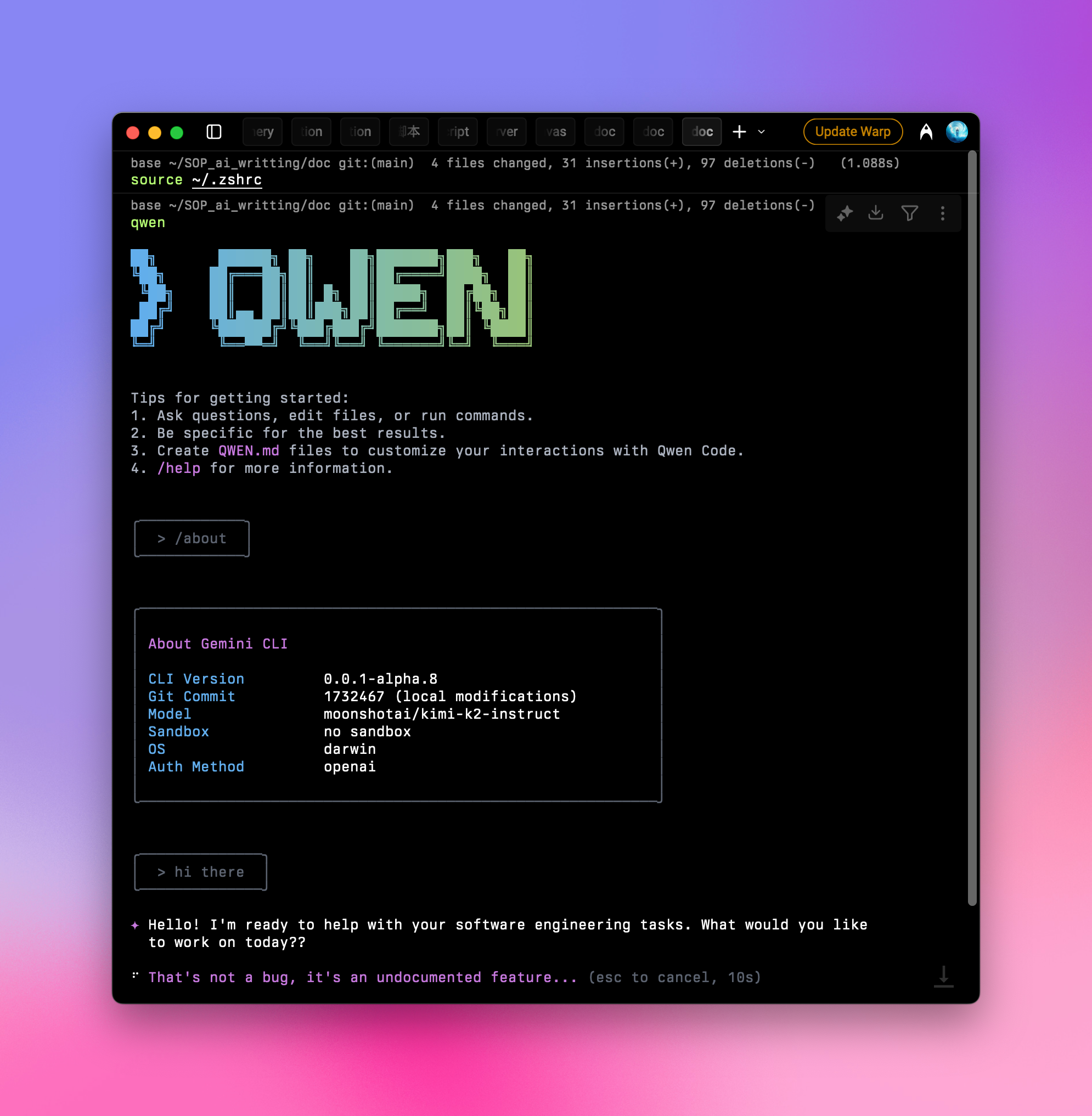 Some users have reported that Qwen Code may occasionally get stuck. Recomendamos setting a **limited quota** for your [token↗](https://aihubmix.com/token) to avoid unnecessary waste.
## You’re now ready to use Qwen Code as normal.
Última atualização: 2026-06-01
Some users have reported that Qwen Code may occasionally get stuck. Recomendamos setting a **limited quota** for your [token↗](https://aihubmix.com/token) to avoid unnecessary waste.
## You’re now ready to use Qwen Code as normal.
Última atualização: 2026-06-01