> ## Documentation Index
> Fetch the complete documentation index at: https://docs.aihubmix.com/llms.txt
> Use this file to discover all available pages before exploring further.
# OpenAI Translatorでの使用
* 例:OpenAI Translator;
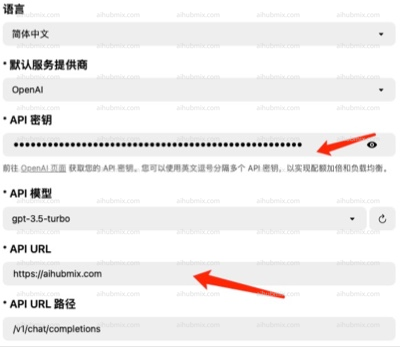
* APIキーを、[当サイトのキー](https://aihubmix.com/token)から生成したものに変更します。
* API URLを次のように変更します:
```
https://aihubmix.com
```
(注意:URLの末尾に「/」を付けないでください)\\
 ## モデルが読み込めない問題が発生した場合
**注:**
バージョン0.4.33および0.4.34でモデルが読み込めない場合は、古いバージョンに戻してください。
古いバージョンのアドレス:[https://github.com/openai-translator/openai-translator/releases/tag/v0.4.32](https://github.com/openai-translator/openai-translator/releases/tag/v0.4.32)\
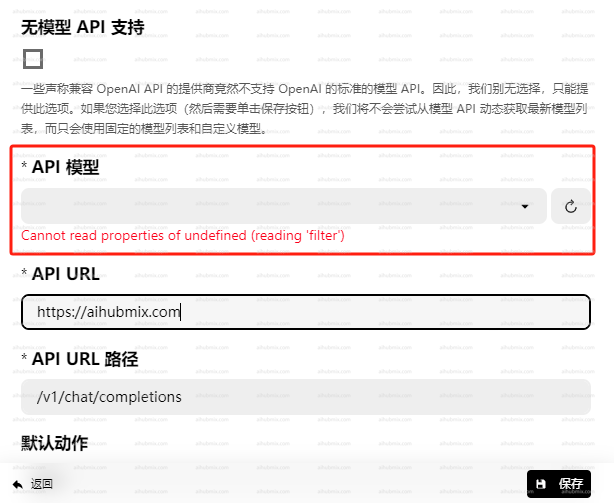
OpenAI TranslatorでAPIモデルを選択できない問題が発生した場合。
## モデルが読み込めない問題が発生した場合
**注:**
バージョン0.4.33および0.4.34でモデルが読み込めない場合は、古いバージョンに戻してください。
古いバージョンのアドレス:[https://github.com/openai-translator/openai-translator/releases/tag/v0.4.32](https://github.com/openai-translator/openai-translator/releases/tag/v0.4.32)\
OpenAI TranslatorでAPIモデルを選択できない問題が発生した場合。
 \
**以下の方法で解決を試みることができます:**
* 「モデルAPIサポートなし」オプションにチェックを入れます。
* 当サイトの設定ページからモデル名をコピーし、手動で入力します。
\
**以下の方法で解決を試みることができます:**
* 「モデルAPIサポートなし」オプションにチェックを入れます。
* 当サイトの設定ページからモデル名をコピーし、手動で入力します。
 ***
最終更新日:2026-06-01
***
最終更新日:2026-06-01