> ## Documentation Index
> Fetch the complete documentation index at: https://docs.aihubmix.com/llms.txt
> Use this file to discover all available pages before exploring further.
# Claude Opus 4.7 新パラメータガイド
 > 本記事では [Claude Opus 4.7](https://aihubmix.com/model/claude-opus-4-7) における推論制御の 2 つの重要な変更点と、**AIHubmix** ネイティブ API および **Chat** 統一インターフェースの完全な使用方法を解説します。あわせて参照:[Anthropic 公式アナウンス](https://www.anthropic.com/news/claude-opus-4-7) および [モデル変更ログ](https://platform.claude.com/docs/en/about-claude/models/whats-new-claude-4-7)。
## 1. 新しい推論制御機能
### ✦ 新しい `xhigh` 推論強度レベル
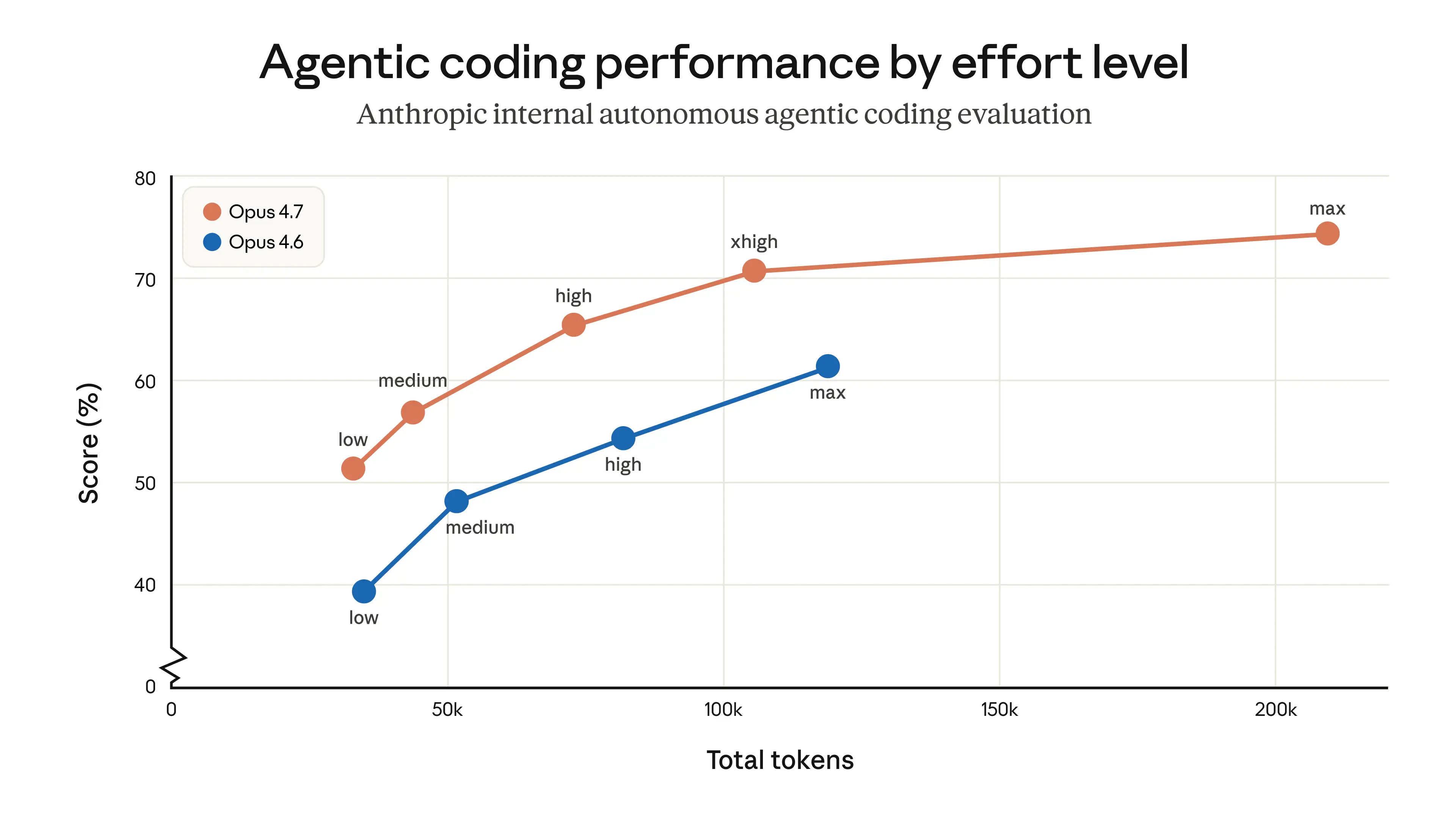
新しい `xhigh` レベルは `high` と `max` の間に位置し、**コーディングおよびエージェントタスク** 専用に設計されており、能力と効率のバランスをより適切に取ります。
```text theme={null}
low ── medium ── high ── xhigh ★NEW ── max
```
### ✦ Thinking コンテンツはデフォルトで非表示
ストリーミングレスポンスにおいて、思考プロセスは **デフォルトでは表示されなくなりました**。推論サマリーを受け取るには、リクエストで `display` フィールドを明示的に渡してください:
| **display 値** | **Opus 4.7** | **Opus 4.6** | **動作** |
| :------------ | :----------- | :----------- | :------------------- |
| "omitted" | **デフォルト** | デフォルトではない | Thinking ブロックの内容は空 |
| "summarized" | 手動で設定する必要あり | **デフォルト** | Thinking サマリーテキストを返す |
```text theme={null}
"reasoning": {
"effort": "xhigh",
"display": "summarized"
}
```
> **図**:Opus 4.7 の新しい xhigh レベル — Agentic コーディングパフォーマンス比較(出典:Anthropic 公式)
> 本記事では [Claude Opus 4.7](https://aihubmix.com/model/claude-opus-4-7) における推論制御の 2 つの重要な変更点と、**AIHubmix** ネイティブ API および **Chat** 統一インターフェースの完全な使用方法を解説します。あわせて参照:[Anthropic 公式アナウンス](https://www.anthropic.com/news/claude-opus-4-7) および [モデル変更ログ](https://platform.claude.com/docs/en/about-claude/models/whats-new-claude-4-7)。
## 1. 新しい推論制御機能
### ✦ 新しい `xhigh` 推論強度レベル
新しい `xhigh` レベルは `high` と `max` の間に位置し、**コーディングおよびエージェントタスク** 専用に設計されており、能力と効率のバランスをより適切に取ります。
```text theme={null}
low ── medium ── high ── xhigh ★NEW ── max
```
### ✦ Thinking コンテンツはデフォルトで非表示
ストリーミングレスポンスにおいて、思考プロセスは **デフォルトでは表示されなくなりました**。推論サマリーを受け取るには、リクエストで `display` フィールドを明示的に渡してください:
| **display 値** | **Opus 4.7** | **Opus 4.6** | **動作** |
| :------------ | :----------- | :----------- | :------------------- |
| "omitted" | **デフォルト** | デフォルトではない | Thinking ブロックの内容は空 |
| "summarized" | 手動で設定する必要あり | **デフォルト** | Thinking サマリーテキストを返す |
```text theme={null}
"reasoning": {
"effort": "xhigh",
"display": "summarized"
}
```
> **図**:Opus 4.7 の新しい xhigh レベル — Agentic コーディングパフォーマンス比較(出典:Anthropic 公式)
 ***
## 2. Claude Native API リファレンス
#### **Anthropic ネイティブ API の** `effort `**値は公式仕様と一致しています:**
| **effort 値** | **対応モデル** | **説明** | **推奨ユースケース** |
| :----------- | :-------------- | :---------------------------- | :------------------------ |
| low | すべての対応モデル | トークンを大幅節約、能力は中程度のトレードオフ | 単純なタスク、高並行リクエスト、サブエージェント |
| medium | すべての対応モデル | 適度なトークン節約とのバランスモード | 一般的なエージェントタスク |
| high | すべての対応モデル | デフォルト。高い能力パフォーマンス | 複雑な推論、コーディング、エージェントタスク |
| **xhigh(新)** | **Opus 4.7 のみ** | high と max の間の拡張能力。長期的タスクで優れる | コーディングとエージェントタスクの推奨スタート地点 |
| max | Opus シリーズ | 最大能力 | フロンティア研究問題 |
#### **AIHubmix Claude Native API — Opus 4.7 例**
```text theme={null}
from anthropic import Anthropic
client = Anthropic(
api_key="",
base_url="https://aihubmix.com"
)
response = client.messages.create(
model="claude-opus-4-7",
max_tokens=16000,
thinking={"type": "adaptive"},
output_config={"effort": "xhigh"}, # Options: low / medium / high / xhigh / max
messages=[
{
"role": "user",
"content": "A snail is at the bottom of a 10-meter well. Each day it climbs 3 meters, but each night it slides back 2 meters. How many days does it take to reach the top?"
}
]
)
print(response.content[-1].text)
```
***
## 3. AIHubmix Chat 統一インターフェースでの推論強度サポート
AIHubMix Chat 統一インターフェースは OpenAI 仕様に合わせており、`reasoning.effort` で推論強度を制御します。**Claude モデルごとに対応する effort レベルへ自動マッピングされます:**
#### Claude モデル向け `reasoning_effort `**(推論強度制御)**
| **effort 値** | **Opus >=4.7(新)** | **Opus 4.6 / 4.5** | **Sonnet 4.6** |
| :----------- | :---------------- | :----------------- | :------------- |
| minimal | low | low | low |
| medium | medium | medium | medium |
| high | high | high | high |
| xhigh | xhigh | max | high |
| max | max | max | high |
**注**:`xhigh` がネイティブにサポートされているのは Opus 4.7 のみです。他の Opus モデルは自動的に `max` にフォールバックし、Sonnet シリーズは `high` にフォールバックします。
#### **Chat 統一インターフェース — Opus 4.7 例**
```text theme={null}
from openai import OpenAI
client = OpenAI(
base_url="https://aihubmix.com/v1",
api_key="",
)
completion = client.chat.completions.create(
model="claude-opus-4-7",
# max_tokens=10000, # Default is 4096; enable for longer outputs
messages=[
{
"role": "user",
"content": "A snail is at the bottom of a 10-meter well. Each day it climbs 3 meters, but each night it slides back 2 meters. How many days does it take to reach the top?"
}
],
extra_body={
"reasoning": {"effort": "xhigh"}
}
)
print(completion.choices[0].message.content)
```
***
## 4. Chat 統一インターフェースでの Thinking コンテンツ制御
OpenAI 互換インターフェースでは、`reasoning` が `display` フィールドをサポートし、Thinking サマリーを返すかどうかを制御できます。
**Claude Opus 4.7 はデフォルトでは Thinking コンテンツを返しません。有効にするには** `"display": "summarized" `**を設定してください。**
| フィールド | 値 | 説明 |
| :-------- | :------------- | :------------------------- |
| `display` | *(省略)* | Thinking コンテンツは返さない(デフォルト) |
| `display` | `"summarized"` | Thinking サマリーを返す |
#### **Opus 4.7 — Thinking サマリー例**
```text theme={null}
from openai import OpenAI
client = OpenAI(
base_url="https://aihubmix.com/v1",
api_key="",
)
completion = client.chat.completions.create(
model="claude-opus-4-7",
messages=[
{
"role": "user",
"content": "A snail is at the bottom of a 10-meter well. Each day it climbs 3 meters, but each night it slides back 2 meters. How many days does it take to reach the top?"
}
],
extra_body={
"reasoning": {"effort": "xhigh", "display": "summarized"}
}
)
print(completion.choices[0].message.content)
```
***
## *詳細は [AIHubmix ドキュメント](https://docs.aihubmix.com/en) または [Anthropic 公式ドキュメント](https://docs.anthropic.com/) を参照してください。*
最終更新日:2026-06-01
***
## 2. Claude Native API リファレンス
#### **Anthropic ネイティブ API の** `effort `**値は公式仕様と一致しています:**
| **effort 値** | **対応モデル** | **説明** | **推奨ユースケース** |
| :----------- | :-------------- | :---------------------------- | :------------------------ |
| low | すべての対応モデル | トークンを大幅節約、能力は中程度のトレードオフ | 単純なタスク、高並行リクエスト、サブエージェント |
| medium | すべての対応モデル | 適度なトークン節約とのバランスモード | 一般的なエージェントタスク |
| high | すべての対応モデル | デフォルト。高い能力パフォーマンス | 複雑な推論、コーディング、エージェントタスク |
| **xhigh(新)** | **Opus 4.7 のみ** | high と max の間の拡張能力。長期的タスクで優れる | コーディングとエージェントタスクの推奨スタート地点 |
| max | Opus シリーズ | 最大能力 | フロンティア研究問題 |
#### **AIHubmix Claude Native API — Opus 4.7 例**
```text theme={null}
from anthropic import Anthropic
client = Anthropic(
api_key="",
base_url="https://aihubmix.com"
)
response = client.messages.create(
model="claude-opus-4-7",
max_tokens=16000,
thinking={"type": "adaptive"},
output_config={"effort": "xhigh"}, # Options: low / medium / high / xhigh / max
messages=[
{
"role": "user",
"content": "A snail is at the bottom of a 10-meter well. Each day it climbs 3 meters, but each night it slides back 2 meters. How many days does it take to reach the top?"
}
]
)
print(response.content[-1].text)
```
***
## 3. AIHubmix Chat 統一インターフェースでの推論強度サポート
AIHubMix Chat 統一インターフェースは OpenAI 仕様に合わせており、`reasoning.effort` で推論強度を制御します。**Claude モデルごとに対応する effort レベルへ自動マッピングされます:**
#### Claude モデル向け `reasoning_effort `**(推論強度制御)**
| **effort 値** | **Opus >=4.7(新)** | **Opus 4.6 / 4.5** | **Sonnet 4.6** |
| :----------- | :---------------- | :----------------- | :------------- |
| minimal | low | low | low |
| medium | medium | medium | medium |
| high | high | high | high |
| xhigh | xhigh | max | high |
| max | max | max | high |
**注**:`xhigh` がネイティブにサポートされているのは Opus 4.7 のみです。他の Opus モデルは自動的に `max` にフォールバックし、Sonnet シリーズは `high` にフォールバックします。
#### **Chat 統一インターフェース — Opus 4.7 例**
```text theme={null}
from openai import OpenAI
client = OpenAI(
base_url="https://aihubmix.com/v1",
api_key="",
)
completion = client.chat.completions.create(
model="claude-opus-4-7",
# max_tokens=10000, # Default is 4096; enable for longer outputs
messages=[
{
"role": "user",
"content": "A snail is at the bottom of a 10-meter well. Each day it climbs 3 meters, but each night it slides back 2 meters. How many days does it take to reach the top?"
}
],
extra_body={
"reasoning": {"effort": "xhigh"}
}
)
print(completion.choices[0].message.content)
```
***
## 4. Chat 統一インターフェースでの Thinking コンテンツ制御
OpenAI 互換インターフェースでは、`reasoning` が `display` フィールドをサポートし、Thinking サマリーを返すかどうかを制御できます。
**Claude Opus 4.7 はデフォルトでは Thinking コンテンツを返しません。有効にするには** `"display": "summarized" `**を設定してください。**
| フィールド | 値 | 説明 |
| :-------- | :------------- | :------------------------- |
| `display` | *(省略)* | Thinking コンテンツは返さない(デフォルト) |
| `display` | `"summarized"` | Thinking サマリーを返す |
#### **Opus 4.7 — Thinking サマリー例**
```text theme={null}
from openai import OpenAI
client = OpenAI(
base_url="https://aihubmix.com/v1",
api_key="",
)
completion = client.chat.completions.create(
model="claude-opus-4-7",
messages=[
{
"role": "user",
"content": "A snail is at the bottom of a 10-meter well. Each day it climbs 3 meters, but each night it slides back 2 meters. How many days does it take to reach the top?"
}
],
extra_body={
"reasoning": {"effort": "xhigh", "display": "summarized"}
}
)
print(completion.choices[0].message.content)
```
***
## *詳細は [AIHubmix ドキュメント](https://docs.aihubmix.com/en) または [Anthropic 公式ドキュメント](https://docs.anthropic.com/) を参照してください。*
最終更新日:2026-06-01