> ## Documentation Index
> Fetch the complete documentation index at: https://docs.aihubmix.com/llms.txt
> Use this file to discover all available pages before exploring further.
# Structured Output Repair
> Structured Output Repair: per-API-Key auto-repair of malformed JSON (truncation, trailing commas, code blocks) for Chat Completions, Responses, Claude, Gemini.
In [Structured Output](/en/api/Structured-Output) scenarios, the JSON a model returns sometimes fails to parse: the output is truncated by `max_tokens`, carries a trailing comma, or is wrapped inside a Markdown code block. The application side usually has to write retry or manual-fix logic to handle this.
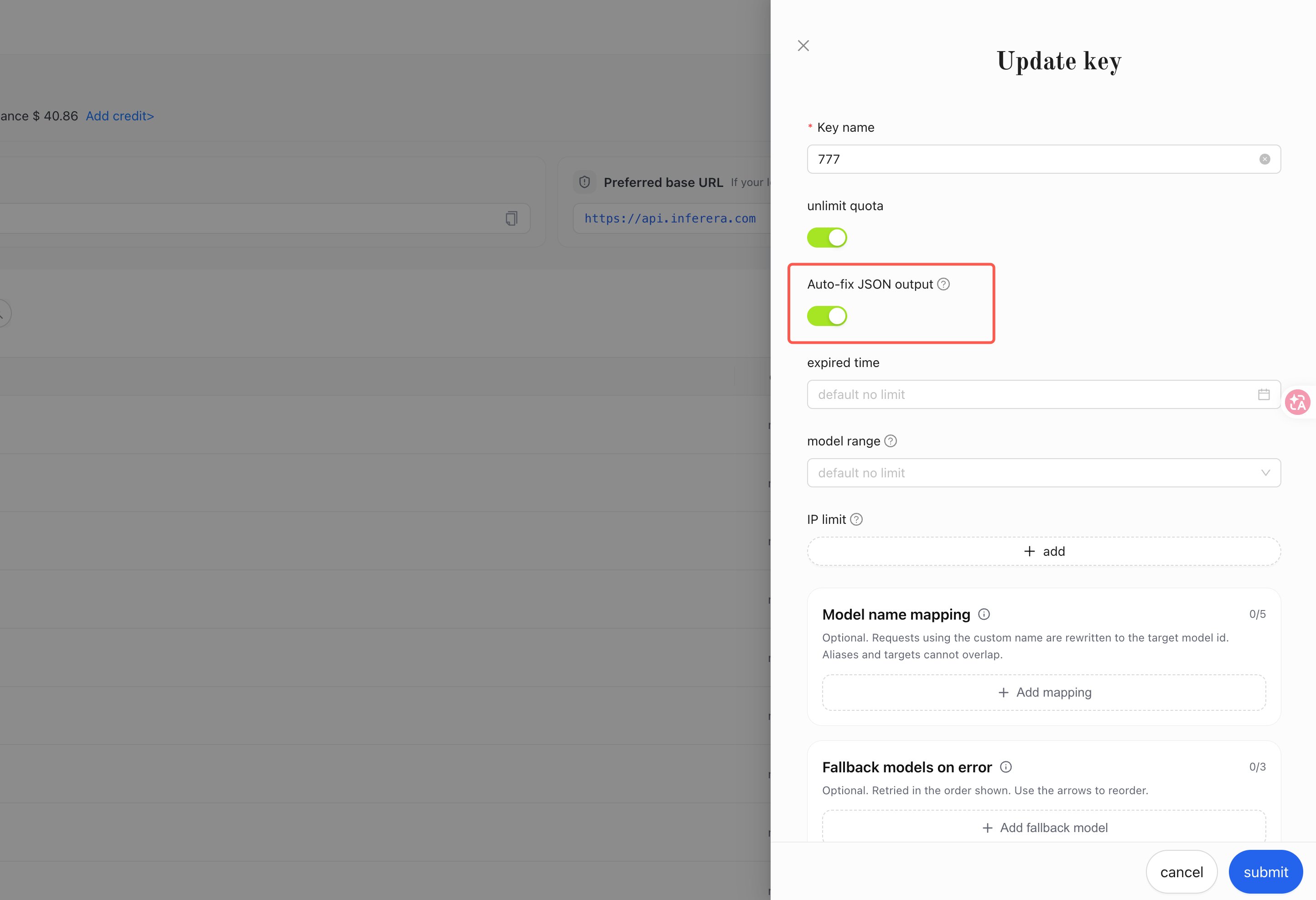
**Structured Output Repair** is a **Key-level** capability, disabled by default. Once enabled, for **non-streaming** requests that declare structured JSON output, when the JSON returned by the model has format errors, the AIHubMix gateway automatically repairs it into parseable, valid JSON before returning; no client code changes are required.
This switch is disabled by default; when it is off, all responses are returned as-is. The switch is configured independently per Key and takes effect immediately once enabled.
Create or edit a Key and turn on the "Structured Output Repair" switch.
 ***
## 1. Conditions for it to take effect
Repair happens only when **all** of the following conditions are met:
1. The Key used by the request has "Structured Output Repair" enabled.
2. The request is **non-streaming** (`stream: true` is not set).
3. The request declares structured JSON output (the declaration field for each protocol is listed in the table below).
4. The text content returned by the model cannot be parsed as JSON.
| Protocol | Endpoint | Structured output declaration field |
| ---------------- | ----------------------------------------------- | ------------------------------------------------------------------------------------- |
| Chat Completions | `/v1/chat/completions` | `response_format.type` is `json_object` or `json_schema` |
| Responses | `/v1/responses` | `text.format.type` is `json_schema` or `json_object` |
| Claude Messages | `/v1/messages` | `output_config.format.type` is `json_schema` |
| Gemini | `/gemini/v1beta/models/{model}:generateContent` | `generationConfig.responseMimeType` is `application/json`, or `responseSchema` is set |
When the content is already valid JSON, no change is made and it is returned as-is.
***
## 2. Repairable format errors
**Unclosed brackets / quotes caused by truncated output** (e.g. `finish_reason` is `length`):
```text Before theme={null}
{"items": [{"name": "Widget", "price": 9.99}, {"name": "Gad
```
```json After theme={null}
{"items": [{"name": "Widget", "price": 9.99}, {"name": "Gad"}]}
```
**Markdown code-block wrapping**:
````text Before theme={null}
```json
{"status": "ok", "count": 3}
```
````
```json After theme={null}
{"status": "ok", "count": 3}
```
**Trailing comma**:
```text Before theme={null}
{"a": 1, "b": 2,}
```
```json After theme={null}
{"a": 1, "b": 2}
```
**Single quotes**:
```text Before theme={null}
{'name': 'Widget'}
```
```json After theme={null}
{"name": "Widget"}
```
**Unquoted keys**:
```text Before theme={null}
{name: "Widget", price: 9.99}
```
```json After theme={null}
{"name": "Widget", "price": 9.99}
```
**Mixed text and JSON** (explanatory text before or after the JSON):
```text Before theme={null}
Here is the JSON you requested: {"name": "Widget", "price": 9.99}
```
```json After theme={null}
{"name": "Widget", "price": 9.99}
```
Repair follows a conservative strategy:
* Repair only completes or normalizes JSON syntax; **numeric values and string content keep the original text, with no precision loss or rewriting**.
* The repaired result must be a valid JSON object or array, and its difference from the original must stay within a reasonable range; if either condition is not met, repair is abandoned and the original content is returned as-is.
***
## 3. How to tell whether a response was repaired
When repair occurs, there are two programmable / viewable signals:
1. **Response header** `X-JSON-Repaired: true` (this response header is absent when no repair occurs).
2. **Call log note**: the note column for the corresponding request on the [call log page](https://console.aihubmix.com/logs) shows `This request gateway automatically corrected the JSON format issue in the model output.`
Token usage and billing are calculated from the model's original output; repair does not change the billing result.
***
## 4. Full example
Take generating product information as an example: the request uses `json_schema` to declare structured output. With the switch enabled, even if the model output has the format errors described above, the `content` you receive can be parsed directly:
```python Python theme={null}
import json
import os
import requests
response = requests.post(
"https://aihubmix.com/v1/chat/completions",
headers={
"Authorization": f"Bearer {os.environ['AIHUBMIX_API_KEY']}",
"Content-Type": "application/json",
},
json={
"model": "gpt-5.2",
"messages": [
{"role": "user", "content": "Generate a product listing for a wireless keyboard."}
],
"response_format": {
"type": "json_schema",
"json_schema": {
"name": "product",
"schema": {
"type": "object",
"properties": {
"name": {"type": "string"},
"price": {"type": "number"},
"description": {"type": "string"},
},
"required": ["name", "price"],
"additionalProperties": False,
},
},
},
},
)
repaired = response.headers.get("X-JSON-Repaired") == "true"
product = json.loads(response.json()["choices"][0]["message"]["content"])
print(product, "repaired:", repaired)
```
```typescript TypeScript theme={null}
const response = await fetch("https://aihubmix.com/v1/chat/completions", {
method: "POST",
headers: {
Authorization: `Bearer ${process.env.AIHUBMIX_API_KEY}`,
"Content-Type": "application/json",
},
body: JSON.stringify({
model: "gpt-5.2",
messages: [
{ role: "user", content: "Generate a product listing for a wireless keyboard." },
],
response_format: {
type: "json_schema",
json_schema: {
name: "product",
schema: {
type: "object",
properties: {
name: { type: "string" },
price: { type: "number" },
description: { type: "string" },
},
required: ["name", "price"],
additionalProperties: false,
},
},
},
}),
});
const repaired = response.headers.get("X-JSON-Repaired") === "true";
const data = await response.json();
const product = JSON.parse(data.choices[0].message.content);
console.log(product, "repaired:", repaired);
```
```shell curl theme={null}
curl -sD - https://aihubmix.com/v1/chat/completions \
-H "Authorization: Bearer $AIHUBMIX_API_KEY" \
-H "Content-Type: application/json" \
-d '{
"model": "gpt-5.2",
"messages": [
{"role": "user", "content": "Generate a product listing for a wireless keyboard."}
],
"response_format": {
"type": "json_schema",
"json_schema": {
"name": "product",
"schema": {
"type": "object",
"properties": {
"name": {"type": "string"},
"price": {"type": "number"},
"description": {"type": "string"}
},
"required": ["name", "price"],
"additionalProperties": false
}
}
}
}'
```
To observe a repair on purpose, set `max_tokens` to a small value (such as `80`) so the output is truncated: the response's `finish_reason` is `length`, the `content` is valid repaired JSON, and the response header carries `X-JSON-Repaired: true`.
***
## 5. Boundaries and notes
Streaming requests (`stream: true`) are not repaired and are forwarded as-is. When you need the repair capability, use non-streaming requests.
Repair guarantees that the content can be parsed as JSON; data that is missing due to truncation cannot be recovered. We recommend also checking `finish_reason` / `stop_reason`, and when the output is truncated, increasing `max_tokens` as needed and retrying.
* **Syntax repair**: whether the field names and field types conform to your schema still needs to be validated on the application side.
* **Tool call parameters are out of scope for repair**: the parameter JSON of `tool_calls` / `function_call` is not repaired; tool parameters should always be validated on the application side before execution.
* **Multi-text-block output is not repaired**: when the model output contains multiple text blocks (for example, Gemini returning multiple `parts`), it is returned as-is.
* **Reasoning content is unaffected**: reasoning text such as `reasoning_content` and Gemini's thought part does not participate in repair.
***
## FAQ
**Will repair change the numeric values or text in the returned content?**
No. Repair only completes or normalizes JSON syntax (completing closing brackets, removing trailing commas, normalizing quotes, stripping code-block markers); numeric values and string content keep the original text of the model output.
**Will enabling the switch affect ordinary requests that do not declare structured output?**
No. Requests that do not declare structured output fields such as `response_format`, as well as all streaming requests, have their responses returned as-is.
**Will repair incur extra billing or change token usage?**
No. Token usage and billing are calculated from the model's original output, and the repair process incurs no extra charges.
**Is the repaired JSON guaranteed to conform to the schema I defined?**
Repair guarantees that the content can be parsed as JSON; whether the field names and field types conform to the schema depends on the model output itself, so we recommend keeping schema validation on the application side.
***
## 1. Conditions for it to take effect
Repair happens only when **all** of the following conditions are met:
1. The Key used by the request has "Structured Output Repair" enabled.
2. The request is **non-streaming** (`stream: true` is not set).
3. The request declares structured JSON output (the declaration field for each protocol is listed in the table below).
4. The text content returned by the model cannot be parsed as JSON.
| Protocol | Endpoint | Structured output declaration field |
| ---------------- | ----------------------------------------------- | ------------------------------------------------------------------------------------- |
| Chat Completions | `/v1/chat/completions` | `response_format.type` is `json_object` or `json_schema` |
| Responses | `/v1/responses` | `text.format.type` is `json_schema` or `json_object` |
| Claude Messages | `/v1/messages` | `output_config.format.type` is `json_schema` |
| Gemini | `/gemini/v1beta/models/{model}:generateContent` | `generationConfig.responseMimeType` is `application/json`, or `responseSchema` is set |
When the content is already valid JSON, no change is made and it is returned as-is.
***
## 2. Repairable format errors
**Unclosed brackets / quotes caused by truncated output** (e.g. `finish_reason` is `length`):
```text Before theme={null}
{"items": [{"name": "Widget", "price": 9.99}, {"name": "Gad
```
```json After theme={null}
{"items": [{"name": "Widget", "price": 9.99}, {"name": "Gad"}]}
```
**Markdown code-block wrapping**:
````text Before theme={null}
```json
{"status": "ok", "count": 3}
```
````
```json After theme={null}
{"status": "ok", "count": 3}
```
**Trailing comma**:
```text Before theme={null}
{"a": 1, "b": 2,}
```
```json After theme={null}
{"a": 1, "b": 2}
```
**Single quotes**:
```text Before theme={null}
{'name': 'Widget'}
```
```json After theme={null}
{"name": "Widget"}
```
**Unquoted keys**:
```text Before theme={null}
{name: "Widget", price: 9.99}
```
```json After theme={null}
{"name": "Widget", "price": 9.99}
```
**Mixed text and JSON** (explanatory text before or after the JSON):
```text Before theme={null}
Here is the JSON you requested: {"name": "Widget", "price": 9.99}
```
```json After theme={null}
{"name": "Widget", "price": 9.99}
```
Repair follows a conservative strategy:
* Repair only completes or normalizes JSON syntax; **numeric values and string content keep the original text, with no precision loss or rewriting**.
* The repaired result must be a valid JSON object or array, and its difference from the original must stay within a reasonable range; if either condition is not met, repair is abandoned and the original content is returned as-is.
***
## 3. How to tell whether a response was repaired
When repair occurs, there are two programmable / viewable signals:
1. **Response header** `X-JSON-Repaired: true` (this response header is absent when no repair occurs).
2. **Call log note**: the note column for the corresponding request on the [call log page](https://console.aihubmix.com/logs) shows `This request gateway automatically corrected the JSON format issue in the model output.`
Token usage and billing are calculated from the model's original output; repair does not change the billing result.
***
## 4. Full example
Take generating product information as an example: the request uses `json_schema` to declare structured output. With the switch enabled, even if the model output has the format errors described above, the `content` you receive can be parsed directly:
```python Python theme={null}
import json
import os
import requests
response = requests.post(
"https://aihubmix.com/v1/chat/completions",
headers={
"Authorization": f"Bearer {os.environ['AIHUBMIX_API_KEY']}",
"Content-Type": "application/json",
},
json={
"model": "gpt-5.2",
"messages": [
{"role": "user", "content": "Generate a product listing for a wireless keyboard."}
],
"response_format": {
"type": "json_schema",
"json_schema": {
"name": "product",
"schema": {
"type": "object",
"properties": {
"name": {"type": "string"},
"price": {"type": "number"},
"description": {"type": "string"},
},
"required": ["name", "price"],
"additionalProperties": False,
},
},
},
},
)
repaired = response.headers.get("X-JSON-Repaired") == "true"
product = json.loads(response.json()["choices"][0]["message"]["content"])
print(product, "repaired:", repaired)
```
```typescript TypeScript theme={null}
const response = await fetch("https://aihubmix.com/v1/chat/completions", {
method: "POST",
headers: {
Authorization: `Bearer ${process.env.AIHUBMIX_API_KEY}`,
"Content-Type": "application/json",
},
body: JSON.stringify({
model: "gpt-5.2",
messages: [
{ role: "user", content: "Generate a product listing for a wireless keyboard." },
],
response_format: {
type: "json_schema",
json_schema: {
name: "product",
schema: {
type: "object",
properties: {
name: { type: "string" },
price: { type: "number" },
description: { type: "string" },
},
required: ["name", "price"],
additionalProperties: false,
},
},
},
}),
});
const repaired = response.headers.get("X-JSON-Repaired") === "true";
const data = await response.json();
const product = JSON.parse(data.choices[0].message.content);
console.log(product, "repaired:", repaired);
```
```shell curl theme={null}
curl -sD - https://aihubmix.com/v1/chat/completions \
-H "Authorization: Bearer $AIHUBMIX_API_KEY" \
-H "Content-Type: application/json" \
-d '{
"model": "gpt-5.2",
"messages": [
{"role": "user", "content": "Generate a product listing for a wireless keyboard."}
],
"response_format": {
"type": "json_schema",
"json_schema": {
"name": "product",
"schema": {
"type": "object",
"properties": {
"name": {"type": "string"},
"price": {"type": "number"},
"description": {"type": "string"}
},
"required": ["name", "price"],
"additionalProperties": false
}
}
}
}'
```
To observe a repair on purpose, set `max_tokens` to a small value (such as `80`) so the output is truncated: the response's `finish_reason` is `length`, the `content` is valid repaired JSON, and the response header carries `X-JSON-Repaired: true`.
***
## 5. Boundaries and notes
Streaming requests (`stream: true`) are not repaired and are forwarded as-is. When you need the repair capability, use non-streaming requests.
Repair guarantees that the content can be parsed as JSON; data that is missing due to truncation cannot be recovered. We recommend also checking `finish_reason` / `stop_reason`, and when the output is truncated, increasing `max_tokens` as needed and retrying.
* **Syntax repair**: whether the field names and field types conform to your schema still needs to be validated on the application side.
* **Tool call parameters are out of scope for repair**: the parameter JSON of `tool_calls` / `function_call` is not repaired; tool parameters should always be validated on the application side before execution.
* **Multi-text-block output is not repaired**: when the model output contains multiple text blocks (for example, Gemini returning multiple `parts`), it is returned as-is.
* **Reasoning content is unaffected**: reasoning text such as `reasoning_content` and Gemini's thought part does not participate in repair.
***
## FAQ
**Will repair change the numeric values or text in the returned content?**
No. Repair only completes or normalizes JSON syntax (completing closing brackets, removing trailing commas, normalizing quotes, stripping code-block markers); numeric values and string content keep the original text of the model output.
**Will enabling the switch affect ordinary requests that do not declare structured output?**
No. Requests that do not declare structured output fields such as `response_format`, as well as all streaming requests, have their responses returned as-is.
**Will repair incur extra billing or change token usage?**
No. Token usage and billing are calculated from the model's original output, and the repair process incurs no extra charges.
**Is the repaired JSON guaranteed to conform to the schema I defined?**
Repair guarantees that the content can be parsed as JSON; whether the field names and field types conform to the schema depends on the model output itself, so we recommend keeping schema validation on the application side.