> ## Documentation Index
> Fetch the complete documentation index at: https://docs.aihubmix.com/llms.txt
> Use this file to discover all available pages before exploring further.
# Dify Plugin
> Integrate Claude, GPT, Gemini and more in Dify via the Aihubmix plugin, covering chat, embeddings, rerank and speech, with prompt caching for Claude.
## One-Click Install for Aihubmix Plugin
Simply click the link below and hit the **Install** button on the Dify Marketplace page:
👉 [Go to Dify Plugin Page](https://marketplace.dify.ai/plugins/langgenius/aihubmix?language=en-US\&theme=system)
**Example image:**  ## Configuration
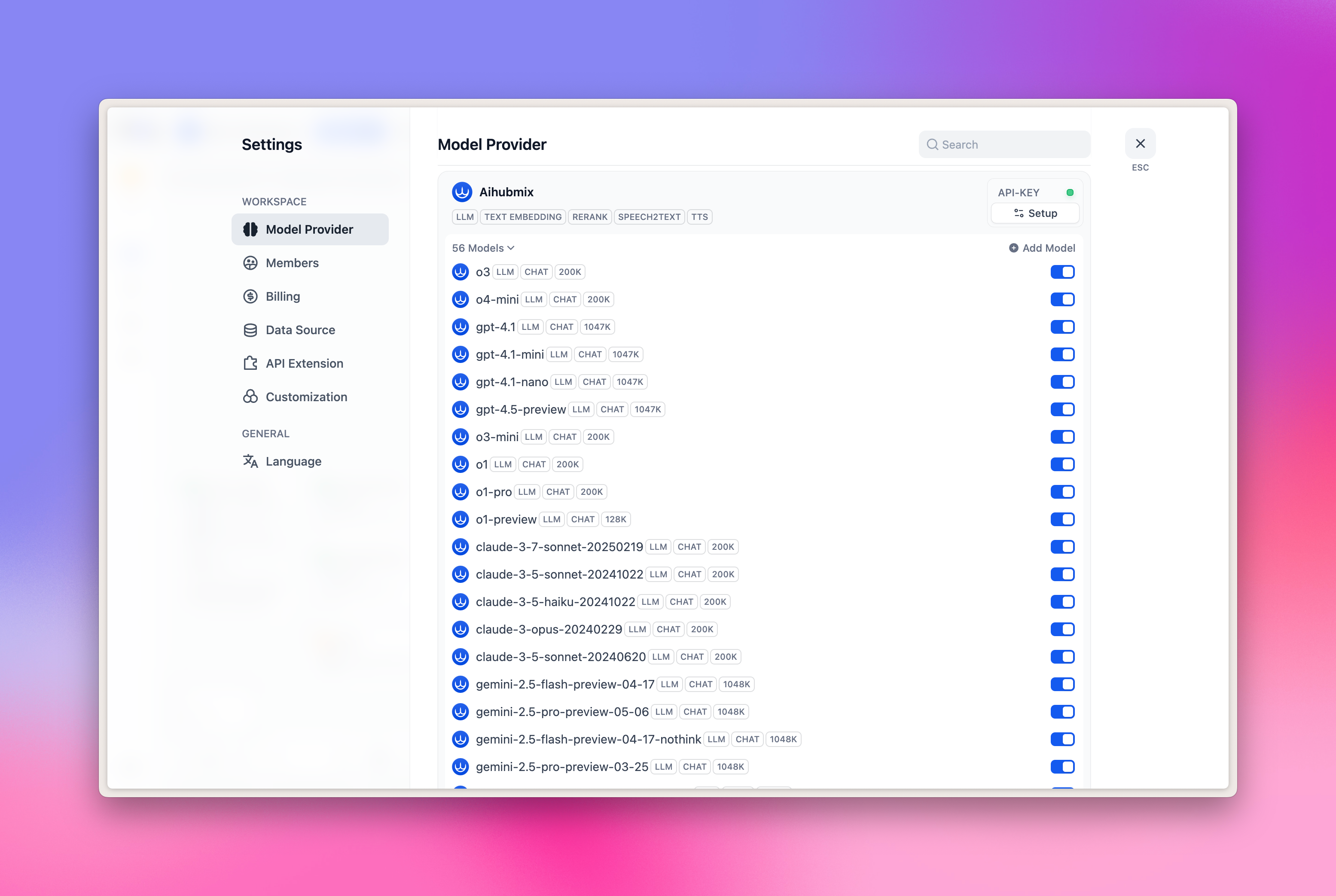
1. Click the avatar on the top right of the page → Select 'Settings'
2. Click the 'Model Provider' Tab
3. Find Aihubmix in the right side → Expand Setup, and fill in your [API Key](https://console.aihubmix.com/token)
## Configuration
1. Click the avatar on the top right of the page → Select 'Settings'
2. Click the 'Model Provider' Tab
3. Find Aihubmix in the right side → Expand Setup, and fill in your [API Key](https://console.aihubmix.com/token)
 **Currently, the following 5 categories of models are pre-configured:**
* LLM: Large language model
* TEXT EMBEDDING: Vector embedding model
* RERANK: Re-ranking model
* SPEECH2TEXT: Speech-to-text model
* TTS: Text-to-speech model
**Currently, the following 5 categories of models are pre-configured:**
* LLM: Large language model
* TEXT EMBEDDING: Vector embedding model
* RERANK: Re-ranking model
* SPEECH2TEXT: Speech-to-text model
* TTS: Text-to-speech model
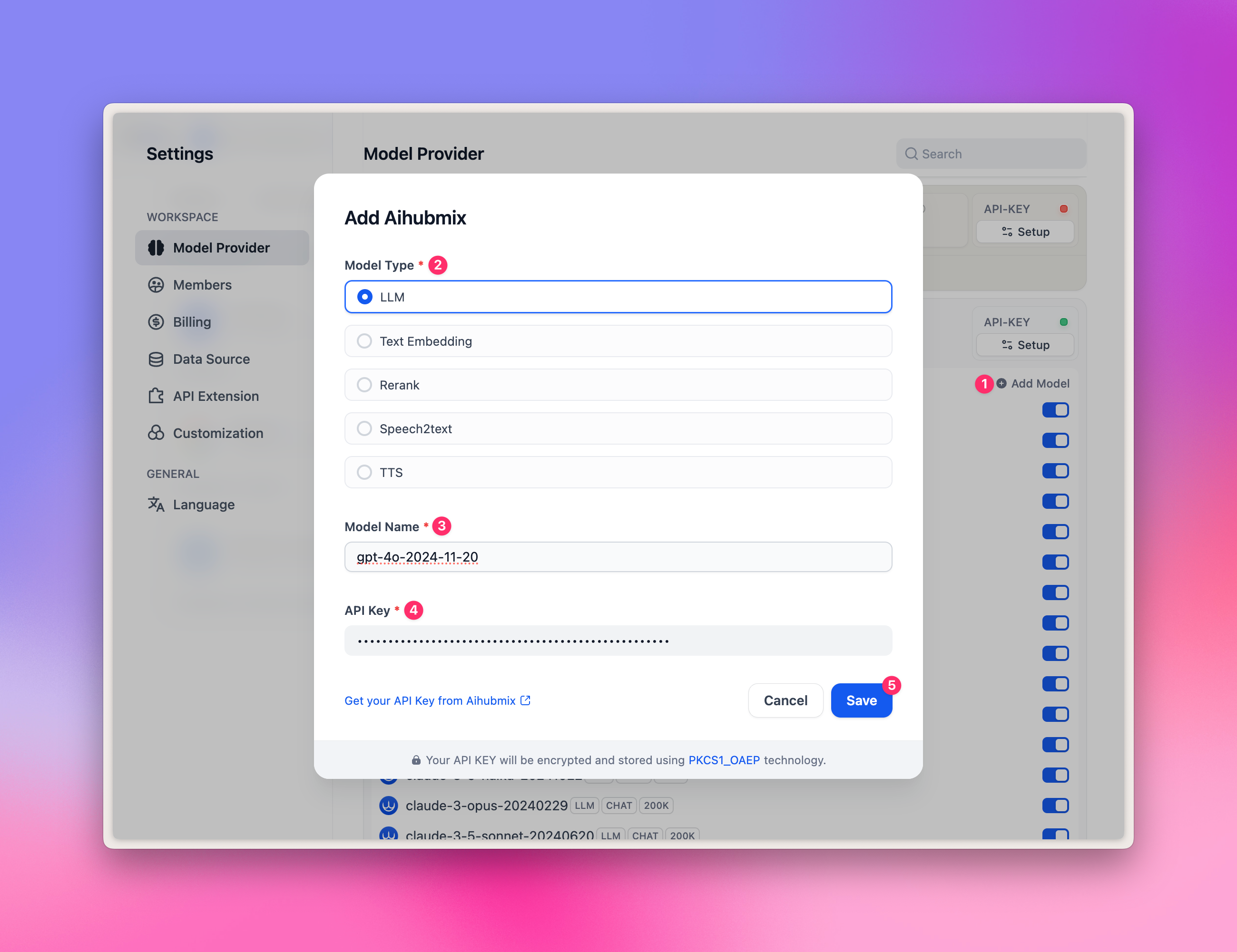
 **How to add more custom models?**
Click '+ Add model', and fill in the Model Name option:
* Fill in any [model ID](https://aihubmix.com/models) in the model gallery, such as `gpt-4o-2024-11-20`.
* Fill in your API Key, and click 'Save.
Note: due to the special design of the Dify plugin, it currently does not support image generation models, so models like `gpt-image-1` cannot be added.
**How to add more custom models?**
Click '+ Add model', and fill in the Model Name option:
* Fill in any [model ID](https://aihubmix.com/models) in the model gallery, such as `gpt-4o-2024-11-20`.
* Fill in your API Key, and click 'Save.
Note: due to the special design of the Dify plugin, it currently does not support image generation models, so models like `gpt-image-1` cannot be added.
 ## LLM selection
In the Workflow node, select 'LLM', and you can select the models provided by Aihubmix.
**Example image:**
## LLM selection
In the Workflow node, select 'LLM', and you can select the models provided by Aihubmix.
**Example image:** 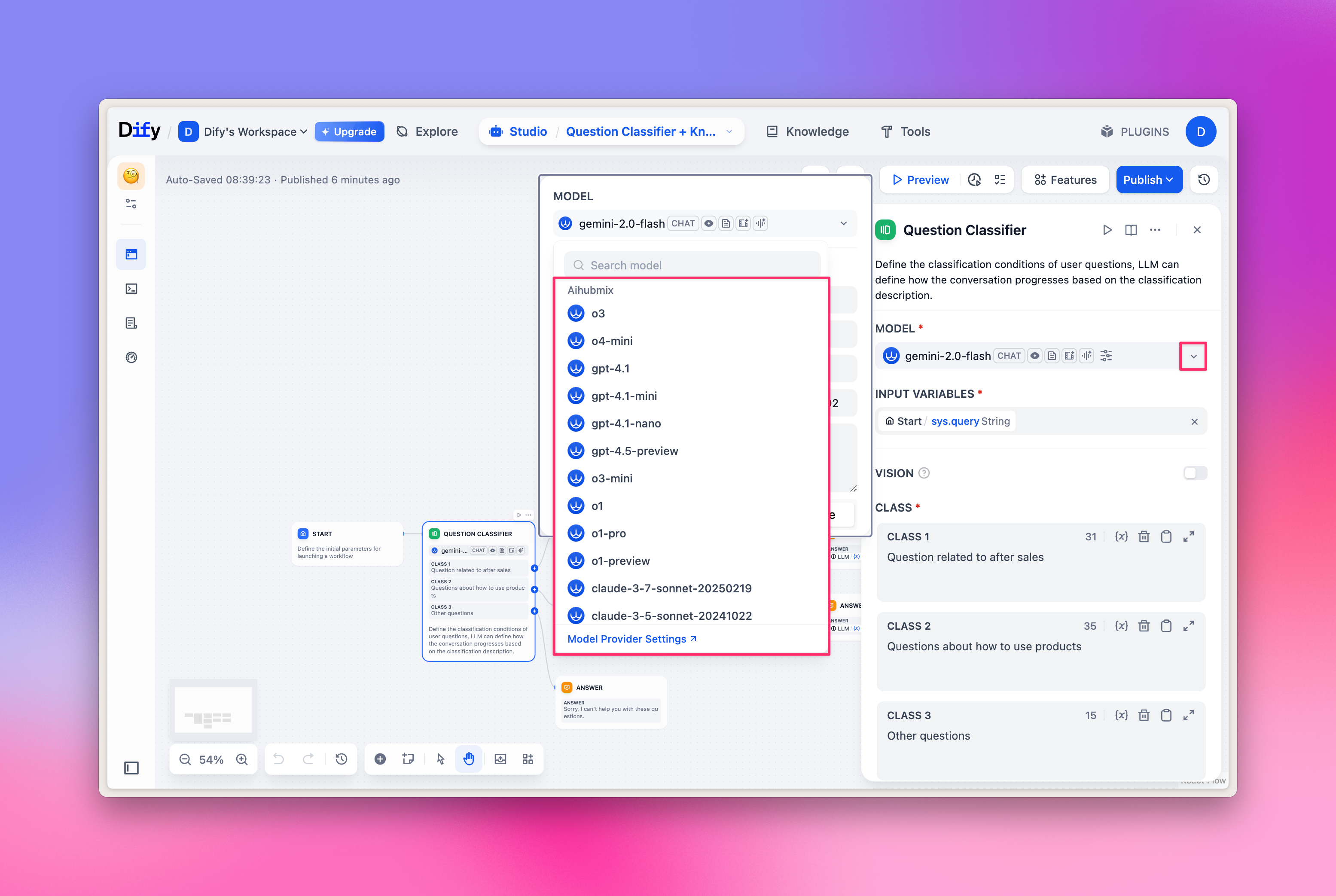 ## Embeddings/Reranker model selection
Embeddings/Reranker models are mainly used for knowledge base question answering, you can quickly experience it in the top Knowledge Tab, and also select the corresponding model in the Workflow node.
**Example image:**
## Embeddings/Reranker model selection
Embeddings/Reranker models are mainly used for knowledge base question answering, you can quickly experience it in the top Knowledge Tab, and also select the corresponding model in the Workflow node.
**Example image:** 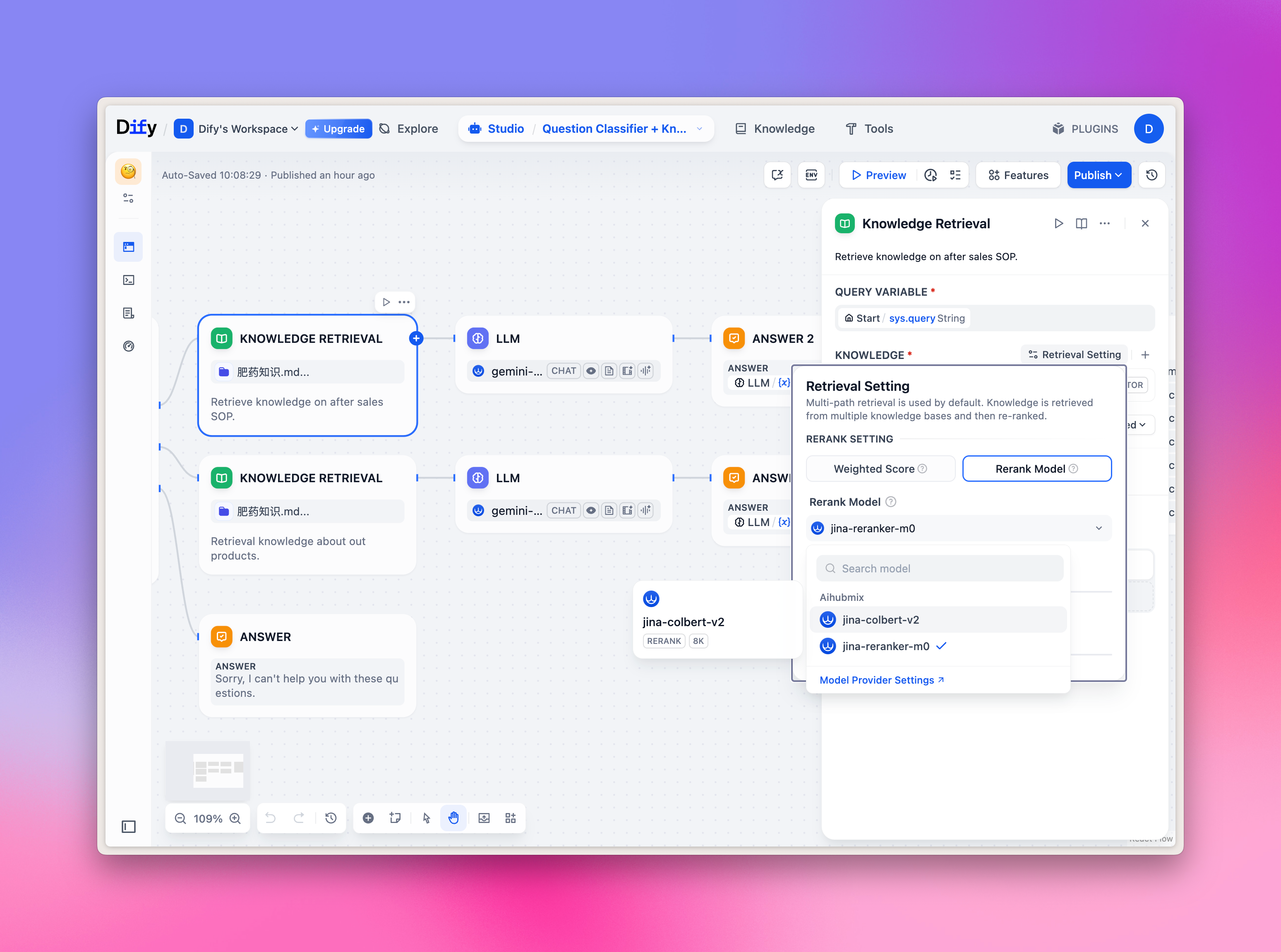 ## TTS/SST selection
TTS/SST models are mainly used for speech parsing and synthesis, when selecting tools, the corresponding is not the regular 'LLM', but the 'Audio' type in the 'Tools' Tab. Corresponding relationship:
1. TTS text-to-speech: select 'Text to Speech'
2. SST speech-to-text: select 'Speech to Text'
**Example image:**
## TTS/SST selection
TTS/SST models are mainly used for speech parsing and synthesis, when selecting tools, the corresponding is not the regular 'LLM', but the 'Audio' type in the 'Tools' Tab. Corresponding relationship:
1. TTS text-to-speech: select 'Text to Speech'
2. SST speech-to-text: select 'Speech to Text'
**Example image:** 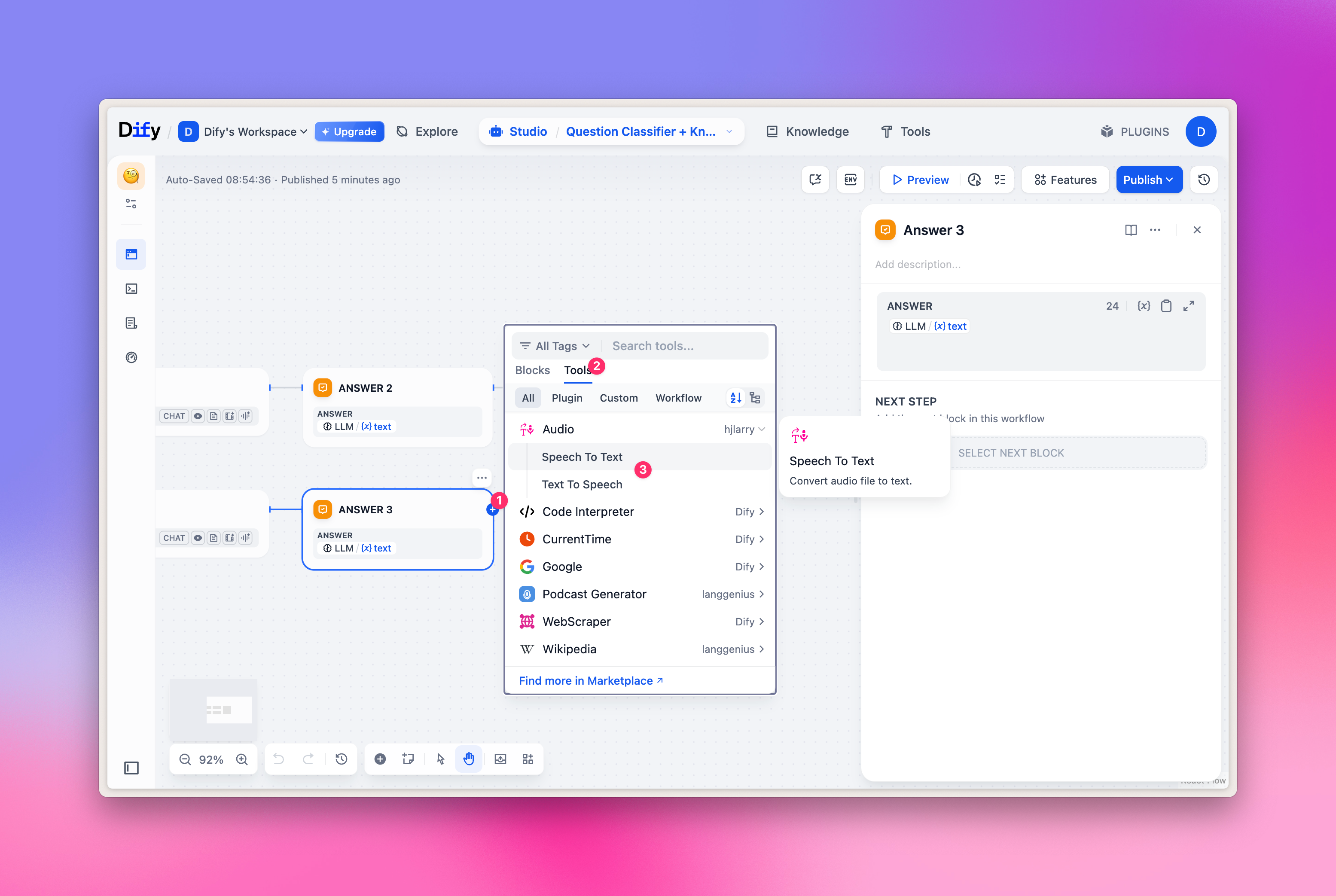 ## Claude Prompt Caching
Enable prompt caching for Claude models in Dify through this plugin: wrap the prompt you want to cache in `…`, and set the "auto-cache threshold for large messages" in the model parameters to a positive integer. For full usage and cache-hit tips, see [Claude Prompt Caching](./Claude-Cache).
***
Last updated: 2026-06-01
## Claude Prompt Caching
Enable prompt caching for Claude models in Dify through this plugin: wrap the prompt you want to cache in `…`, and set the "auto-cache threshold for large messages" in the model parameters to a positive integer. For full usage and cache-hit tips, see [Claude Prompt Caching](./Claude-Cache).
***
Last updated: 2026-06-01