> ## Documentation Index
> Fetch the complete documentation index at: https://docs.aihubmix.com/llms.txt
> Use this file to discover all available pages before exploring further.
# Claude Prompt Caching
> Prompt caching significantly reduces processing time for repetitive tasks or prompts containing consistent elements, effectively lowering token costs.
Different Claude models have different minimum cacheable token thresholds (512 / 1,024 / 2,048 / 4,096), and the threshold is not proportional to the model version number: for example, Claude Opus 4.8 is 1,024, Claude Opus 4.7 is 2,048, and Claude Opus 4.6 / 4.5 and Claude Haiku 4.5 are 4,096. See the full breakdown under "Cache limitations" below. Content below the threshold will not be written to the cache even if marked with `cache_control`, and no error is returned.
Here's an example of how to implement prompt caching with the Messages API using a cache\_control block:
```shell Curl theme={null}
curl https://aihubmix.com/v1/messages \
-H "content-type: application/json" \
-H "x-api-key: AIHUBMIX_API_KEY" \
-H "anthropic-version: 2023-06-01" \
-d '{
"stream": true,
"model": "claude-opus-4-20250514",
"max_tokens": 20000,
"system": [
{
"type": "text",
"text": "You are an AI assistant tasked with analyzing literary works. Your goal is to provide insightful commentary on themes, characters, and writing style."
},
{
"type": "text",
"text": "Pride and Prejudice by Jane Austen... [Place complete text content here]",
"cache_control": {"type": "ephemeral"}
}
],
"thinking": {
"type": "enabled",
"budget_tokens": 16000
},
"messages": [
{
"role": "user",
"content": "Analyze the major themes in Pride and Prejudice."
}
]
}'
```
```py Python (Anthropic SDK - Recommended) theme={null}
import os
import anthropic
client = anthropic.Anthropic(
api_key="sk-***", # Replace with the key you generated in AiHubMix
base_url="https://aihubmix.com"
)
# Streaming response with caching
with client.messages.stream(
model="claude-opus-4-20250514",
max_tokens=20000,
system=[
{
"type": "text",
"text": "You are an AI assistant tasked with analyzing literary works. Your goal is to provide insightful commentary on themes, characters, and writing style.\n"
},
{
"type": "text",
"text": "",
"cache_control": {"type": "ephemeral"}
}
],
thinking={
"type": "enabled",
"budget_tokens": 16000
},
messages=[
{"role": "user", "content": "Analyze the major themes in 'Pride and Prejudice'."}
]
) as stream:
for text in stream.text_stream:
print(text, end="", flush=True)
# Non-streaming response
message = client.messages.create(
model="claude-opus-4-20250514",
max_tokens=20000,
system=[
{
"type": "text",
"text": "You are an AI assistant tasked with analyzing literary works."
},
{
"type": "text",
"text": "",
"cache_control": {"type": "ephemeral"}
}
],
messages=[
{"role": "user", "content": "Analyze the major themes in 'Pride and Prejudice'."}
]
)
print(message.content)
```
```py Python (Requests - Alternative) theme={null}
import requests
url = "https://aihubmix.com/v1/messages"
headers = {
"content-type": "application/json",
"x-api-key": "sk-***", # Replace with the key you generated in AiHubMix
"anthropic-version": "2023-06-01"
}
data = {
"stream": True,
"model": "claude-opus-4-20250514",
"max_tokens": 20000,
"system": [
{
"type": "text",
"text": "You are an AI assistant tasked with analyzing literary works. Your goal is to provide insightful commentary on themes, characters, and writing style.\n"
},
{
"type": "text",
"text": "",
"cache_control": {"type": "ephemeral"}
}
],
"thinking": {
"type": "enabled",
"budget_tokens": 16000
},
"messages": [{"role": "user", "content": "Analyze the major themes in 'Pride and Prejudice'."}]
}
response = requests.post(url, headers=headers, json=data, stream=True)
# Check response status
if response.status_code == 200:
# Process the streaming response
for line in response.iter_lines():
if line:
print(line.decode('utf-8'))
else:
print(f"Error: {response.status_code}, {response.text}")
```
**Response:**
```json theme={null}
{"cache_creation_input_tokens":188086,"cache_read_input_tokens":0,"input_tokens":21,"output_tokens":393}
{"cache_creation_input_tokens":0,"cache_read_input_tokens":188086,"input_tokens":21,"output_tokens":393}
```
In this example, the entire text of "Pride and Prejudice" is cached using the cache\_control parameter. This enables reuse of this large text across multiple API calls without reprocessing it each time. Changing only the user message allows you to ask various questions about the book while utilizing the cached content, leading to faster responses and improved efficiency.
## How prompt caching works
When you send a request with prompt caching enabled:
1. The system checks if a prompt prefix, up to a specified cache breakpoint, is already cached from a recent query.
2. If found, it uses the cached version, reducing processing time and costs.
3. Otherwise, it processes the full prompt and caches the prefix once the response begins. This is especially useful for:
* Prompts with many examples
* Large amounts of context or background information
* Repetitive tasks with consistent instructions
* Long multi-turn conversations
By default, the cache has a 5-minute lifetime. The cache is refreshed for no additional cost each time the cached content is used. We also support a **1-hour cache** for scenarios requiring longer cache duration.
## Prompt caching caches the full prefix
Prompt caching references the entire prompt - `tools`, `system`, and `messages` (in that order) up to and including the block designated with `cache_control`.
## Common mistake: "writing the cache but never reading it"
The most common failure looks like this: every request has a large `cache_creation_input_tokens` (the cache is being written constantly), but `cache_read_input_tokens` stays at `0` (it's never read back) — so you save nothing.
There's only one root cause: **the content before the cache breakpoint (`cache_control`) changed between two requests.** A cache hit requires that the breakpoint and everything before it (in `tools` → `system` → `messages` order) be byte-for-byte identical; if even a single character before the breakpoint changes, the entire prefix cache is invalidated and rewritten.
### ❌ Wrong: putting the per-turn question before the breakpoint
```json theme={null}
{
"messages": [
{
"role": "user",
"content": [
{ "type": "text", "text": "请总结这份资料的核心观点。" }, // ← changes every turn, yet placed before the breakpoint
{ "type": "text", "text": "<大文档>", "cache_control": { "type": "ephemeral" } } // breakpoint
]
}
]
}
```
On the next turn, when the question changes to "请列出其中的关键风险点。", the content before the breakpoint changes, so the cache for the large document that follows is no longer read.
### ✅ Correct: large document first + breakpoint + question last
```json theme={null}
{
"messages": [
{
"role": "user",
"content": [
{ "type": "text", "text": "<固定不变的大文档/参考资料,≥4096 token>", "cache_control": { "type": "ephemeral" } }, // breakpoint; prefix stays constant
{ "type": "text", "text": "请总结这份资料的核心观点。" } // ← the per-turn question, placed after the breakpoint
]
}
]
}
```
On the next turn, replace only this final question block (leave the large document untouched) to get a cache hit.
### Measured comparison (claude-opus-4-6, a few seconds between the two calls)
| Approach | What changed on the 2nd call | `cache_creation` | `cache_read` | Result |
| --------- | ------------------------------------------ | ---------------- | ------------ | ------------------------------- |
| ❌ Wrong | Content **before** the breakpoint | 19821 | **0** | Entire prefix rewritten, no hit |
| ✅ Correct | Only the question **after** the breakpoint | **0** | **19814** | Full hit |
Key points:
1. Put the fixed, large block (reference document, long context) at the **very front** of the `messages` user message, with `cache_control` at its end, and **do not change a single character** of it;
2. Put the per-turn question/instruction **after** the breakpoint (after the large document within the same `user` message, or in subsequent messages); in multi-turn conversations, **only append** — never go back and edit earlier messages;
3. When `thinking` is enabled, thinking blocks in earlier assistant turns must be **passed back verbatim**, otherwise the prefix breaks the same way (see "What cannot be cached" below);
4. If a block is smaller than the minimum cache threshold (which varies by model, from 512 to 4,096 tokens — see "Cache limitations" below), it won't be written to the cache even if marked with `cache_control` — this is expected behavior, see "Cache limitations" below.
## Pricing
Prompt caching introduces a new pricing structure. The table below shows the price per million tokens for each supported model:
| Model | Base Input Tokens | 5m Cache Writes | 1h Cache Writes | Cache Hits & Refreshes | Output Tokens |
| ----------------- | ----------------- | ---------------- | --------------- | ---------------------- | ---------------- |
| Claude Opus 4 | Platform pricing | 1.25x base price | 2x base price | 0.1x base price | Platform pricing |
| Claude Sonnet 4 | Platform pricing | 1.25x base price | 2x base price | 0.1x base price | Platform pricing |
| Claude Sonnet 3.7 | Platform pricing | 1.25x base price | 2x base price | 0.1x base price | Platform pricing |
| Claude Sonnet 3.5 | Platform pricing | 1.25x base price | 2x base price | 0.1x base price | Platform pricing |
| Claude Haiku 3.5 | Platform pricing | 1.25x base price | 2x base price | 0.1x base price | Platform pricing |
| Claude Opus 3 | Platform pricing | 1.25x base price | 2x base price | 0.1x base price | Platform pricing |
| Claude Haiku 3 | Platform pricing | 1.25x base price | 2x base price | 0.1x base price | Platform pricing |
Note:
* 5-minute cache write tokens are 1.25 times the base input tokens price
* 1-hour cache write tokens are 2 times the base input tokens price
* Cache read tokens are 0.1 times the base input tokens price
* Regular input and output tokens are priced at platform standard rates
## How to implement prompt caching
### Supported models
Prompt caching is supported across all Anthropic Claude models, including the current Claude Opus 4.8 / 4.7 / 4.6 / 4.5, Claude Sonnet 5 / 4.6 / 4.5, Claude Haiku 4.5, and Claude Fable 5, as well as earlier models such as Claude Opus 4, Sonnet 4, Sonnet 3.7, Sonnet 3.5, Haiku 3.5, Haiku 3, and Opus 3. See the minimum threshold for each model under "Cache limitations" below.
### Automatic caching (top-level cache\_control)
Add a single `cache_control` field at the top level of the request body to enable automatic caching: the system automatically applies the cache breakpoint to the last cacheable block and moves it forward as the conversation grows, which suits rolling caching in multi-turn conversations. The automatic breakpoint uses 1 of the 4 breakpoint slots and can be combined with block-level explicit breakpoints. Automatic caching is not supported on Amazon Bedrock.
```json theme={null}
{
"model": "claude-sonnet-5",
"max_tokens": 1024,
"cache_control": {"type": "ephemeral"},
"system": "You are an AI assistant tasked with analyzing literary works.",
"messages": [
{"role": "user", "content": "Analyze the major themes in Pride and Prejudice."}
]
}
```
When you need precise control over the cache boundary, use the block-level explicit breakpoints described below.
### Structuring your prompt
Place static content (tool definitions, system instructions, context, examples) at the beginning of your prompt. Mark the end of the reusable content for caching using the `cache_control` parameter.
Cache prefixes are created in the following order: `tools`, `system`, then `messages`.
Using the `cache_control` parameter, you can define up to 4 cache breakpoints, allowing you to cache different reusable sections separately. For each breakpoint, the system will automatically check for cache hits at previous positions and use the longest matching prefix if one is found.
### Cache limitations
The minimum cacheable prompt length varies by model, and is not proportional to the model version number:
| Minimum Cache Tokens | Models |
| :------------------- | :--------------------------------------------------------------------------------------------------------------------------------------------------------------------------- |
| 512 | Claude Fable 5, Claude Mythos 5 (1,024 on Amazon Bedrock) |
| 1,024 | Claude Opus 4.8, Claude Sonnet 5, Claude Sonnet 4.6, Claude Sonnet 4.5, Claude Opus 4.1, Claude Opus 4, Claude Sonnet 4, Claude Sonnet 3.7, Claude Sonnet 3.5, Claude Opus 3 |
| 2,048 | Claude Opus 4.7, Claude Haiku 3.5, Claude Haiku 3 |
| 4,096 | Claude Opus 4.6, Claude Opus 4.5, Claude Haiku 4.5 |
Shorter prompts cannot be cached, even if marked with `cache_control`. Any requests to cache fewer than this number of tokens will be processed without caching. To see if a prompt was cached, see the response usage [fields](https://docs.anthropic.com/en/docs/build-with-claude/prompt-caching#tracking-cache-performance).
For concurrent requests, note that a cache entry only becomes available after the first response begins. If you need cache hits for parallel requests, wait for the first response before sending subsequent requests.
Currently supported cache lifetimes:
* **"ephemeral"**: Default 5-minute lifetime
* **1-hour cache**: Set `"ttl": "1h"` in `cache_control`, for scenarios requiring longer cache duration
### 1-hour cache duration
For scenarios requiring longer cache duration, we provide a 1-hour cache option.
Include `ttl` in the `cache_control` definition; no additional request header is required:
```shell theme={null}
curl https://aihubmix.com/v1/messages \
-H "content-type: application/json" \
-H "x-api-key: AIHUBMIX_API_KEY" \
-H "anthropic-version: 2023-06-01" \
-d '{
"model": "claude-opus-4-20250514",
"system": [
{
"type": "text",
"text": "Long-term instructions...",
"cache_control": {
"type": "ephemeral",
"ttl": "1h"
}
}
],
"messages": [...]
}'
```
```json theme={null}
{
"cache_control": {
"type": "ephemeral",
"ttl": "5m" | "1h"
}
}
```
#### When to use 1-hour cache
1-hour cache is particularly suitable for:
* **Batch processing**: Processing large volumes of requests with common prefixes
* **Long-running sessions**: Conversations requiring context maintenance over extended periods
* **Large document analysis**: Multiple different types of analysis on the same document
* **Codebase Q\&A**: Multiple queries on the same codebase over extended periods
#### Mixing different TTLs
You can mix different cache durations within the same request:
```json theme={null}
{
"system": [
{
"type": "text",
"text": "Long-term instructions...",
"cache_control": {
"type": "ephemeral",
"ttl": "1h"
}
},
{
"type": "text",
"text": "Short-term context...",
"cache_control": {
"type": "ephemeral",
"ttl": "5m"
}
}
]
}
```
### What can be cached
Every block in the request can be designated for caching with cache\_control. This includes:
* Tools: Tool definitions in the `tools` array
* System messages: Content blocks in the `system` array
* Messages: Content blocks in the `messages.content` array, for both user and assistant turns
* Images & Documents: Content blocks in the `messages.content` array, in user turns
* Tool use and tool results: Content blocks in the `messages.content` array, in both user and assistant turns
Each of these elements can be marked with `cache_control` to enable caching for that portion of the request.
### What cannot be cached
While most request blocks can be cached, there are some exceptions:
* **Thinking blocks** cannot be cached directly with `cache_control`. However, thinking blocks CAN be cached alongside other content when they appear in previous assistant turns. When cached this way, they DO count as input tokens when read from cache.
* **Sub-content blocks** (like citations) themselves cannot be cached directly. Instead, cache the top-level block.
* **Empty text blocks** cannot be cached.
### Tracking cache performance
Monitor cache performance using these API response fields, within `usage` in the response (or `message_start` event if [streaming](https://docs.anthropic.com/en/api/messages-streaming)):
* `cache_creation_input_tokens`: Number of tokens written to the cache when creating a new entry.
* `cache_read_input_tokens`: Number of tokens retrieved from the cache for this request.
* `input_tokens`: Number of input tokens which were not read from or used to create a cache.
### Best practices for effective caching
To optimize prompt caching performance:
* Cache stable, reusable content like system instructions, background information, large contexts, or frequent tool definitions.
* Place cached content at the prompt's beginning for best performance.
* Use cache breakpoints strategically to separate different cacheable prefix sections.
* Regularly analyze cache hit rates and adjust your strategy as needed.
* For long-term content, consider using 1-hour cache for better cost efficiency.
### Optimizing for different use cases
Tailor your prompt caching strategy to your scenario:
* Conversational agents: Reduce cost and latency for extended conversations, especially those with long instructions or uploaded documents.
* Coding assistants: Improve autocomplete and codebase Q\&A by keeping relevant sections or a summarized version of the codebase in the prompt.
* Large document processing: Incorporate complete long-form material including images in your prompt without increasing response latency.
* Detailed instruction sets: Share extensive lists of instructions, procedures, and examples to fine-tune Claude's responses. Developers often include an example or two in the prompt, but with prompt caching you can get even better performance by including 20+ diverse examples of high quality answers.
* Agentic tool use: Enhance performance for scenarios involving multiple tool calls and iterative code changes, where each step typically requires a new API call.
* Talk to books, papers, documentation, podcast transcripts, and other longform content: Bring any knowledge base alive by embedding the entire document(s) into the prompt, and letting users ask it questions.
### Troubleshooting common issues
If experiencing unexpected behavior:
* Ensure cached sections are identical and marked with cache\_control in the same locations across calls
* Check that calls are made within the cache lifetime (5 minutes or 1 hour)
* Verify that `tool_choice` and image usage remain consistent between calls
* Validate that you are caching at least the minimum number of tokens
* While the system will attempt to use previously cached content at positions prior to a cache breakpoint, you may use an additional `cache_control` parameter to guarantee cache lookup on previous portions of the prompt, which may be useful for queries with very long lists of content blocks
Note that changes to `tool_choice` or the presence/absence of images anywhere in the prompt will invalidate the cache, requiring a new cache entry to be created.
### Cache storage and sharing
* **Organization Isolation:** Caches are isolated between organizations. Different organizations never share caches, even if they use identical prompts.
* **Exact Matching:** Cache hits require 100% identical prompt segments, including all text and images up to and including the block marked with cache control. The same block must be marked with cache\_control during cache reads and creation.
* **Output Token Generation:** Prompt caching has no effect on output token generation. The response you receive will be identical to what you would get if prompt caching was not used.
***
## Enabling Claude caching in clients / platforms
Many clients have no field to fill in `cache_control` directly; instead they inject it for you via their own "syntactic sugar" or toggles. The underlying rule is exactly the same as above — **the cached prefix must stay verbatim across every turn, and changing content goes after the cache breakpoint** — otherwise you'll "write but never read" (see "Common mistake" above).
### Dify (via the Aihubmix plugin)
The Aihubmix Dify plugin inherits the syntactic sugar of Anthropic's official plugin. Enable it in two steps:
1. Wrap the prompt you want to cache (the fixed system prompt / long context) in `…`, and the plugin will automatically convert it into a `cache_control` breakpoint at that point;
2. In the model parameters, set the "auto-cache threshold for large messages" to a positive integer: the cache is only actually written once the content reaches that token threshold (still subject to the minimum cache requirement in "Cache limitations" below, which is 4096 tokens for Opus 4.5/4.6 and Haiku 4.5); setting it to 0 or leaving it blank disables it.
For plugin installation and configuration, see [Dify Plugin](./Dify-plugin).
### Cherry Studio
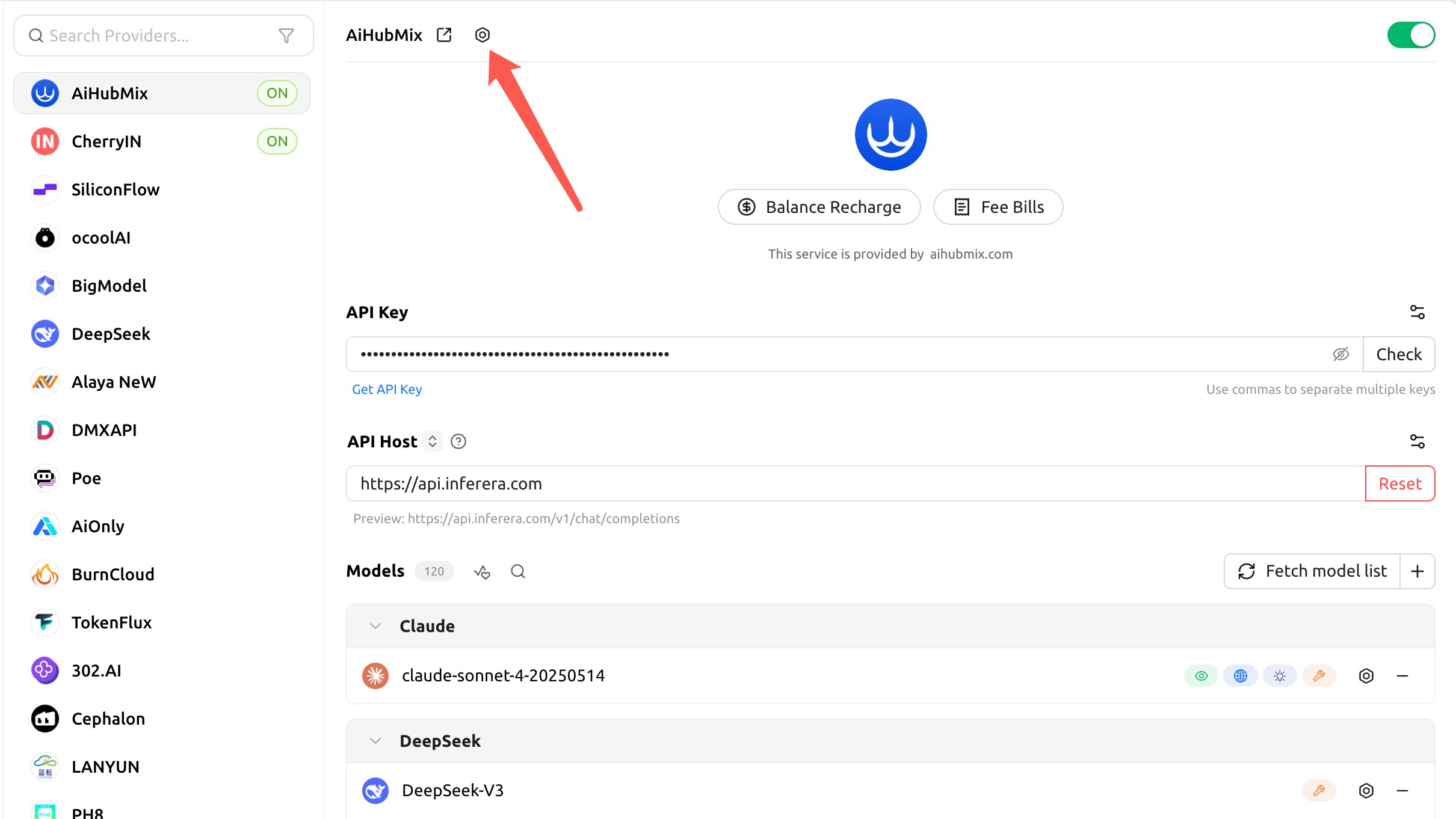
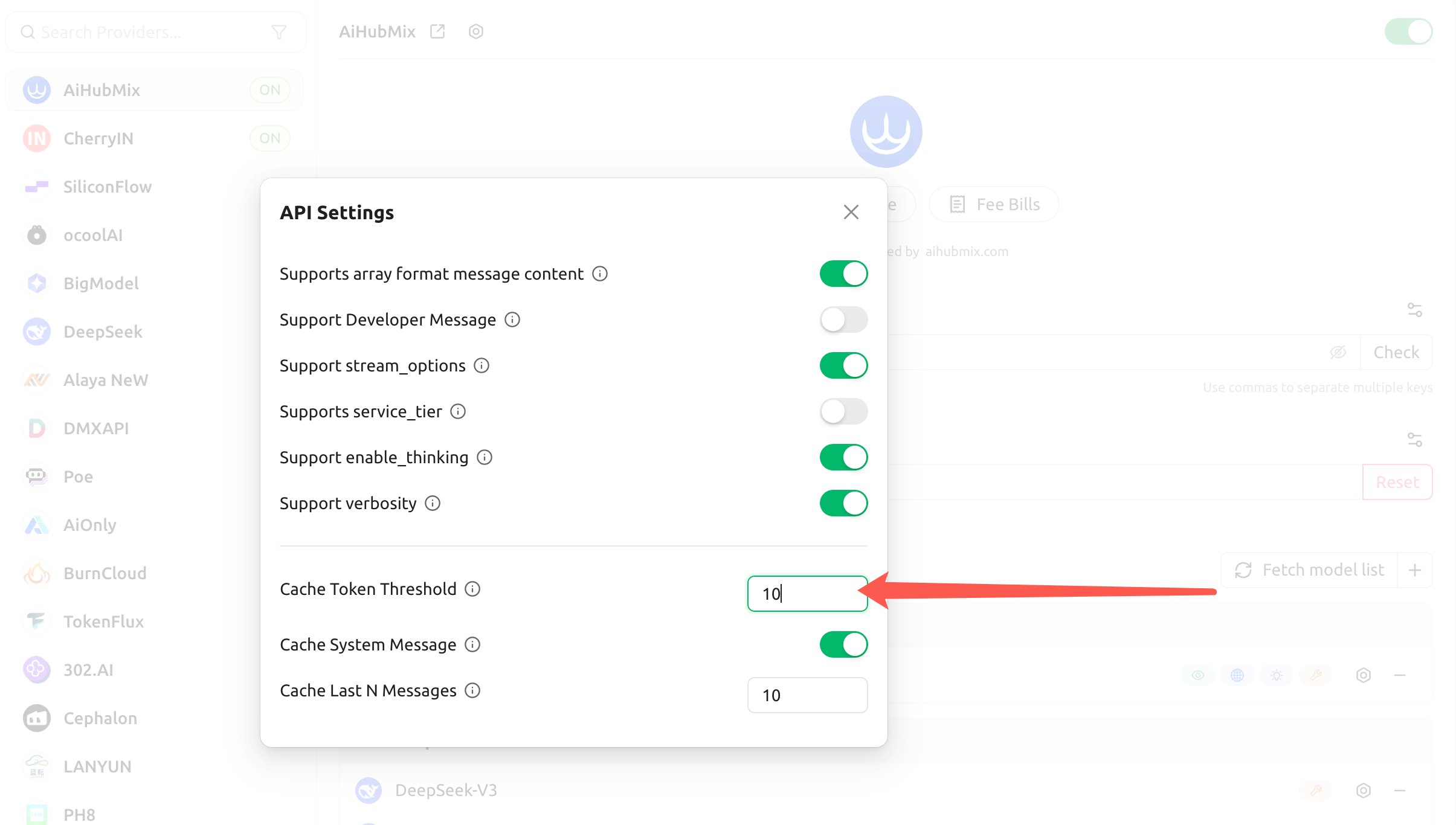
When Cherry Studio calls Claude through Aihubmix, caching is off by default (the "Cache Token Threshold" defaults to `0`); you need to turn it on in the provider's "API Settings".
1. Click the gear to the right of the Aihubmix provider name to open "API Settings":
 2. Configure the following three items, and the client will automatically inject `cache_control` for Claude accordingly:
* **Cache Token Threshold**: a cache breakpoint is only injected once the content exceeds this number of tokens (set a positive number to enable, 0 or blank to disable);
* **Cache System Message**: when enabled, a cache breakpoint is placed on the `system` message (good for caching a fixed long system prompt);
* **Cache Last N Messages**: places a cache breakpoint on the most recent N messages (good for rolling caching in multi-turn conversations).
2. Configure the following three items, and the client will automatically inject `cache_control` for Claude accordingly:
* **Cache Token Threshold**: a cache breakpoint is only injected once the content exceeds this number of tokens (set a positive number to enable, 0 or blank to disable);
* **Cache System Message**: when enabled, a cache breakpoint is placed on the `system` message (good for caching a fixed long system prompt);
* **Cache Last N Messages**: places a cache breakpoint on the most recent N messages (good for rolling caching in multi-turn conversations).
 For the setup steps, see [Cherry Studio](../clients/Cherry-Studio).
The thresholds above only determine "**when the client injects a breakpoint**"; they do not change Anthropic's minimum cache requirement: the actual write still requires the cached content to reach the minimum cache tokens (4096 for Opus 4.5/4.6 and Haiku 4.5). If you put content that changes every turn (such as a rotating instruction) into the cached system prompt, you'll likewise "write but never read".
***
## FAQ
### Why is the cache being written (`cache_creation_input_tokens` is large) but never read (`cache_read_input_tokens` is 0)?
Because the content before the cache breakpoint (`cache_control`) changed between two requests. A hit requires the breakpoint and everything before it to be byte-for-byte identical; once you put content that changes every turn before the breakpoint, the entire prefix cache is invalidated and rewritten on every turn. Put the fixed content first and the changing content after the breakpoint — see "Common mistake" above.
### What is the minimum number of tokens needed for caching?
Content below the minimum cache length won't be cached even if marked with `cache_control`. It's 4096 tokens for Claude Opus 4.5/4.6 and Haiku 4.5; most other Claude models are 1024 tokens, and Haiku 3/3.5 are 2048 tokens. See "Cache limitations" above.
### How long does the cache last? Can it be changed to 1 hour?
By default 5 minutes, refreshed at no cost on every hit. For a longer duration, set `"ttl": "1h"` in `cache_control`; no additional request header is required. 1-hour cache writes are billed at 2x the base input rate. See "1-hour cache duration" above.
### How do I enable caching in Dify / Cherry Studio?
These clients don't take `cache_control` directly: Dify wraps the content to cache in `…` and sets an "auto-cache threshold for large messages"; Cherry Studio sets "Cache Token Threshold / Cache System Message / Cache Last N Messages" under "API Settings". See "Enabling Claude caching in clients / platforms" above.
***
## Support Across Different Models
* Whether Prompt Caching is supported depends on the model itself.
* If the model inherently supports caching without requiring explicit parameter declarations, it can be supported through OpenAI-compatible forwarding.
* OpenAI supports prompt caching by default, applied automatically (prefix of 1,024 tokens or more). On models before GPT-5.6, cache writes have no additional fee and caches are cleared after 5-10 minutes of inactivity; on GPT-5.6 and later, cache writes are billed at 1.25x the input rate, cache reads at 0.1x, caches are retained for at least 30 minutes, and explicit cache breakpoints are supported. See [GPT Prompt Caching](/en/api/GPT-Cache).
* Claude requires the native `cache_control: { type: "ephemeral" }` declaration. Caching rate is 1.25 times the standard input cost (5-minute) or 2 times (1-hour), cached token retrieval costs 0.1 times the normal rate, with a 5-minute or 1-hour lifecycle. [Details](https://docs.anthropic.com/en/docs/build-with-claude/prompt-caching#how-to-implement-prompt-caching)
* Deepseek V3 and R1 natively support caching. Caching rate equals the standard input cost, cached token retrieval costs 0.1 times the normal rate. [Details](https://api-docs.deepseek.com/)
* Gemini [implicit caching support](https://ai.google.dev/gemini-api/docs/caching?lang=python):
* **Implicit Caching**: Enabled by default for all Gemini 2.5 models. If your request hits the cache, cost savings are automatically applied. This feature is effective as of May 8, 2025. The minimum input token count for context caching is 1,024 for Gemini 2.5 Flash and 2,048 for Gemini 2.5 Pro.
* Tips to improve implicit cache hit rate:
* Try placing large, frequently reused content at the beginning of the prompt.
* Try sending requests with similar prefixes within a short time window.
* You can view the number of cache-hit tokens in the `usage_metadata` field of the response object.
* Cost savings are calculated based on prefilled cache hits. Only prefill cache and YouTube video preprocessing cache are eligible for implicit caching.
***
Last updated: 2026-07-10
For the setup steps, see [Cherry Studio](../clients/Cherry-Studio).
The thresholds above only determine "**when the client injects a breakpoint**"; they do not change Anthropic's minimum cache requirement: the actual write still requires the cached content to reach the minimum cache tokens (4096 for Opus 4.5/4.6 and Haiku 4.5). If you put content that changes every turn (such as a rotating instruction) into the cached system prompt, you'll likewise "write but never read".
***
## FAQ
### Why is the cache being written (`cache_creation_input_tokens` is large) but never read (`cache_read_input_tokens` is 0)?
Because the content before the cache breakpoint (`cache_control`) changed between two requests. A hit requires the breakpoint and everything before it to be byte-for-byte identical; once you put content that changes every turn before the breakpoint, the entire prefix cache is invalidated and rewritten on every turn. Put the fixed content first and the changing content after the breakpoint — see "Common mistake" above.
### What is the minimum number of tokens needed for caching?
Content below the minimum cache length won't be cached even if marked with `cache_control`. It's 4096 tokens for Claude Opus 4.5/4.6 and Haiku 4.5; most other Claude models are 1024 tokens, and Haiku 3/3.5 are 2048 tokens. See "Cache limitations" above.
### How long does the cache last? Can it be changed to 1 hour?
By default 5 minutes, refreshed at no cost on every hit. For a longer duration, set `"ttl": "1h"` in `cache_control`; no additional request header is required. 1-hour cache writes are billed at 2x the base input rate. See "1-hour cache duration" above.
### How do I enable caching in Dify / Cherry Studio?
These clients don't take `cache_control` directly: Dify wraps the content to cache in `…` and sets an "auto-cache threshold for large messages"; Cherry Studio sets "Cache Token Threshold / Cache System Message / Cache Last N Messages" under "API Settings". See "Enabling Claude caching in clients / platforms" above.
***
## Support Across Different Models
* Whether Prompt Caching is supported depends on the model itself.
* If the model inherently supports caching without requiring explicit parameter declarations, it can be supported through OpenAI-compatible forwarding.
* OpenAI supports prompt caching by default, applied automatically (prefix of 1,024 tokens or more). On models before GPT-5.6, cache writes have no additional fee and caches are cleared after 5-10 minutes of inactivity; on GPT-5.6 and later, cache writes are billed at 1.25x the input rate, cache reads at 0.1x, caches are retained for at least 30 minutes, and explicit cache breakpoints are supported. See [GPT Prompt Caching](/en/api/GPT-Cache).
* Claude requires the native `cache_control: { type: "ephemeral" }` declaration. Caching rate is 1.25 times the standard input cost (5-minute) or 2 times (1-hour), cached token retrieval costs 0.1 times the normal rate, with a 5-minute or 1-hour lifecycle. [Details](https://docs.anthropic.com/en/docs/build-with-claude/prompt-caching#how-to-implement-prompt-caching)
* Deepseek V3 and R1 natively support caching. Caching rate equals the standard input cost, cached token retrieval costs 0.1 times the normal rate. [Details](https://api-docs.deepseek.com/)
* Gemini [implicit caching support](https://ai.google.dev/gemini-api/docs/caching?lang=python):
* **Implicit Caching**: Enabled by default for all Gemini 2.5 models. If your request hits the cache, cost savings are automatically applied. This feature is effective as of May 8, 2025. The minimum input token count for context caching is 1,024 for Gemini 2.5 Flash and 2,048 for Gemini 2.5 Pro.
* Tips to improve implicit cache hit rate:
* Try placing large, frequently reused content at the beginning of the prompt.
* Try sending requests with similar prefixes within a short time window.
* You can view the number of cache-hit tokens in the `usage_metadata` field of the response object.
* Cost savings are calculated based on prefilled cache hits. Only prefill cache and YouTube video preprocessing cache are eligible for implicit caching.
***
Last updated: 2026-07-10