> ## Documentation Index
> Fetch the complete documentation index at: https://docs.aihubmix.com/llms.txt
> Use this file to discover all available pages before exploring further.
# All API Hub x AIHubMix Einrichtungsleitfaden
> Erfahren Sie, wie Sie mit der Drittanbieter-Open-Source-Browsererweiterung All API Hub AIHubMix API Keys, Kontostand, Modellpreise und Modelllisten verwalten und in Tools wie Cherry Studio, Claude Code Router und Kilo Code exportieren.
# All API Hub x AIHubMix Einrichtungsleitfaden
AIHubMix unterstützt den einheitlichen API-Zugriff auf mehr als 700 führende KI-Modelle, darunter GPT, Claude, Gemini, DeepSeek und Grok. Für Entwickler, die mit mehreren Modellen, Clients oder API Keys arbeiten, gehören das Speichern von Keys, das Prüfen des Kontostands und das Vergleichen von Modellpreisen zu den häufigsten Verwaltungsaufgaben.
Dieser Leitfaden stellt **All API Hub** vor, eine Drittanbieter-Open-Source-Browsererweiterung, mit der Nutzer AIHubMix API Keys, Kontostand, Modellpreise und Modelllisten unterstützend verwalten und Zugangsdaten in häufig genutzte AI-Client-Tools exportieren können.
***
## Hinweis zu Drittanbieter-Tools
All API Hub ist eine Drittanbieter-Open-Source-Browsererweiterung und kein offizielles Produkt von AIHubMix. AIHubMix ist nicht an Entwicklung, Betrieb, Wartung oder Datenspeicherung dieser Erweiterung beteiligt und kann keine Garantie für Sicherheit, Stabilität, Kompatibilität oder künftige Updates übernehmen. Dieser Artikel beschreibt nur die kompatible Nutzung mit AIHubMix und stellt keine offizielle Empfehlung oder Sicherheitszusage dar.
***
## Warum AIHubMix-Nutzer All API Hub verwenden können
* Prüfen, ob ein API Key korrekt gespeichert wurde
* Den aktuellen Kontostand überprüfen
* Eingabe- und Ausgabepreise verschiedener Modelle vergleichen
* Prüfen, ob ein Modell zum Client oder Anwendungsfall passt
* Base URL und API Key schnell in mehreren AI-Tools konfigurieren
***
## Was ist All API Hub?
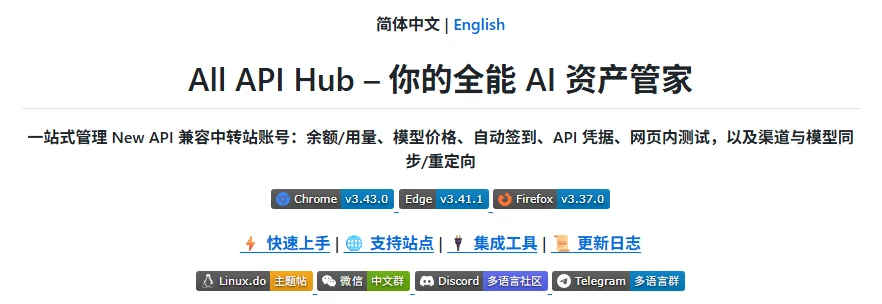
All API Hub ist eine Drittanbieter-Open-Source-Browsererweiterung für AI-API-Nutzer. Sie dient dazu, API-Konten, API Keys, Kontostand und Modellpreise zentral zu verwalten.
 ***
## Kernfunktionen
### 1. AIHubMix-Kontostand anzeigen
Nach dem Hinzufügen eines AIHubMix-Kontos lässt sich der Kontostand direkt in der Erweiterung prüfen.
### 2. Einmalig sichtbare API Keys speichern
AIHubMix API Keys werden in der Regel nur beim Erstellen vollständig angezeigt. All API Hub kann beim Speichern des vollständigen Keys helfen.
### 3. Modellpreise prüfen
Modellnamen, Eingabepreise, Ausgabepreise und Suchergebnisse lassen sich anzeigen.
### 4. In AI-Clients exportieren
Export zu Cherry Studio, CC Switch, Kilo Code, CLIProxyAPI, Claude Code Router und weiteren Tools.
***
## All API Hub installieren
* Chrome: [Chrome Web Store](https://chromewebstore.google.com/detail/lapnciffpekdengooeolaienkeoilfeo)
* Edge: [Microsoft Edge Add-ons](https://microsoftedge.microsoft.com/addons/detail/pcokpjaffghgipcgjhapgdpeddlhblaa)
* Firefox: [Firefox Add-ons](https://addons.mozilla.org/firefox/addon/\{bc73541a-133d-4b50-b261-36ea20df0d24})
* GitHub Releases: [https://github.com/qixing-jk/all-api-hub/releases/latest](https://github.com/qixing-jk/all-api-hub/releases/latest)
***
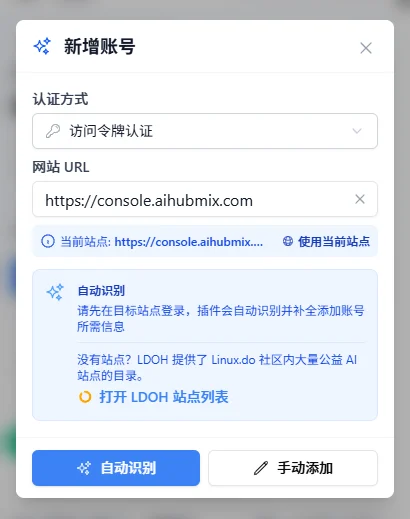
## AIHubMix-Konto in All API Hub hinzufügen
1. Bei der AIHubMix-Konsole anmelden
2. Die All API Hub-Erweiterung öffnen
3. "Add Account" klicken und die AIHubMix-Konsolenadresse eingeben
4. "Auto Detect" ausführen, prüfen und speichern
***
## Kernfunktionen
### 1. AIHubMix-Kontostand anzeigen
Nach dem Hinzufügen eines AIHubMix-Kontos lässt sich der Kontostand direkt in der Erweiterung prüfen.
### 2. Einmalig sichtbare API Keys speichern
AIHubMix API Keys werden in der Regel nur beim Erstellen vollständig angezeigt. All API Hub kann beim Speichern des vollständigen Keys helfen.
### 3. Modellpreise prüfen
Modellnamen, Eingabepreise, Ausgabepreise und Suchergebnisse lassen sich anzeigen.
### 4. In AI-Clients exportieren
Export zu Cherry Studio, CC Switch, Kilo Code, CLIProxyAPI, Claude Code Router und weiteren Tools.
***
## All API Hub installieren
* Chrome: [Chrome Web Store](https://chromewebstore.google.com/detail/lapnciffpekdengooeolaienkeoilfeo)
* Edge: [Microsoft Edge Add-ons](https://microsoftedge.microsoft.com/addons/detail/pcokpjaffghgipcgjhapgdpeddlhblaa)
* Firefox: [Firefox Add-ons](https://addons.mozilla.org/firefox/addon/\{bc73541a-133d-4b50-b261-36ea20df0d24})
* GitHub Releases: [https://github.com/qixing-jk/all-api-hub/releases/latest](https://github.com/qixing-jk/all-api-hub/releases/latest)
***
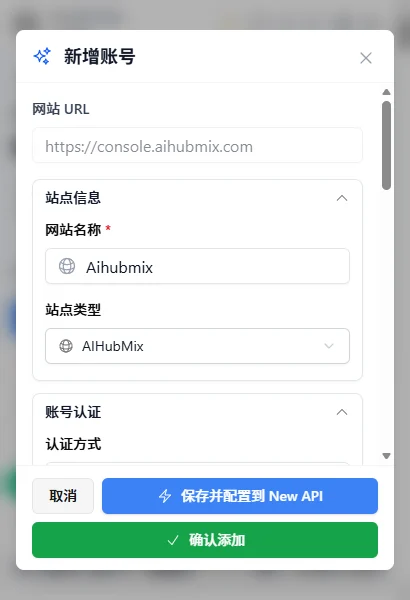
## AIHubMix-Konto in All API Hub hinzufügen
1. Bei der AIHubMix-Konsole anmelden
2. Die All API Hub-Erweiterung öffnen
3. "Add Account" klicken und die AIHubMix-Konsolenadresse eingeben
4. "Auto Detect" ausführen, prüfen und speichern
 ***
## AIHubMix API Key speichern
Aus Sicherheitsgründen wird ein AIHubMix API Key beim Erstellen nur einmal vollständig angezeigt. Speichern Sie ihn direkt nach der Erstellung.
***
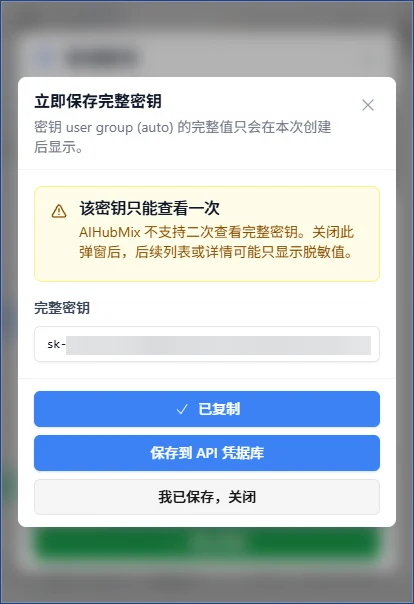
## AIHubMix API Key speichern
Aus Sicherheitsgründen wird ein AIHubMix API Key beim Erstellen nur einmal vollständig angezeigt. Speichern Sie ihn direkt nach der Erstellung.
 ***
## AIHubMix-Modellpreise prüfen
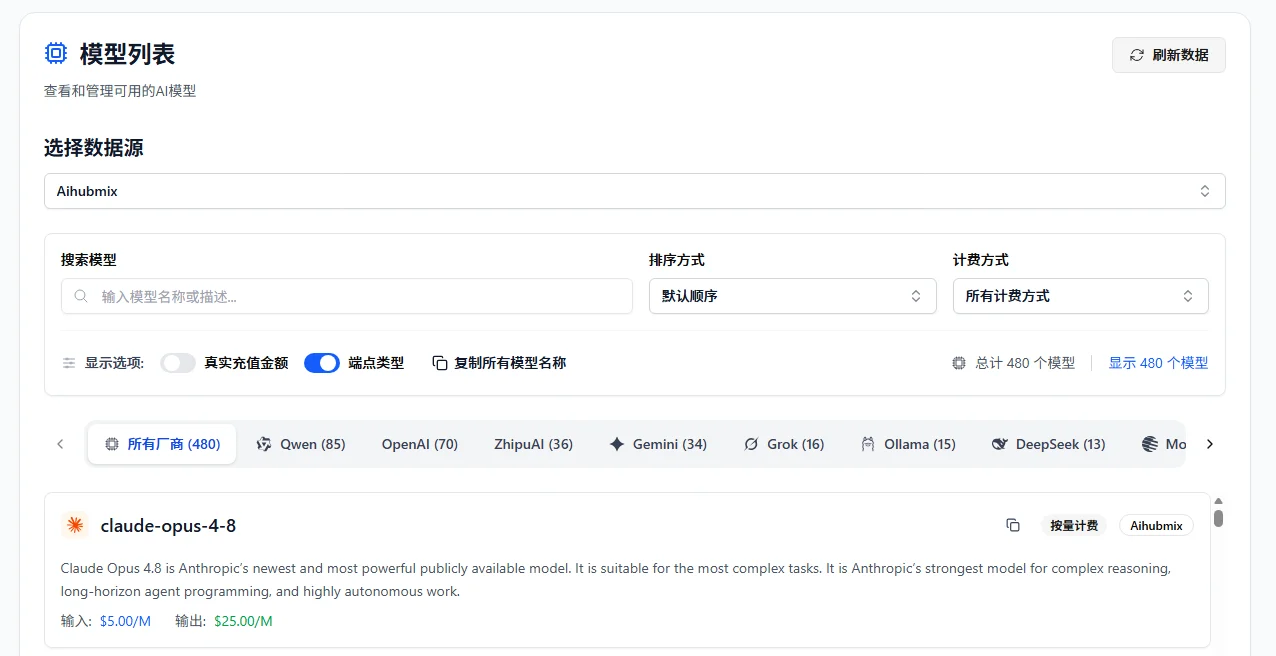
In All API Hub können Nutzer Modelllisten, Eingabepreise, Ausgabepreise und Suchergebnisse anzeigen, um Kosten zwischen Modellen zu vergleichen.
***
## AIHubMix-Modellpreise prüfen
In All API Hub können Nutzer Modelllisten, Eingabepreise, Ausgabepreise und Suchergebnisse anzeigen, um Kosten zwischen Modellen zu vergleichen.
 ***
## AIHubMix API Key in AI-Clients exportieren
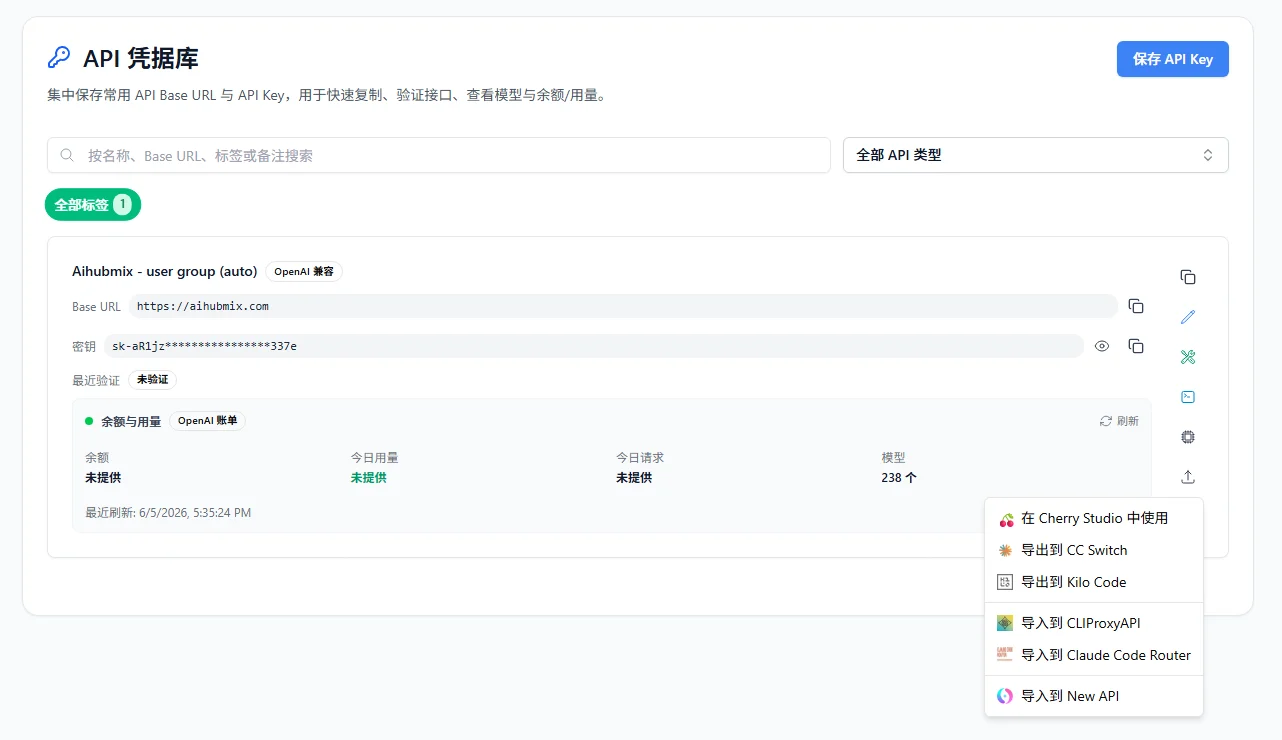
All API Hub kann AIHubMix API Key und Base URL in Cherry Studio, CC Switch, Kilo Code, Claude Code Router, CLIProxyAPI und weitere Tools exportieren.
***
## AIHubMix API Key in AI-Clients exportieren
All API Hub kann AIHubMix API Key und Base URL in Cherry Studio, CC Switch, Kilo Code, Claude Code Router, CLIProxyAPI und weitere Tools exportieren.
 ***
## All API Hub vs. AI-Clients
| Funktion | All API Hub | AI-Clients |
| ------------------ | ----------------- | ----------------------- |
| API-Key-Verwaltung | Unterstützt | Meist nicht unterstützt |
| Kontostand | Unterstützt | Meist nicht unterstützt |
| Modellpreise | Unterstützt | Meist nicht unterstützt |
| AI-Chat | Nicht unterstützt | Unterstützt |
***
## FAQ
### Ist All API Hub ein offizielles AIHubMix-Produkt?
Nein. All API Hub ist eine Drittanbieter-Open-Source-Browsererweiterung und unabhängig von AIHubMix.
### Kann All API Hub die AIHubMix-Konsole ersetzen?
Nein. Die AIHubMix-Konsole bleibt der zentrale Ort für Konto, Aufladung, API-Key-Erstellung und offizielle Einstellungen.
***
## Mit AIHubMix + All API Hub starten
1. AIHubMix-Konto registrieren oder anmelden
2. API Key in der AIHubMix-Konsole erstellen
3. All API Hub installieren
4. AIHubMix-Konto hinzufügen
5. Vollständigen API Key speichern
6. Kontostand und Modellpreise prüfen
7. Bei Bedarf in AI-Client-Tools exportieren
***
## Ressourcen
* AIHubMix: [https://aihubmix.com](https://aihubmix.com)
* AIHubMix API docs: [https://docs.aihubmix.com](https://docs.aihubmix.com)
* AIHubMix models: [https://aihubmix.com/models](https://aihubmix.com/models)
* AIHubMix pricing: [https://aihubmix.com/pricing](https://aihubmix.com/pricing)
* All API Hub GitHub: [https://github.com/qixing-jk/all-api-hub](https://github.com/qixing-jk/all-api-hub)
* All API Hub docs: [https://all-api-hub.qixing1217.top](https://all-api-hub.qixing1217.top)
***
## All API Hub vs. AI-Clients
| Funktion | All API Hub | AI-Clients |
| ------------------ | ----------------- | ----------------------- |
| API-Key-Verwaltung | Unterstützt | Meist nicht unterstützt |
| Kontostand | Unterstützt | Meist nicht unterstützt |
| Modellpreise | Unterstützt | Meist nicht unterstützt |
| AI-Chat | Nicht unterstützt | Unterstützt |
***
## FAQ
### Ist All API Hub ein offizielles AIHubMix-Produkt?
Nein. All API Hub ist eine Drittanbieter-Open-Source-Browsererweiterung und unabhängig von AIHubMix.
### Kann All API Hub die AIHubMix-Konsole ersetzen?
Nein. Die AIHubMix-Konsole bleibt der zentrale Ort für Konto, Aufladung, API-Key-Erstellung und offizielle Einstellungen.
***
## Mit AIHubMix + All API Hub starten
1. AIHubMix-Konto registrieren oder anmelden
2. API Key in der AIHubMix-Konsole erstellen
3. All API Hub installieren
4. AIHubMix-Konto hinzufügen
5. Vollständigen API Key speichern
6. Kontostand und Modellpreise prüfen
7. Bei Bedarf in AI-Client-Tools exportieren
***
## Ressourcen
* AIHubMix: [https://aihubmix.com](https://aihubmix.com)
* AIHubMix API docs: [https://docs.aihubmix.com](https://docs.aihubmix.com)
* AIHubMix models: [https://aihubmix.com/models](https://aihubmix.com/models)
* AIHubMix pricing: [https://aihubmix.com/pricing](https://aihubmix.com/pricing)
* All API Hub GitHub: [https://github.com/qixing-jk/all-api-hub](https://github.com/qixing-jk/all-api-hub)
* All API Hub docs: [https://all-api-hub.qixing1217.top](https://all-api-hub.qixing1217.top)